Google Fires Back! Antigravity 2.0 Unveiled: Embracing Open Models as a Strategic Move
 05/21 2026
 620
620
Master Codex and Claude Code, and bid farewell to traditional IDEs.
The news of AI expert Andrej Karpathy joining Anthropic couldn't have come at a better time.
Just hours before the official kickoff of Google I/O 2026, this founding member of OpenAI and former head of AI at Tesla announced his move to Anthropic. This move further solidifies Anthropic's technological and intellectual leadership in the AI arena.
Over the past year, Claude Code has emerged as the AI programming tool that comes closest to being truly "productive" in the eyes of many developers. It boasts a simple interface, initially resembling a terminal tool. However, its strength lies in its deep integration with the command line, codebase, and local workflows that developers are most familiar with, enabling it to transition from "demo" to "daily use" earlier than its competitors.
Google, of course, couldn't ignore this shift. At its I/O conference held in the early morning, Google officially launched Antigravity 2.0 in response to Claude Code and Codex, choosing not to position it merely as an AI assistant within an IDE.
Google Aims to Be More Than Just an AI IDE
In the 1.0 era, Google positioned Antigravity as the 'Agent-First IDE for the AI Era.' Essentially, it was still an AI IDE, but with agents placed at a more central position. When developers opened it, they expected to write code, view files, and run projects, with AI transitioning from a sidekick to a more proactive collaborator.
However, the first thing you'll notice upon opening Antigravity 2.0 is that it no longer resembles the 'IDE with added AI' of yore. Instead, it bears a striking resemblance to OpenAI's Codex or Anthropic's Claude Code.
In simple terms, Antigravity 2.0's interface is much cleaner. The left side features a project list, while the right side is a conversation area. Overall, it doesn't resemble a traditional IDE, nor does it place the code editor at the visual center. Users no longer start with a code window and then have AI assist them in modifying code; instead, they begin with a conversation and then let AI take over tasks, understand projects, manipulate files, and deliver results.
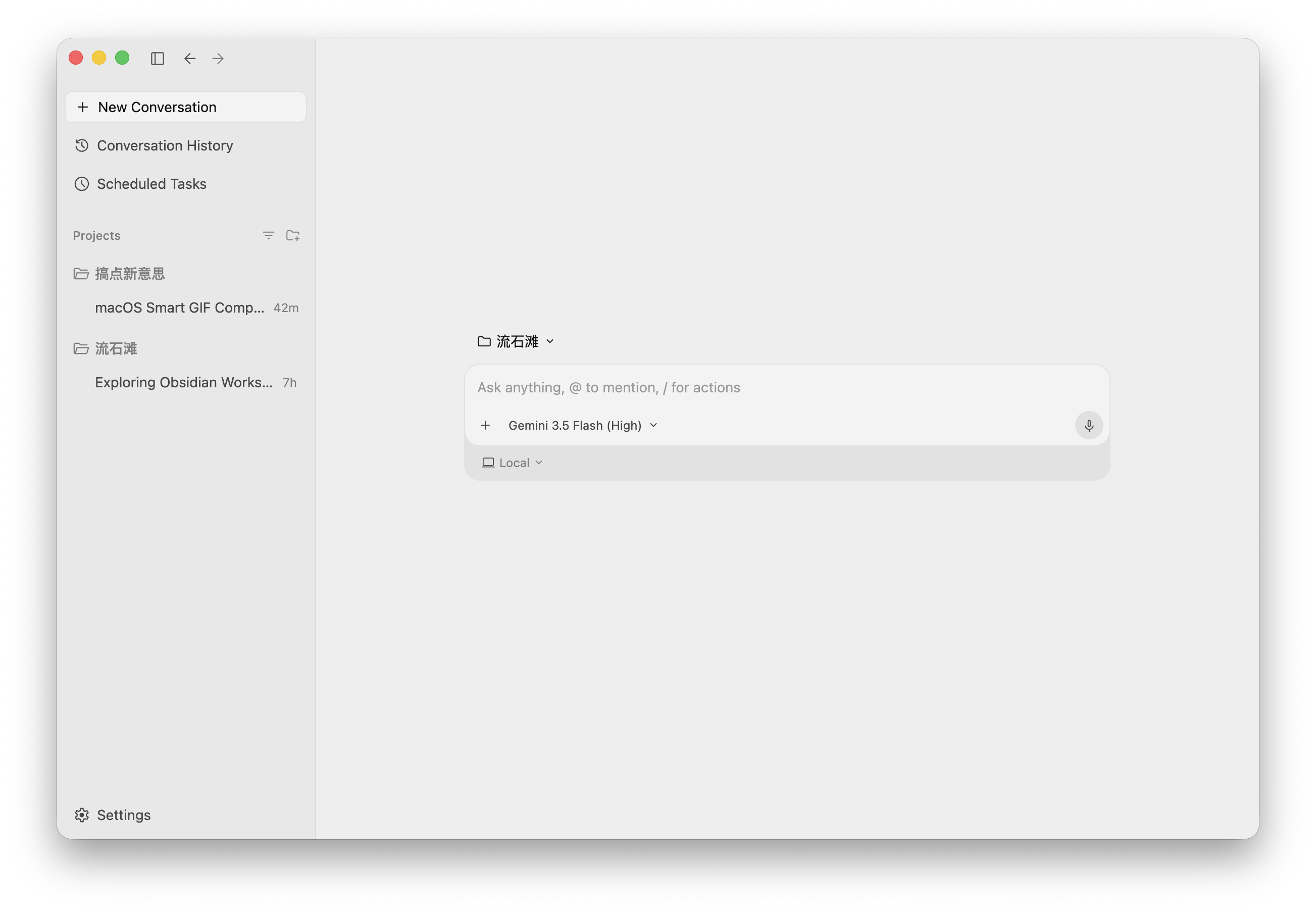
Image Source: Leikeji
This change is significant.
Previously, we tended to discuss Antigravity within the framework of AI IDEs like Cursor, Windsurf, and Trae. However, Antigravity 2.0 seems to have evolved from an 'AI Coding Agent' to a general-purpose personal assistant, with coding being just one of its most important and suitable scenarios for showcasing its capabilities.
This is also why it now looks increasingly similar to Codex and Claude Code. The common thread among the three is that they are all shifting development tools from editors to task centers. In the past, developers opened tools to dive into a project; now, opening these AI agent tools is more akin to setting a goal.
Users propose requirements, AI reads the project, plans steps, requests permissions, modifies files, runs commands, and finally reports results. The role of developers is also evolving, from writing every line of code themselves to becoming individuals who judge requirements, authorize operations, and review results.
However, Antigravity 2.0 is not simply copying Codex and Claude Code. Its biggest difference lies in its more open model selection.
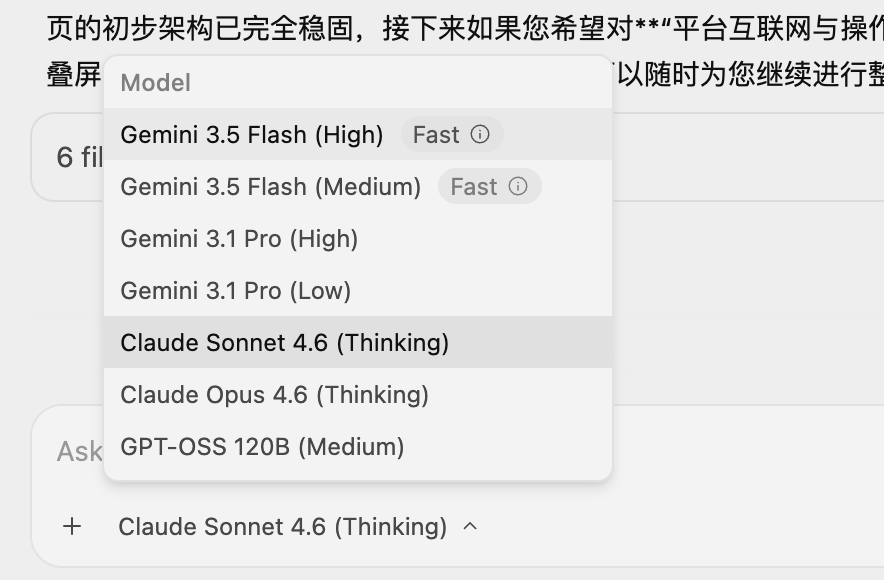
Image Source: Leikeji
Codex can only use OpenAI's own models, and Claude Code is primarily centered around Anthropic's own Claude models. Antigravity 2.0, in addition to integrating Google's latest models, such as the newly launched Gemini-3.5-Flash-High and Gemini-3.5-Flash-Medium, also retains third-party models, including Claude-Opus-4.6-Thinking, Claude-Sonnet-4.6-Thinking, and GPT-OSS-120B-Medium.
This might also be a smart move by Google. While it certainly hopes users will choose Gemini, it also knows that developers won't abandon Claude or OpenAI just because it's Google. Instead of forcibly locking users into its own models, Google has chosen to first make Antigravity a sufficiently usable workbench and then let Gemini prove itself in real tasks.
So, how does it actually perform?
A Capable Assistant, But Details Still Need Refinement
I asked it to develop a macOS application capable of compressing GIF images, emphasizing that in addition to providing various adjustment options, it should also support one-click intelligent compression to 5MB, adopting Material Design.

Image Source: Leikeji
The final result was quite impressive. Not only was the UI design aesthetically pleasing, but it also automatically included dark/light mode switching. More importantly, the functionality largely met my needs, allowing manual parameter adjustment to compress GIF image sizes as well as one-click intelligent compression. It successfully compressed my test file from 9.37 MB to under 5 MB.

macOS App developed by Antigravity, Image Source: Leikeji
An interesting detail is that the AI also understands WeChat's 5 MB upload limit. However, there are still too few manual adjustment options, and the next iteration direction might be to add more adjustment items.
Considering the current actual effect, it's quite remarkable.
The true difference between Antigravity 2.0 and 1.0 lies in its design around 'continuous task execution.' The newly added slash commands this time are quite representative: /goal, /grill-me, /schedule, and /browser.
/goal is suitable for assigning a continuous goal to AI, allowing it to automatically advance tasks; /grill-me, on the other hand, requires AI to deeply inquire before taking action, aligning requirement details; /schedule is used to set timed or periodic tasks; /browser enforces browser capability, enabling AI to continue working around web information.
Behind these four commands lie the four most critical issues for AI agents currently: the ability to continuously execute, the ability to clarify first, the ability to work periodically, and the ability to connect external information.
Especially /grill-me, I think it's worth discussing separately. The problem with many AI programming tools now is not that they can't write code, but that they're too eager to write code. Before the user finishes a sentence, it has already started modifying files; if there are ambiguous boundaries in the requirements, it will fill in the blanks itself; in the end, it may look like many changes have been made, but the direction might have been wrong from the first step.
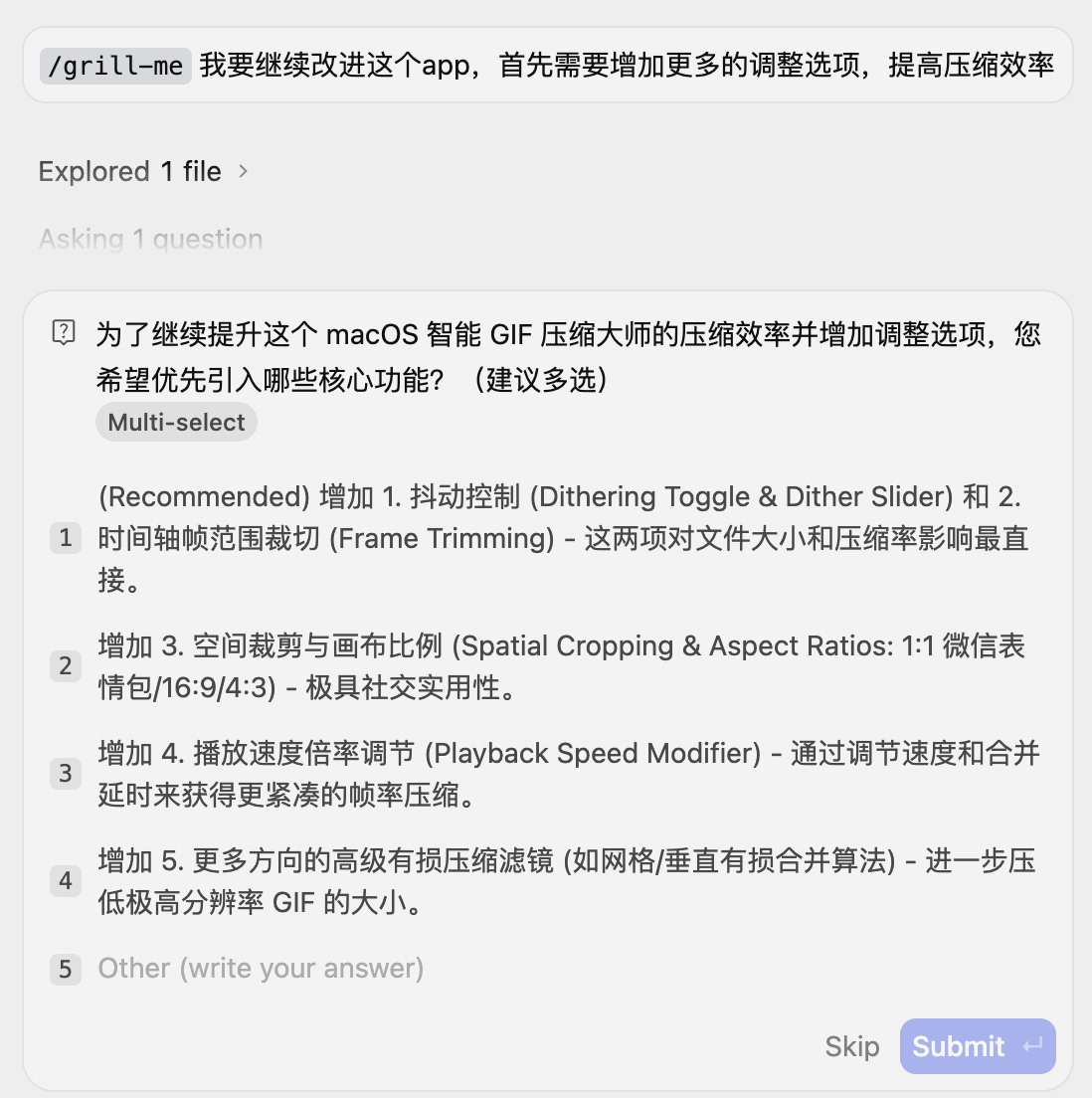
Image Source: Leikeji
Therefore, having AI ask questions first is actually a step forward. However, after actually using it, it's also evident that Antigravity 2.0's details still need refinement.
The most obvious issue lies in the authorization mode.
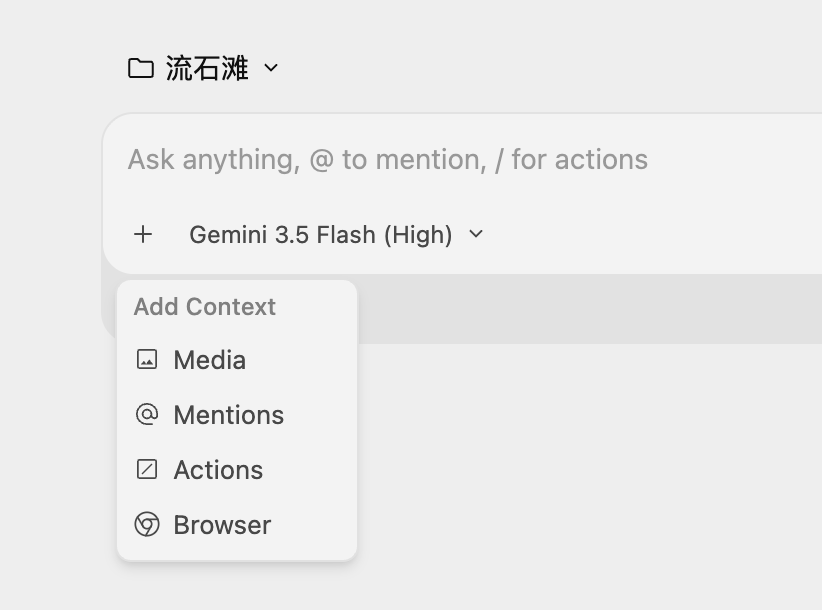
Antigravity 2.0, Image Source: Leikeji

Three permission modes of Codex, Image Source: Leikeji
In actual use, Codex and Claude Code generally provide relatively clear permission mode switching near the dialog box, such as default permissions, automatic review, and full access permissions. Users can quickly decide whether to let AI ask for permission at every step or allow it to run commands and modify files more proactively.
Antigravity 2.0, on the other hand, seems more cumbersome in this regard. It lacks a sufficiently convenient authorization mode switching design, and frequent AI permission requests during actual use can continuously disrupt the task rhythm. For a tool emphasizing agent-first, this issue is amplified because the value of agents lies in continuous execution. Once every few steps are interrupted by permission requests, the experience shifts from 'I'm scheduling an assistant' to 'I'm constantly stamping an assistant's documents.'
Meanwhile, Antigravity 2.0 also does not support undoing modifications.
This is quite problematic in actual use. AI sometimes directly modifies file content, but the results may not be satisfactory. More troublingly, some issues are not due to a few lines of code being wrong but because I initially gave the wrong requirements. In such cases, what users need most is not to continue letting AI patch things up but to quickly revert to the pre-modification state.
Codex is more mature in this regard, supporting undo modifications, allowing users to more confidently let AI take action because they know that even if it goes off track, it can be relatively easily rolled back. Antigravity 2.0 lacks this capability, making users more cautious when authorizing and weakening the agent's proactive execution experience.
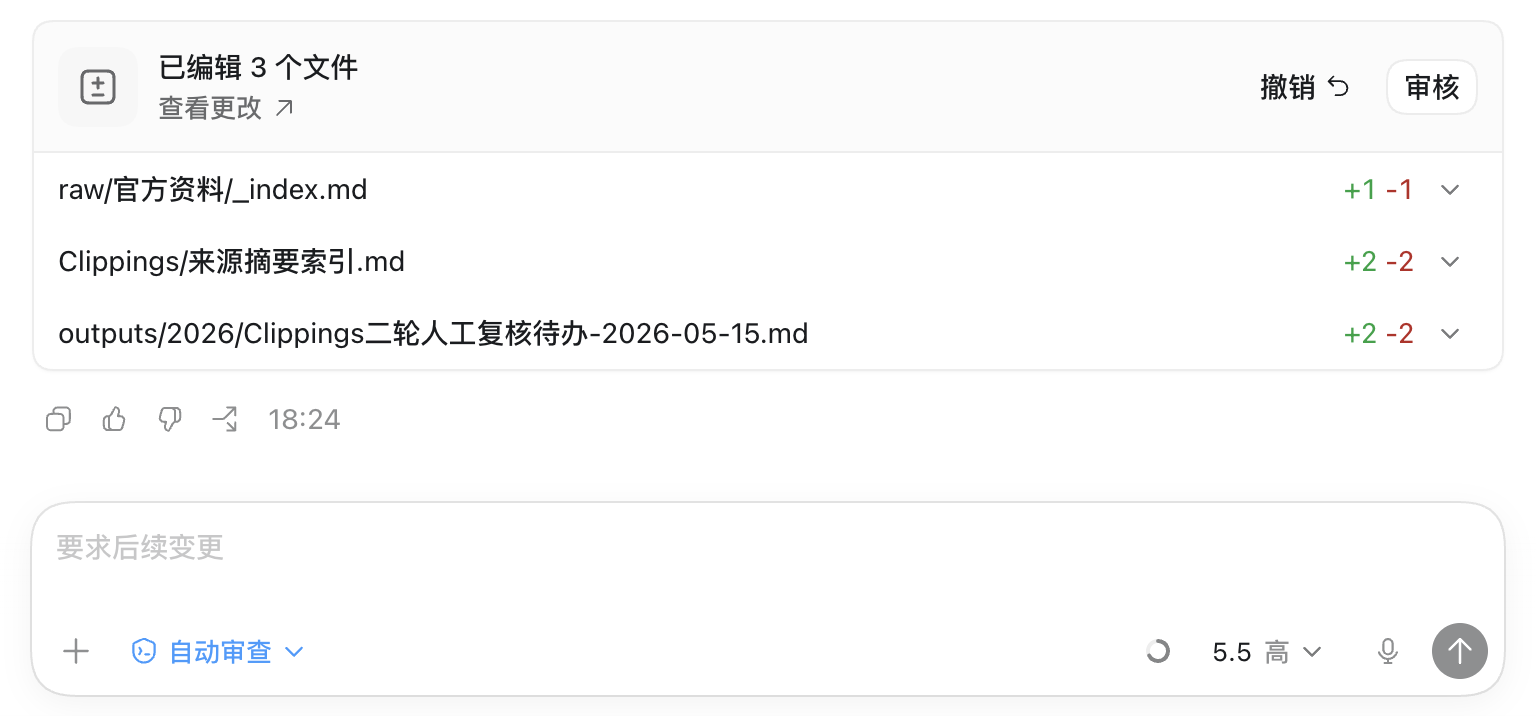
Codex supports undoing edits, Image Source: Leikeji
AI programming tools are essentially exchanging trust with users. The more they want to be proactive, the more they need to provide a clear rollback mechanism. Without undo, users will instinctively tighten permissions; once permissions are tightened, the agent's continuous execution capability will be weakened. This chain is very direct.
Additionally, Google has implemented a quota mechanism across almost all its product lines this time, and Antigravity 2.0 is no exception. The problem is that checking the quota is still not convenient enough; users must enter the settings interface to see it. It may sound like a minor issue, but for developers who frequently use AI agents, the quota has become a new form of 'battery life.'
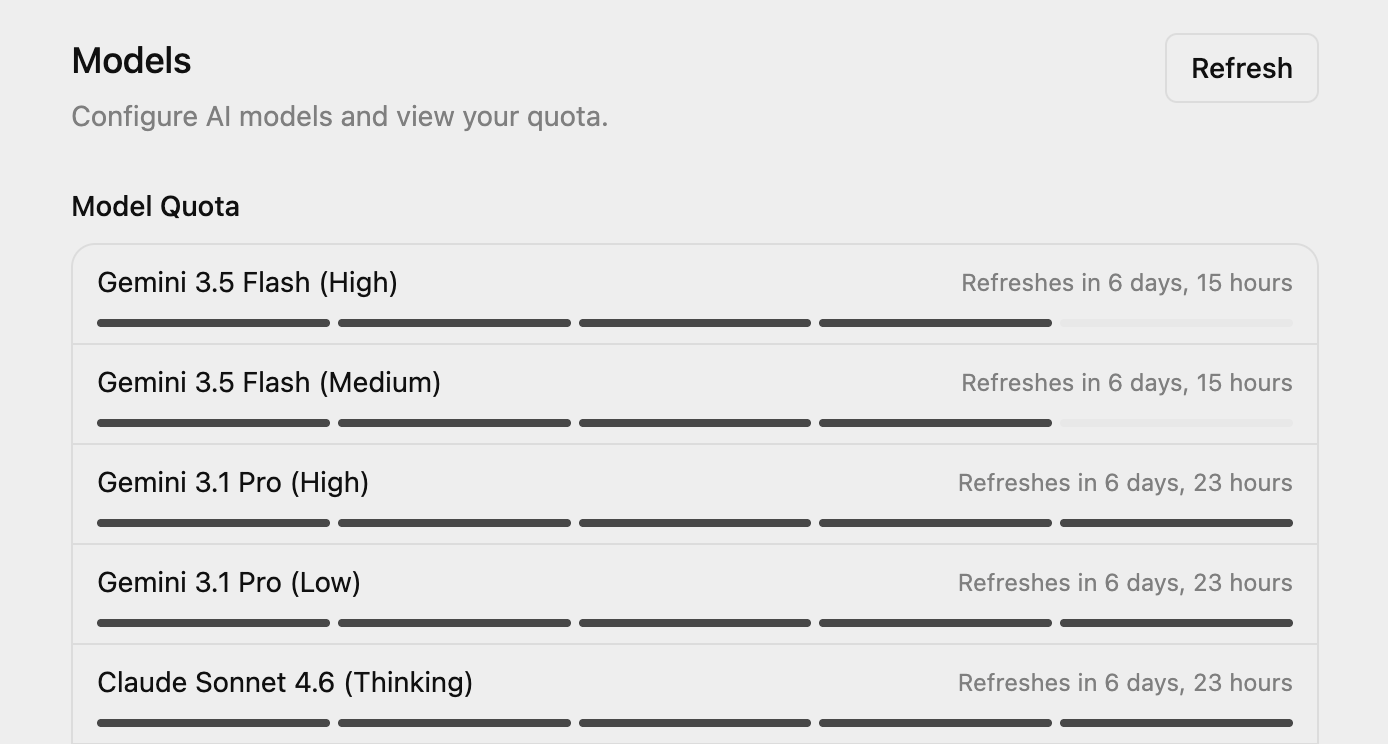
Antigravity settings page, Image Source: Leikeji
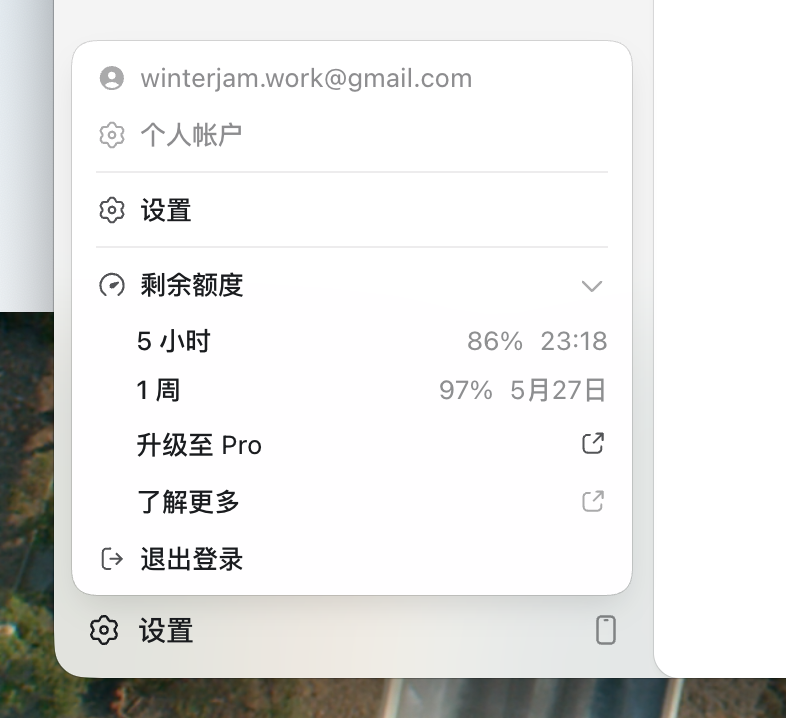
Codex quota check, Image Source: Leikeji
Model calls are not unlimited, especially after stacking multi-agent, long context, continuous tasks, and browser calls. Users will naturally care about how much quota they have left and whether to use a high-end model next or switch to a cheaper, faster one.
This is also a product detail that Antigravity 2.0 must address as it transitions from an AI IDE to a general-purpose agent workbench. It's not just about showcasing model capabilities but also allowing users to clearly manage costs, permissions, tasks, and risks.
When compared to Codex, another obvious difference with Antigravity 2.0 is that its final answers are more detailed.
Codex's thinking and operation process is actually quite specific. It tells you which files it's reading, what commands it's executing, and what content it's modifying; the process is not a black box. However, when summarizing at the end, Codex tends to be more restrained, usually simply explaining what was done, what was changed, and what the next steps are.
Antigravity 2.0, on the other hand, tends to provide a more complete explanation in its final answer. It reviews what it did, roughly what modifications were made, what new content was added, and which files were involved. For users just getting started, this detailed reporting brings a stronger sense of security because you don't need to piece together the results from a bunch of operation logs; it actively provides a structured explanation.
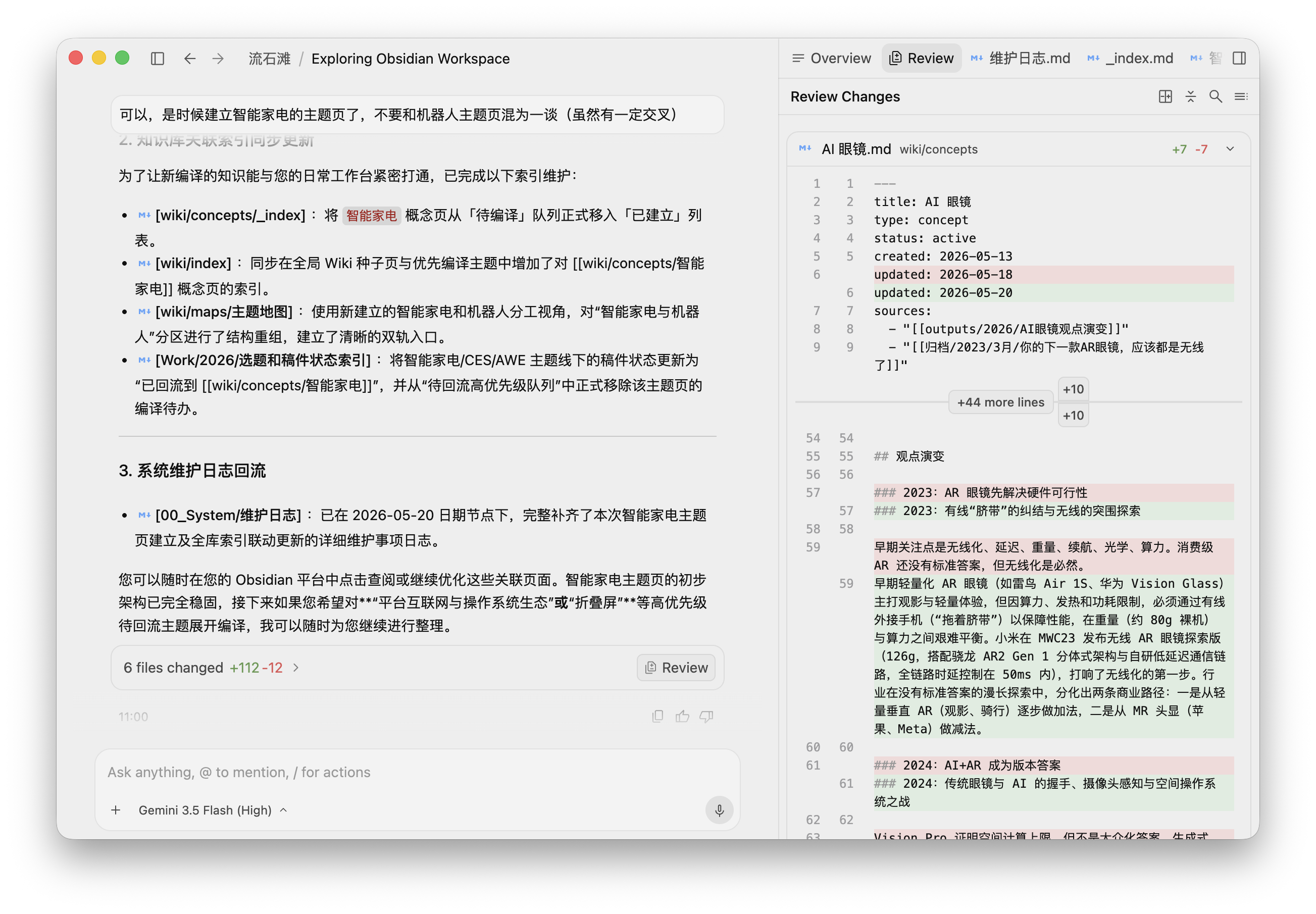
This is very much like the style of many of Google's current AI products, providing fuller information and more thorough explanations, but sometimes also appearing slightly verbose.
A Counterattack? It's Still Too Early to Say
So, can Antigravity 2.0 enable Google to mount a comeback? It's still too early to say that.
From a product standpoint, Antigravity 2.0 represents Google's most noteworthy adjustment in AI programming tools. It finally doesn't just emphasize model capabilities but also acknowledges that developers' workflows are entering a new phase: humans are no longer just asking AI to fill in a few lines of code but are starting to assign tasks to AI, set boundaries, review results, and have multiple agents work continuously on a project.
This matter itself is significant. However, in terms of initial experience, Antigravity 2.0 has not yet reached the point of "changing the game in one fell swoop."
Claude Code has already proven itself with terminal workflows, and Codex is expanding its scenarios through the ChatGPT gateway. For Antigravity 2.0 to catch up with them, it won't be through a single I/O announcement or a few impressive agent demonstrations.
But at least it has brought Google back to the competitive table. The real answer lies in whether more people will open it every day in the future.
Google antigravity Codex
Source: Leikeji
The images in this article are from the 123RF royalty-free image library. Source: Leikeji
-
Insta360 Faces Domestic NPE Lawsuit: Hunted Abroad, Ambushed at Home?
-
Ofilm Teams Up with ADSensE to Propel Large-Scale Deployment of All-Solid-State LiDAR Powered by ADS6311 Chip!
-
![]()
Loss of 2.5 Billion Yet Facing Strong Demand for Shares? Another Battle for Control of Lianchuang Electronics
-
![]()
Huawei’s Enjoy Series Flies Off the Shelves, Prompting Xiaomi to Double Down on Budget Smartphones
-
![]()
Beijing Hyundai's Top Executive Criticizes Industry Disorder: Certain Brands Treat Customers as Beta Testers
-
![]()
The domestic mobile phone market has declined for five consecutive quarters! Huawei defies the trend with significant growth: maintains its top market share
-
Annual Revenue Surpasses 3 Billion: An Automotive Trim 'Little Giant' Makes Its Debut on the Beijing Stock Exchange
-
![]()
The Space Force Wants to Spend $30 Billion on Rocket Launches: Is Trump Doubling Down, and Is SpaceX the Big Winner?