This AI Is Learning to Emulate Human Work Patterns: A Real-World Test of Doubao’s Enhanced Work Capabilities
 10/29 2026
 409
409
Recently, while utilizing AI for work tasks, I stumbled upon an intriguing observation.
Certain tasks are straightforward for humans but demand considerable effort to teach AI.
Consider the task of organizing industry data: it involves navigating websites, filtering information, extracting data, and summarizing it in Excel. After repeating this process numerous times, humans can perform it instinctively.
However, teaching AI requires detailed explanations of each step, filtering criteria, and precautions. Special cases necessitate additional instructions.
What’s worse, when dealing with a new set of data, the entire process might need to be taught from scratch.
Recently, Doubao Work’s Computer Use feature underwent a significant upgrade, introducing two key functionalities: skill recording and Mac lock screen operation.
What piques my interest the most is the ability to record computer operations and automatically generate personalized skills.
In simple terms, by demonstrating a familiar workflow on your computer, Doubao can capture the entire process and organize it into a reusable skill.
Moreover, Doubao now supports Mac lock screen operation. After authorization, Doubao can continue to operate the computer even when the screen is locked, and users can remotely assign tasks via their phones.
While this sounds promising, its practical effectiveness requires testing. Particularly, the recording skill function—can Doubao genuinely learn a workflow and execute it flexibly across different tasks?
With these questions in mind, I identified several everyday work scenarios to evaluate Doubao’s capabilities.
/ 01 / Recording Skills: Organizing Tender Information
Previously, getting AI to accomplish complex tasks involved writing lengthy prompts to explain each step, criteria, and special requirements.
The challenge lies in the fact that many workflows come naturally to us but are difficult to articulate in words.
For instance, organizing government procurement tender announcements entails:
Navigating to the China Government Procurement website, entering keywords, selecting announcement types and time ranges, reviewing project names, procurement units, budget amounts, and bid deadlines, and finally summarizing this information in Excel.
While these steps may seem simple, instructing AI to mimic your habits would require detailed explanations of filtering conditions, data standards, and table formats.
Doubao now offers a more straightforward solution: demonstrate the process on your computer, and it will learn the operations.
Specifically, open Doubao’s skill library, select "New Recording Skill," authorize it, and begin demonstrating. Doubao records the operations and screen, then automatically organizes them into a reusable skill.
The most significant upgrade is the expansion of the recording scope from browser pages to global computer operations. Theoretically, continuous workflows involving browsers, Excel, and desktop software can now be taught through demonstration.
To test this, I selected the scenario of organizing government procurement announcements. After recording, Doubao generated a skill summary named "ccgp-tender-summary."
It summarized the task as: searching for tender announcements on the China Government Procurement website, extracting key information, and automatically summarizing it in an Excel table. Fields to extract include project name, procurement unit, budget amount, announcement date, bid deadline, and announcement link.
Skill summary for "Tender Announcement Organization" automatically generated by Doubao Work
More importantly, it distinguishes between fixed rules and variable inputs for future tasks. For example, search keywords, time ranges, announcement types, and regions can be modified.
This means I don’t need to re-explain the entire workflow next time—just tell Doubao what to search for.
To verify this, I created a new task, selected the generated skill, and input: "Help me search for government procurement tender information for printers in the past month and summarize it in a table."
Doubao then began working independently. 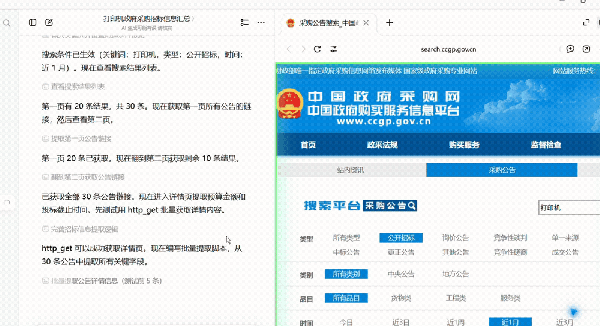
After invoking the skill, Doubao automatically retrieves and extracts announcement information
It first reviewed the saved skill to confirm the workflow, then opened the China Government Procurement website, entered "printer," selected "public tender," and set the time range to the past month.
After filtering, the page returned 30 relevant announcements.
Doubao then began extracting announcement details, attempting to capture fields like budget amount and bid deadline from the detail pages.
An interesting incident occurred here. Initially, Doubao tried to extract information from the detail pages using predefined rules but soon found the results inconsistent, with some fields inaccurate.
Instead of persisting with the original method, it re-examined the webpage’s text structure, adjusted the extraction rules, and tried to supplement missing fields from the search result summaries.
Finally, it merged the data and generated an Excel file via a script.
From the interface, I barely needed to guide it step-by-step. The task took 6 minutes and 32 seconds, resulting in 30 government procurement tender announcements.
In the generated Excel, project names, procurement units, budget amounts, release dates, bid deadlines, and original announcement links were organized into corresponding columns.
Upon review, the structure was neat, and all 30 records were accurately generated.
30 tender announcements summarized into a structured Excel table
Besides recording mouse and keyboard operations, Doubao now supports users verbally explaining their work rules during demonstration.
Many work experiences are hard to grasp through observation alone.
For example, when organizing tender announcements, I might habitually convert budget amounts to ten-thousand yuan, only include public tenders, and leave blank fields for undisclosed amounts instead of estimating.
These rules might not be accurately understood by AI just by observing clicks. However, during recording, I could explain them verbally:
"Note, unify the currency unit here. If the original announcement uses yuan, convert it to ten-thousand yuan."
"If the project’s budget isn’t disclosed, mark it as undisclosed—don’t fill in zero arbitrarily."
"Public tenders and bid results are two types of announcements—don’t mix them."
This way, the demonstration provides concrete steps, while verbal explanations supplement the reasoning behind them.
Even if I accidentally click the wrong button during recording, I can clarify via voice that it was a mistake and explain the correct step.
/ 02 / Teaching AI My Document Formatting Habits
Next, I wanted Doubao to learn something practical: converting PDFs into Word documents formatted to my preferences.
Many workers can relate to this need.
While PDF-to-Word conversion is convenient, it often requires adjusting fonts, headings, paragraphs, and page numbers afterward. Especially for lengthy policy documents, this can be time-consuming.
So, I wanted to see if I could teach Doubao my formatting habits for automatic processing of similar files.
The process was simple.
Open Doubao Work, select "Record Operations to Generate Skill," authorize it, and begin demonstrating on your computer.
I used the "Three-Year Doubling Action Plan for Electric Vehicle Charging Facility Service Capacity (2025–2027)" PDF as an example, opened WPS, and started formatting.
Organizing PDF content into Word and formatting it to my preferences
First, I copied the PDF text into Word, removed extra line breaks, and uniformly adjusted fonts, sizes, and paragraphs.
Next, I formatted headings—bold and centered main headings, set chapter and subheadings to corresponding formats. The body text used KaiTi, small four-point size, first-line indent of two characters, 1.5 line spacing, and added page numbers.
The process was no different from my usual routine. After demonstrating, I ended the recording, and Doubao began organizing the recorded operations.
After a while, it generated a personal skill named "pdf-to-formatted-word."
It was quite detailed, breaking the workflow into seven steps: extracting PDF content, generating a Word draft, cleaning extra line breaks, identifying heading levels, applying formatting rules, inserting page numbers, and verifying against the original.
Even details like font, size, line spacing, and heading levels were compiled into a rule table.
Doubao summarizes a 7-step process and formatting specifications
What was once a repetitive process of explaining to AI is now saved as a reusable personal skill.
However, generating the skill is just the first step—the key is whether it can be reused.
Next, I used another PDF: "Implementation Opinions on the 'AI+Manufacturing' Special Action." This file was more complex, containing multiple chapters and attachments.
I created a new task, invoked the generated skill, and input: "Help me convert this PDF into the Word format I need."
This time, no additional formatting explanations were provided.
Upon receiving the task, Doubao first read the PDF content, identified the document structure, and generated the Word file according to the saved rules.
Interestingly, instead of mechanically repeating my mouse operations in WPS, it used Python document processing tools to complete the formatting.
This indicates that the recorded operations were organized into reusable rules, allowing flexibility in execution methods.
Ultimately, Doubao generated a 23-page Word document.
According to the execution results, it processed 190 paragraphs, identified 9 chapters, 21 subheadings, and 2 attachments, and automatically set heading levels, fonts, line spacing, and page numbers.
Comparing the generated Word with the original PDF, the heading, body, and attachment hierarchies were clear, and the formatting largely met the demonstrated requirements.
Comparison of formatting effects in the final generated Word document
At the very least, this test confirmed that Doubao can transform personal operational habits into reusable AI skills.
/ 03 / From Capable to Proficient: Doubao Work Takes Another Step Forward
Besides recording skills, Doubao Work received another practical upgrade: the ability to operate the computer even when the Mac screen is locked.
Simply put, after authorization, Doubao can continue tasks by observing the screen and simulating mouse and keyboard inputs, even if you’re away from the computer.
It also supports remote task assignment via phone. For example, if you suddenly remember a document to organize while out, you can instruct your Mac at home to start working via your phone.
Note that lock screen work doesn’t mean execution during sleep mode. The Mac must remain powered on, connected to the internet, with the client running and in wake mode; this capability isn’t supported during prolonged lid closure or when battery levels drop below 30%.
Additionally, the previously released Mac version of Computer Use has been upgraded.
Previously, AI operated the computer mainly by capturing screenshots to identify interfaces and determine mouse clicks. Each step required a new screenshot and analysis, making the process time-consuming.
Now, Doubao can directly read macOS interface information (AX tree), knowing the names and locations of buttons and input fields, enabling direct operation without guessing coordinates from screenshots.
For predetermined steps, Doubao can execute them consecutively without pausing to rethink after each click. After each step, the system provides feedback on interface changes (AX diff), helping AI detect success or failure promptly.
In short, Doubao now sees more clearly, clicks more accurately, pauses less, and operates the computer faster and more precisely.
Looking back, Doubao Work’s recent upgrades follow a clear trajectory.
Multi-Agent parallelism allows Doubao to simultaneously invoke multiple sub-agents for tasks like data search and analysis, with a main agent consolidating the results.
Computer Use further equipped it with computer operation capabilities, enabling screen comprehension and cross-software operations via mouse and keyboard, such as desktop organization, email filling, and file processing.
Now, with recording skills and lock screen work, Doubao’s capabilities have advanced further.
From thinking and operating to learning human work methods and continuously executing tasks, Doubao Work is gradually mastering a more complete set of work capabilities.
Users can first teach AI their familiar workflows, then let it execute them repeatedly. Even when away from the computer, time-consuming tasks can progress.
For ordinary people who frequently organize data, create reports, and process documents, this change is quite valuable.
After all, work involves countless repetitive tasks that don’t require rethinking each time. As AI learns these habits, we can dedicate more time to tasks requiring judgment and creativity.
By Archie, Yuanyuan
-
MG: Divergent Fates in Domestic and Overseas Markets—MG4 Fuels 70% of China Sales, While Leading European Market as China’s Top Exporter
-
![]()
Over 400 Jobs Slashed! Apple Trims Down Traditional Operations as New CEO Sets Sights on AI
-
![]()
Starting from 3149 Yuan! iQOO Neo12 Review: Is Active Cooling a Game-Changer for Gamers?
-
![]()
Is There a New Breakthrough in Robot Training? Google’s Genie 4 Unveiled, Ushering in Real-Time Interaction for World Models
-
![]()
Lei Jun, Despite Wealth Halving, Provides Houses for Xiaomi Staff
-
![]()
This AI Is Learning to Emulate Human Work Patterns: A Real-World Test of Doubao’s Enhanced Work Capabilities
-
Technology-Centric Kimi Encounters Hurdles in Global Expansion
-
Could the Three-Row, All-Electric Flagship SUV BMW iX7, Equipped with an 8K Giant Screen and Produced in North America, Become a Bestseller?