Claude Goes Wild: The Overseas Mac mini Rental Craze Explained
 11/20 2026
 505

Big tech is handing out $300 in cloud credits for free, yet developers would rather spend tens of dollars a month renting an overseas Mac mini. The problem lies in the underlying details of risk-control identification.
[ Author: Cheng Yiqing | Editor: Lu Yue ]
Something quite interesting—and rather strange—has been happening in developer circles lately.
Overseas cloud providers like Google Cloud are giving away $300 in trial credits all over the world, with ads plastered everywhere.
But many domestic engineers who write code with AI every day show little interest in these free machines. Some would rather pay a few hundred yuan a month to have someone rent a real physical Mac mini in a US or Australian data center—or even buy an Apple mini desktop, ship it to an overseas friend's home, plug it into the living room router, set up a virtual LAN, and connect remotely to write code.

Other developers who find this too much hassle simply spend a few evenings migrating their entire Codex or Claude Code environment to an overseas cloud host, equipping it with automation scripts to create an unattended background pipeline.
What forced everyone into these elaborate workarounds is Anthropic's recent wave of aggressive account bans. In the days leading up to its listing, Claude noticeably tightened access scrutiny for unsupported regions.
Many people pay monthly subscriptions with legitimate foreign-currency cards, but as soon as they log in through an ordinary proxy node, their account may receive a disable notice the next day—with no refund.
Getting banned on the regular web chat can still be worked around by switching accounts, but if your workflow relies heavily on the code assistant in the terminal, constant disconnections make it hard to maintain rhythm. This environment of hitting walls everywhere has instead forced many people to reorganize their toolchain.
People are no longer just hunting for nodes and playing guerrilla warfare with risk control. Instead, they are figuring out how to truly build a stable, non-disconnecting asynchronous pipeline overseas that doesn't even require sitting in front of the screen waiting for output. What pitfalls they've encountered and how exactly to choose solutions—the community has actually tested out several very practical approaches.
>_ section 01
Big Tech Gives Away $300 Wildly, But Why Do You Still Get Banned Instantly?
Facing Anthropic's ban wave, many people's first instinct is simple: since they check proxy IPs, why not just use legitimate overseas cloud servers from big providers?

Google Cloud generously gives new accounts $300 in credits, valid for a full three months. Many developers claimed the credits, immediately spun up a Linux VM in the US region, installed a desktop or command-line tools, and happily logged into their Claude account.
But reality was unkind. Many accounts, shortly after binding a payment card or opening a dialog box, were shut down by the system for violations within two days.
Many people wonder: the VM is clearly in a US data center, and the speed test shows the correct geographic location, so why does the platform still see through it instantly?
The problem is that big tech's risk-control rules have long since evolved. Previously, cross-region prevention mainly involved blacklisting a batch of public proxy node IPs. But now, giants use multi-weak-signal composite scrutiny to prevent mass crawlers and access from unsupported regions.
The most glaring flaw is the cloud server itself. Whether it's Google Cloud, AWS, or Microsoft Azure, the data center network's Autonomous System Number (ASN) is publicly transparent across the entire internet—instantly recognizable as a data center.
In big tech's risk-control models, data center IPs are already assigned extremely high risk weights. How could a normal programmer writing code daily possibly reside long-term in a cloud data center's internal network environment?
More subtle flaws hide in the details of the local machine environment. As long as you connect from China to an overseas server via remote desktop, your local OS language, clipboard interactions, remote connection protocols, and even system-level time zones that weren't properly changed will all expose clues in the background. Feed several suspicious signals into the risk-control model, and the automated ban logic triggers immediately.
Many beginners waste the $300 credits for nothing and lose several valuable foreign-region accounts on top of it.
>_ section 02
Renting a Mac mini in the US—What Exactly Are You Guarding Against?
Since data center VMs are full of flaws, some heavy users with extremely high stability requirements have simply taken another route: using physical hardware directly.
In developer communities, one of the hottest recent topics is how to get a real physical Mac mini overseas.
Some rent monthly through overseas data centers specializing in Apple hardware hosting. Others simply buy an M-series chip mini desktop, ship it to an overseas friend's apartment, and connect it directly to the local home broadband.
Spending an extra few dozen dollars a month to maintain physical hardware far overseas just to run a coding assistant sounds a bit over the top. But in the eyes of teams that must rely on the original Claude Code, this is almost the most reliable card they have.
What they're carefully guarding against is mainly the large model client's comprehensive probing of underlying hardware and environment fingerprints.
Terminal agents like Claude Code have high system privileges when running locally.
According to reverse-engineering observations in developer communities, the client not only captures external network egress but also reads the device's NIC physical address, underlying chip architecture, and system kernel version. VMs in data centers are entirely standardized components simulated by virtualization software, making their characteristics very obvious under risk-control scrutiny.
Whereas a Mac mini in an overseas residence or dedicated data center has genuine Apple physical chips, paired with real physical NICs, and its egress is the local real residential broadband.
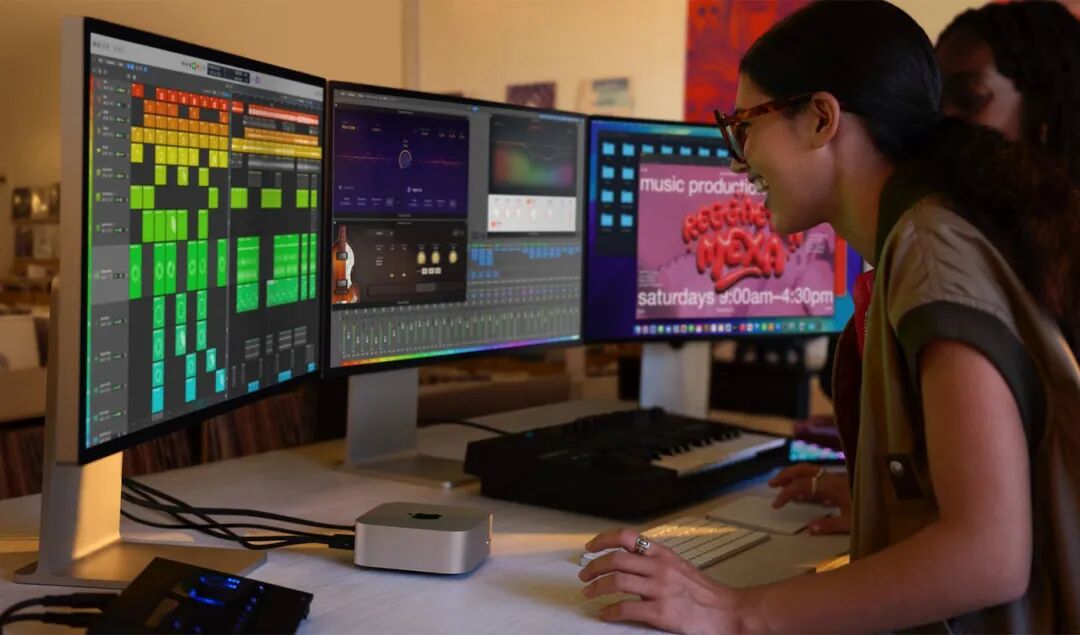
To avoid exposing the real network source when connecting, people typically configure virtual LAN tools like Tailscale or WireGuard on the Mac mini.
Sitting at a domestic workstation, you connect directly to the overseas host through a point-to-point encrypted tunnel, with no public proxy characteristics on the outside.
Compared to the obviously fake VMs in data centers, native residential networks and real hardware have behavioral characteristics in risk-control models that are closer to normal personal devices. Although residential broadband quality varies by region and no one dares guarantee 100% immunity from risk control, compared to gambling daily in blacklisted data centers, this is indeed the relatively most stable approach many advanced developers can find right now.
>_ section 03
Without Wasting Money, How Do You Maximize Overseas Cloud Servers?
Renting a physical Mac mini is indeed hassle-free, but the fixed monthly cost of tens of dollars still poses a barrier for ordinary developers with limited budgets who occasionally write small projects.
With $300 in Google Cloud credits in hand, or a lightweight overseas cloud server bought for a few dozen yuan, how should ordinary people use them to avoid being wiped out by big tech's risk control?
Developers who have figured out the patterns currently rely mainly on three practical rules to avoid pitfalls.
The first rule: absolutely do not use cloud servers to confront the personal web version head-on, and do not run the original client directly on data center networks. Big tech's risk control is always strictest on personal-facing web pages and official consumer entry points, because gray-market operators and freebie hunters all cluster there.
But on enterprise-level API channels, the rules are much looser. Take Google Cloud as an example—its internal Vertex AI platform itself integrates the Claude series models.
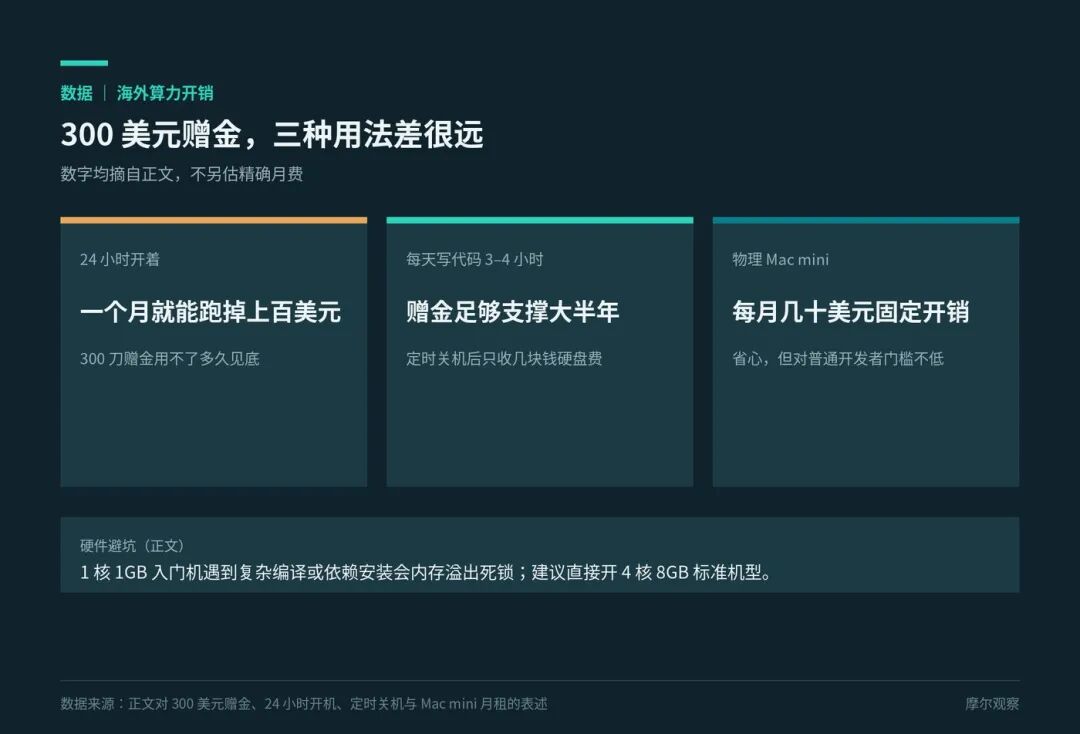
Going through legitimate commercial API interfaces, although third-party hosted models can't directly offset costs with trial credits, it follows enterprise-grade legitimate billing pathways, and as long as you pay per usage, you won't get randomly banned. The $300 credits from the cloud provider can perfectly cover cloud server compute and storage costs—each playing its own role.
The second rule is to avoid the trap of falsely advertised hardware. Some beginners, looking to save money, spin up an entry-level 1-core, 1GB RAM machine on a cloud platform, thinking it's enough to run a command-line coding assistant.
Little do they know that today's coding agents need to pull massive code dependencies, run build scripts, and even start lightweight databases in the background.
With just 1GB of RAM, any complex compilation or dependency installation will immediately cause a deadlock crash due to memory overflow. On platforms like Google Cloud, the smart move is to directly spin up a standard 4-core, 8GB RAM machine.
The third rule is to save money with scheduled shutdowns. If a cloud server runs 24/7, a decent-performance machine can burn through over a hundred dollars a month, and the $300 credits will run out quickly. But people typically only spend three to four hours actually focused on writing code each day.
Configure automatic scheduled scripts to shut down when leaving the workstation or when tasks are detected as idle. During shutdown, the cloud provider only charges a few dollars for basic storage. Amortizing compute costs by actual usage hours, these credits can comfortably last over half a year.
>_ section 04
Stop Being a Supervisor—Turn Your Code Assistant into a Night Shift Worker
Once you've sorted out the network, channels, and overseas servers, if you're still sitting in front of the screen staring at the cursor popping out word by word, you're still using AI in the dumbest way possible.
Many developers, after migrating their runtime environment to overseas cloud, have taken the opportunity to upgrade their workflow: from real-time monitoring to headless asynchronous development.
Previously, running AI coding on your own computer was most torturous due to network jitter and energy drain. After an agent modifies a piece of code and runs tests, it often takes three to five minutes. Sitting in front of the screen waiting wastes time, and turning to do something else easily gets interrupted.
Sometimes you step away briefly, and the program gets stuck on a confirmation dialog, halting the entire afternoon's progress.
After moving the environment to overseas servers, many teams directly use background tools like tmux to hang processes in the cloud. Regardless of whether your local computer's lid is closed, network is disconnected, or powered off, the cloud host continues silently running tasks in the overseas high-speed internal network.
An even more convenient approach is integrating with code repositories. Sitting in China, when you encounter a bug to fix or a small feature, in the web interface on your phone or computer, you file a task ticket to the GitHub repository.
The monitoring script on the overseas cloud host automatically wakes up, dispatches the code assistant to pull the latest branch, understand the requirements, modify the code, and run all automated tests in an isolated environment.
By the time you sit down at your workstation the next morning, the remote agent has already handled all the basic changes and neatly submitted a merge request—you just spend a few minutes confirming.
Many developers originally migrated their environment out just to avoid account bans, but after configuring background persistence and repository integration, they discovered that this asynchronous delivery without guarding the screen actually completely eliminated the previously inefficient human-machine grind.
>_ section 05
Final Thoughts
Over the past year, AI coding tools have iterated at a dizzying pace, with demo videos looking more magical than the last. Type one sentence, and the large model generates a complete code architecture and flashy interface in seconds.
But in actual development environments, technology implementation is never that smooth.
From early days of hunting for nodes, to struggling with foreign-region cards, to later renting physical machines and migrating entire environments to cloud servers—every bit of toolchain tinkering is, plainly put, about finding a smooth path for your work under specific rule constraints.
Ban rules change constantly. What works as a workaround today may tighten up in a few months. And free credits from platforms will eventually run out.
But what truly settles out from this back-and-forth tug of war isn't any specific Mac mini or particular overseas card—it's how to use cloud compute to build stable, fault-tolerant, unattended engineering workflows. Figure out the real boundaries of your tools, and invest energy in habits that can be sustainably implemented—that's how you save time amid this change and focus on doing the work well.
>_ Making complex technology something you can understand.
>_ Moore Observation · Original Production
Unauthorized reproduction prohibited
Disclaimer
This article provides an in-depth analysis and business logic deduction based on public information, including corporate announcements, technical patents, Tianyancha, and authoritative media reports, with the aim of exploring technology roadmaps and industry trends. Product parameters and performance descriptions mentioned in the article are quoted from official disclosure standards and represent only theoretical analysis based on existing data, not absolute feedback from physical experience. Given that technology products (especially new energy vehicles and robots) involve software and hardware OTA iterations, if relevant data differs from actual device performance, please refer to the company's official final release. The views expressed in this article are for reference only and do not constitute any basis for investment or purchasing decisions.
-
![]()
Claude Goes Wild: The Overseas Mac mini Rental Craze Explained
-
![]()
Alibaba Forced to "Hold Back"
-
iCAR V25 Launches with Red Packet Pricing from 119,800 Yuan — Is This Extended-Range Box Car Really a Good Deal?
-
![]()
Boxy SUVs: Only 3 Models Top 10,000 Units in October, 52% Sell Fewer Than 1,000; Deepal G318 and Hongqi G919 Under 200 Units | Mingjing Pro
-
![]()
Google Opens Genie 4 to Eligible Users, Upgrading Real-Time World Generation
-
![]()
Volkswagen Group October China Retail: 145,000 Units — How Do Volkswagen, Audi, and Jetta Break Down?
-
![]()
Musk Wants to Build a Model Y Without a Steering Wheel: Robotaxi Expands from a Solo Car to a Family-Size Vehicle
-
![]()
Weipai Reports 7,886 Retail Units in October; Gaoshan PHEV Alone Accounts for 77.4%