Is the RAG Accuracy Rate Really 90%? First, Overcome the Document Parsing Challenge
 04/23 2026
 597
597
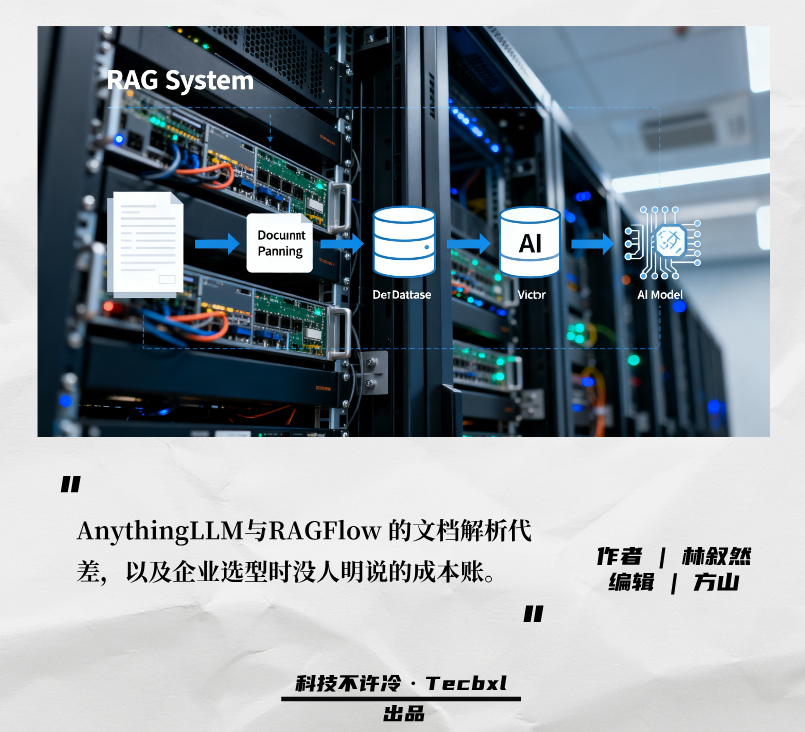
In the 2026 enterprise-level large model testing ground, the same story unfolds daily. Companies spend heavily on computing power and servers, struggling for half a month. They successfully run models with billions of parameters and complete complex local deployments, only to fail at the most basic task of 'reading files.'
Once the system is set up, the business department throws a quarterly financial report with complex tables or a dozens of pages (jǐ shí yè, dozens of pages) scanned PDF contract into the chatbox. They expect AI to instantly identify Violation clause (wéi guī tiáo kuǎn, non-compliant clauses) or summarize revenue data. However, what appears on the screen is often incoherent gibberish, even misidentifying the names of Party A and Party B.
As large models become increasingly intelligent, the knowledge base's inability to properly read files has become the most ironic weakness.
In recent years, the focus has been on enhancing the intelligence of large models, while overlooking the most fundamental aspect: garbage in, garbage out. Data shows that AI can only perform optimally when fed high-quality content. Weak foundations lead to confusion from lengthy descriptive documents, recognition errors from scanned PDFs, and contradictory outputs from inconsistent terminology.
If the system misreads characters from the start, no amount of computing power or model sophistication can prevent it from thrashing around in erroneous data.
Against this backdrop, knowledge base tools on the market have diverged completely. On one side are pragmatic tools like AnythingLLM, emphasizing lightness and ease of use. On the other are hardcore tools like RAGFlow, dedicated to tackling complex document parsing. Behind these two paths lie the technical truths and complexities that enterprises must confront when implementing AI.
01
The Bottleneck of RAG Often Doesn't Lie in Vector Databases
Many technically inclined teams initially believe setting up a knowledge base is simple. They think pulling an open-source framework from GitHub and running an open-source model will suffice. This illusion stems from underestimating the complexity of 'documents.'
To first-generation local knowledge base tools, all files, regardless of type, are treated as long strings of plain text.
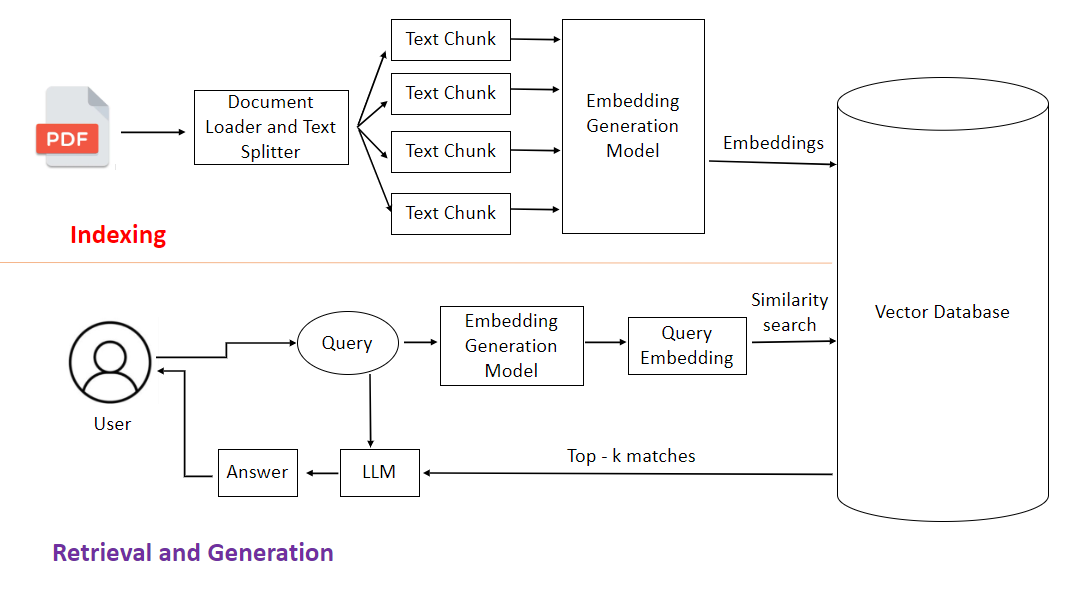
According to technical documentation, traditional lightweight solutions often rely on basic extraction tools like PyPDF2 or pdfplumber, directly scraping text from the underlying document code. After extraction, PDF or Word files are sliced into fixed-length character segments, like cutting a salami every 500 characters, and then stored directly in a database. This logic works fine for simple plain text novels or online articles.
However, it falls apart in real-world business environments.
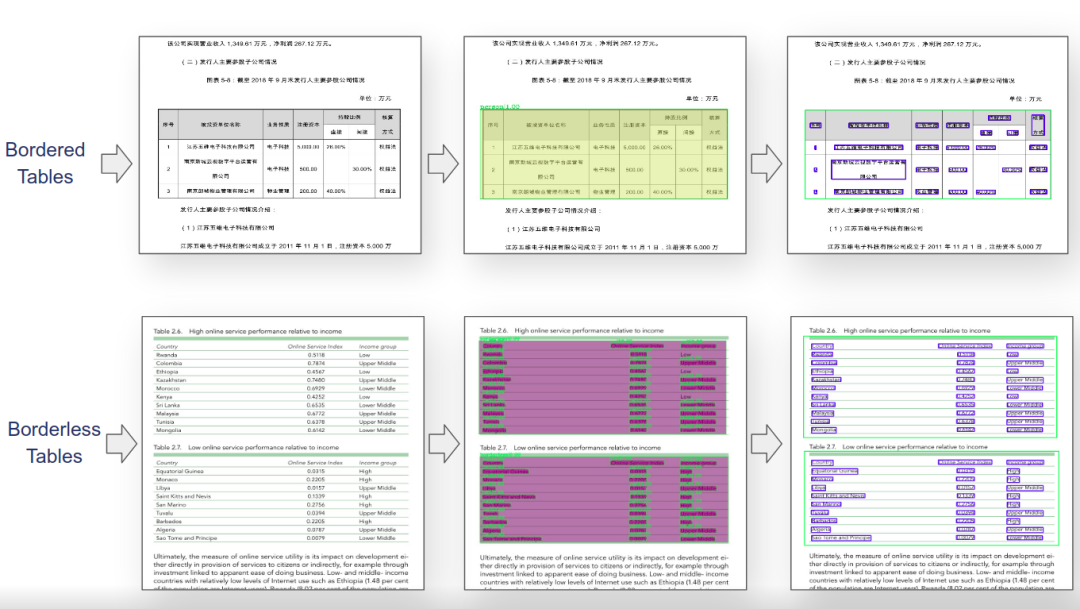
Business documents are never read sequentially like online fiction. Their meaning heavily relies on formatting, tables, and cross-references like 'see note on page 3.' When the system methodically extracts text left to right, tables pose the biggest headache. Two-dimensional tables are flattened into one-dimensional text, losing all row-column relationships.
Originally neatly organized, 'Q3 Revenue' appears in the header, with the specific figure '120 million' in the third row, fifth column. After forced flattening, '120 million' might be preceded by an unrelated code. When business users search, AI struggles to find the correct relationship amidst the jumbled text, leading to nonsense.
The situation worsens with multi-column layouts. The left column lists Party A's obligations, the right Party B's rights. The system, unaware of columns, mixes text from both sides, producing sentences incomprehensible even to humans, let alone machines. Scanned documents are the most problematic.
Without OCR, the system views scanned files like a blurry, out-of-focus photo—completely illegible.
Many traditional industries' archives consist solely of photocopies of paper documents. If the system lacks basic visual recognition capabilities, it extracts nothing but blanks or gibberish from image-based PDFs. File information becomes garbage upon warehousing (rù kù, storage), ensuring subsequent retrieval and generation can only produce garbage.
02
Why Can Target Detection Models Read PDFs?
When direct text scraping fails, hardcore tools like RAGFlow start from scratch.
Take the RAGFlow architecture as an example. It shifts its approach when processing files: instead of extracting text first, it seeks to understand the document's physical structure. Focusing on document understanding and retrieval quality, it suits high-precision needs in professional fields. This task becomes a computer vision challenge rather than simple text processing. As seen in its open-source implementation, RAGFlow employs YOLOv8 for layout analysis, scanning the entire page. Its primary task is to draw bounding boxes.
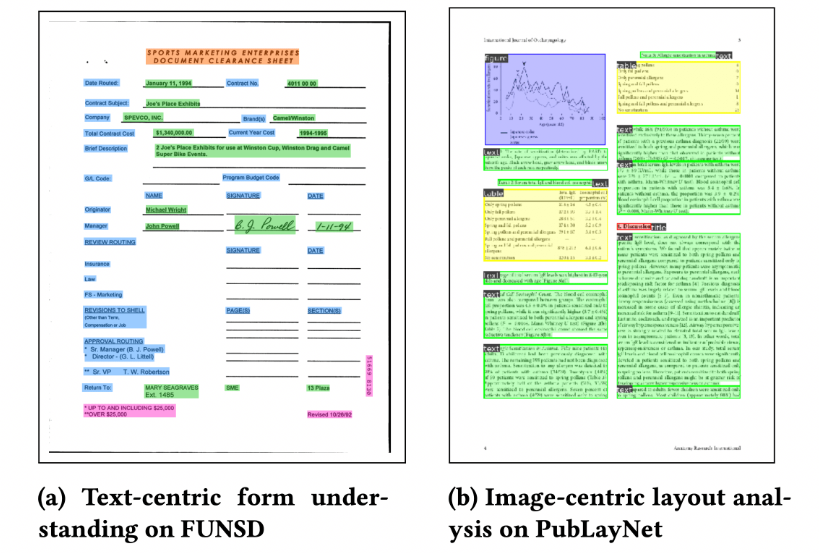
Let AI 'see' first: this is a title, that's a table, here's a stamp. Only after clarifying the layout structure does the system proceed. For plain text boxes, it extracts text. For challenging scanned documents, it first denoises and deskews the image, then deploys multilingual OCR engines like PaddleOCR to extract information pixel by pixel.
Early solutions often used Tesseract, which was lightweight and quick to deploy but suffered from plummeting recognition rates with Chinese vertical text or mixed tables. While PaddleOCR offers higher accuracy and robustness against complex layouts, its model size and computational overhead increase exponentially.
The key is matching document complexity and hardware budget: more scanned files and messier tables justify the precision premium.
This resolves structured extraction challenges for complex formats (e.g., photocopies, tables). With tables, the process becomes extremely tedious. The system must locate each cell's boundaries and rebuild row-column relationships. The final output preserves formatted tables, including cross-page, nested, and merged cells—understandable to humans and queryable by machines.
Moreover, when slicing files, this system no longer rigidly 'cuts salami.' It adapts its approach. Template-based text slicing and visualization adjustment allow the system to cut according to the document's physical structure. Headings must stay with body text, tables must not be split, and list items must remain grouped. A single document might even generate two indices simultaneously: one by paragraph, another by table cell.
This enables rapid location during searches, whether querying paragraphs or table figures. According to technical documentation, the system employs cross-encoders for secondary ranking during multi-channel recall and re-ranking optimization, enhancing answer accuracy. This industrial-grade parsing process leaves no room for shortcuts—it's a hard engineering feat built on computing power and complex algorithms.
03
From Tesseract to PaddleOCR: Newer OCR Isn't Always Better
Hard labor comes at a cost. This hidden expense deters many trial users. After watching demonstrations of deep parsing, many enterprises feel impressed and attempt to build similar systems in-house. However, upon reaching the server room, operations engineers shake their heads.
Training and inferencing large models demand substantial computing resources, representing significant investments for many organizations. Running visual models for layout analysis and high-precision OCR engines for image recognition exceeds the capabilities of ordinary computers. Light laptops or standard office desktops struggle to load models, let alone process thousands of pages in batches. This forces companies to purchase hardware.
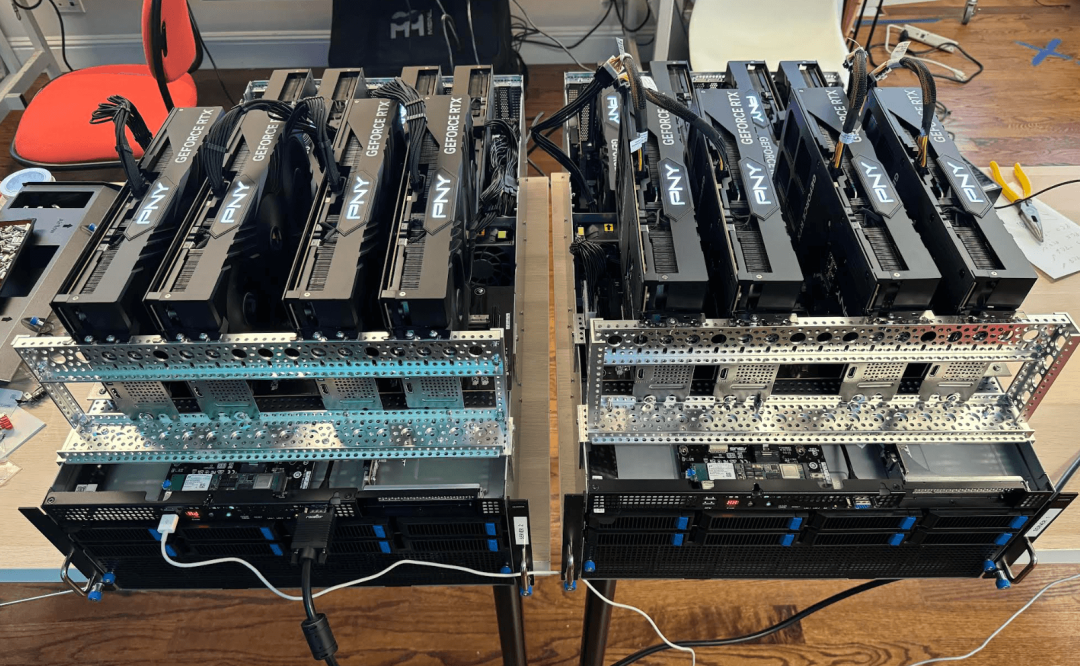
The market now splits into two camps: the wealthy invest millions in all-in-one machines, while the rest make do with low-spec solutions. Computing power has become a hard barrier. Beyond hardware, the true costs lie in manpower and time. Acquiring tools doesn't mean immediate usability. Contracts from the legal department and equipment maintenance manuals from the workshop have vastly different layouts. Applying default rules still yields poor parsing results.
Technical teams must spend time customizing parsing templates for different business documents.
Many companies optimistically assume AI can be deployed within a week or two. In reality, consolidating messy Word and PDF files from various departments, cleaning bad data, and filling in missing information often consume significant time.
For a medium-sized enterprise, building a private knowledge base from scratch typically takes 3-6 months or longer.
Such customization drives total costs far beyond expectations—not just software expenses, but also team maintenance. This is where lightweight tools like AnythingLLM shine. They avoid complex visual analysis, focusing solely on basic text processing. The advantages are obvious: cost savings. They run on ordinary computers with Docker. Critically, they embed large documents only once.
Under high-frequency usage, re-embedding documents for each query skyrockets costs. Their one-time embedding and multiple reuse strategy cuts costs by 90% compared to other document chatbot solutions. In today's climate of scrutinized IT spending, this immediate cost saving holds irresistible appeal for many SMEs.
04
Lightweight Solutions Work Until You Hit Scanned Documents
No technology is absolutely superior—it's about fitting the right tool to the right context. At this stage, enterprises no longer blindly experiment with AI but choose based on actual conditions. Selection requires comprehensive consideration of data complexity, development resources, and business objectives. In many industries, such as healthcare, finance, or government agencies, data must remain within local boundaries—a non-negotiable rule. Their priority is building a fully localized, privately secure platform.
AnythingLLM supports local deployment, keeping data off third-party servers. If most processed documents are neatly formatted Word files or plain text, with no need to interpret complex scans, this approach works. As seen in its open-source implementation, AnythingLLM supports multi-model integration, allowing users to freely switch between commercial APIs and local open-source models.
If speed, cost savings, and data security are priorities, this is the way to go. However, if business departments handle numerous scanned customs declarations daily or legal teams verify multi-page PDF contract photocopies filled with stamps, tables, and handwritten signatures, opting for a lightweight tool to save money backfires. The system outputs misspelled words and gibberish.
Business users must then manually verify each line against the originals.
This doesn't enhance efficiency—it creates chaos.
In such cases, regardless of hardware costs or tuning complexities, systems like RAGFlow with deep parsing capabilities become necessary. They specialize in complex document parsing, suitable for scenarios handling multi-format documents with high answer accuracy requirements.
Because parsing failures require costly manual corrections later. Another type of team aims beyond document Q&A—they want automated workflows, like having AI place orders in systems after document review.
This exceeds pure knowledge base scope, requiring tools like Dify or LibreChat. Dify supports visual workflow orchestration with built-in agent frameworks, suitable for enterprise-grade AI application development. Despite the market's abundance of tools, each specializes in different areas. Enterprises must first identify their bottlenecks.
05
Final Thoughts
While vendors' model benchmarks soar, enterprise AI adoption hasn't matched expectations. The real battleground has shifted. People now realize that limiting AI performance isn't insufficient computing power or model intelligence but enterprises' own messy unstructured data. Dusty scans, disorganized tables, and unclassified archives represent the true obstacles.
Document format chaos, information redundancy, and unverifiable knowledge timeliness create significant data governance hurdles.
Spend 80% of effort cleaning data, 20% selecting tools. Don't reverse this order. Whoever masters this grunt work will truly ground their AI knowledge base. Ignore hype about miraculous concepts—check if your system's PDFs are read correctly. That's the only tangible test.
Disclaimer
This content is based on a thorough analysis of corporate announcements, technical patents, and authoritative media reports, aiming to explore technological routes and industrial trends. Product parameters and performance descriptions cited herein are drawn from official disclosures and represent theoretical analyses based on existing data, not absolute feedback from real-world experiences. Given that tech products (especially new energy vehicles and robots) undergo continuous software and hardware OTA updates, any discrepancies between this data and actual product performance should defer to official corporate releases. The views expressed herein are for reference only and do not constitute investment or purchasing advice.
— THE END —
-
![]()
Wang Huiwen, Former Meituan Executive, Achieves 20-Fold ROI, Supports 24 AI Startups
-
![]()
Another AI Computing Power Unicorn Launches IPO! Founded by a Changjiang Scholar
-
![]()
OFILM Holdings Secures Zhongke Daojing, Marking a Significant Leap in the Optical Communication Industry!
-
What Will Be the Next Key Battleground for Large Models After AI Coding?
-
![]()
Leapmotor's Sales Soar, Yet Hidden Concerns Loom
-
![]()
China’s Action Camera Market Soars: 3.12 Million Units Sold in Six Months, DJI Secures 74% Dominance
-
![]()
Zhang Yiming: Strategic Retreat as a Path Forward
-
![]()
Exploring Charging for Some Features of QianWen App: Can It Follow the Path of Doubao?