Next-Gen 13-inch Surface Pro Review: Huge Improvements in Performance and Energy Efficiency, Integrated Graphics Rival Latest X86
 07/09 2026
 538
538
1. Introduction: Would You Choose an All-ARM Surface Lineup?
We recently got our hands on the new 13-inch Surface Pro, which, like the 13-inch Surface Laptop we tested last year, runs on an ARM-based Snapdragon processor. The official naming remains peculiar, with a full-width comma separating the model and size—a distinctly 'Microsoft' touch.
However, this year's 13-inch Surface Pro continues Microsoft's tradition of premium craftsmanship and design on the Windows platform. The 13-inch 3:2 screen, paired with a stylus, offers a completely different experience. Of course, the magnetic keyboard accessory transforms the new 13-inch Surface Pro into a laptop, catering to traditional user habits with equal attention.
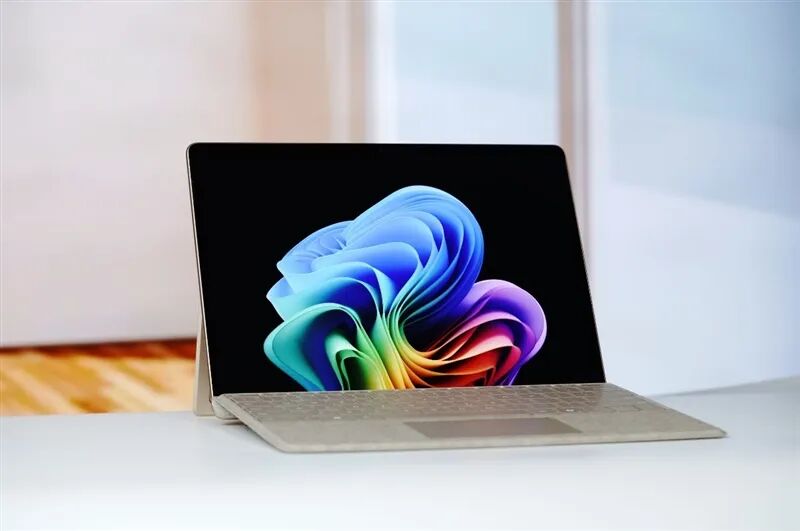
Although environmental attributes aren't a major concern domestically, Microsoft still meticulously details the eco-friendly materials used in the new 13-inch Surface Pro. These include 100% recycled aluminum for the chassis, 100% recycled rare-earth metals in the magnets, and 100% recycled cobalt in the battery. For domestic users, durability remains the top priority.
The tablet form factor of the new 13-inch Surface Pro means it has fewer ports than a typical laptop and includes some designs not commonly found on laptops, such as side-mounted power and volume buttons—essentially a smartphone design. However, given its tablet shape, these are actually quite convenient to use.
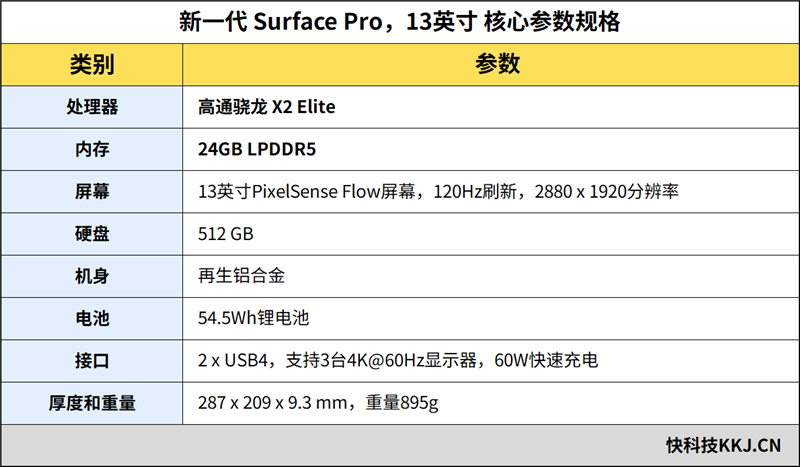
Besides the dedicated magnetic charging port, the new 13-inch Surface Pro offers only two identical USB4 ports. While the quantity may seem limited, their functionality is robust. In addition to high-speed data transfer, they support DisplayPort 1.4a video expansion, enabling simultaneous support for three 4K@60Hz displays and a minimum of 60W PD fast charging.
The new 13-inch Surface Pro is powered by Qualcomm's latest Snapdragon X2 Elite processor for Windows PCs in 2026. Built on the third-generation Oryon architecture, it delivers superior performance and energy efficiency. The integrated Qualcomm Hexagon NPU provides up to 80 TOPS of computing power, easily activating all AI capabilities on Windows 11 AI+ PC.
Since AI features on Windows 11 AI+ PC currently rely solely on CPU and NPU computing power, DIY enthusiasts and gamers cannot directly utilize the computing capabilities of high-performance graphics cards. This makes mobile platforms the best choice for users to experience native AI applications on Windows 11 AI+ PC.
Key specifications of the new 13-inch Surface Pro include:
2. Design Appreciation: Classic Surface Tablet Aesthetics with Exquisite Craftsmanship
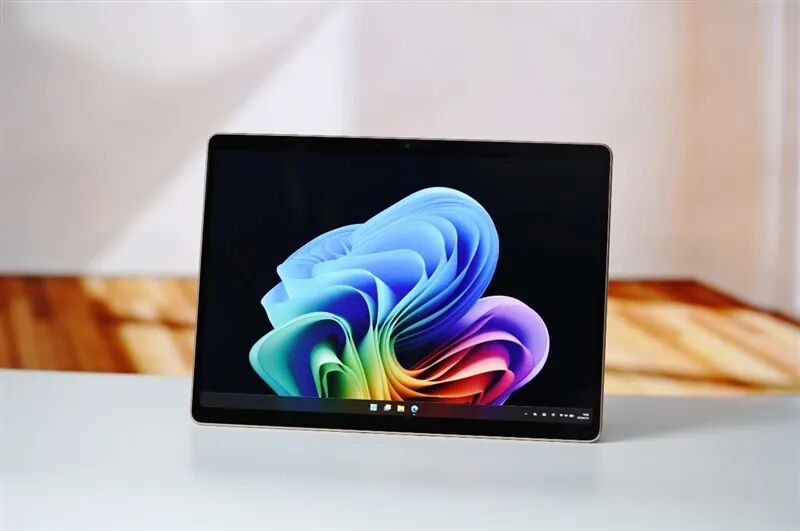
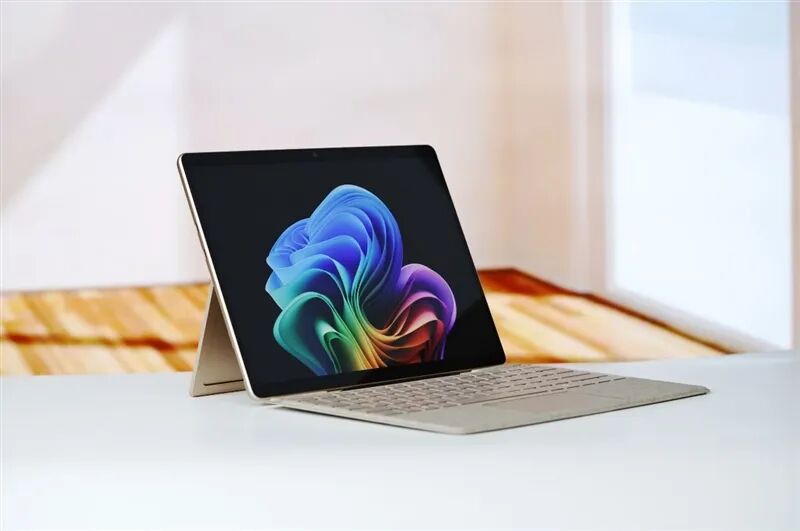
This year's 13-inch Surface Pro, the twelfth-generation product in Microsoft's Surface lineup, retains its tablet form. The front features a clean 13-inch screen that users can interact with directly or pair with a magnetic keyboard cover for a laptop-like experience.
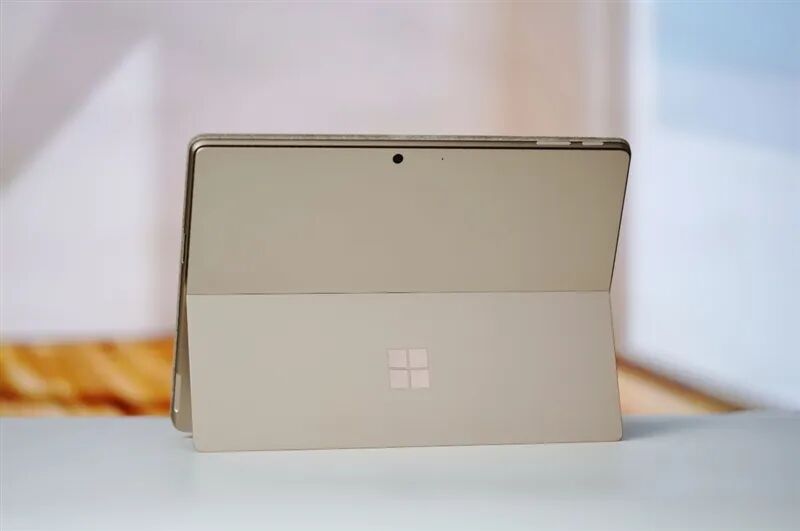
The new 13-inch Surface Pro is available in Platinum, Black, and Sand Gold. Our unit is in Sand Gold, featuring a fine matte finish on the surface and a mirrored Microsoft 'Field' logo on the back, exuding excellent texture.
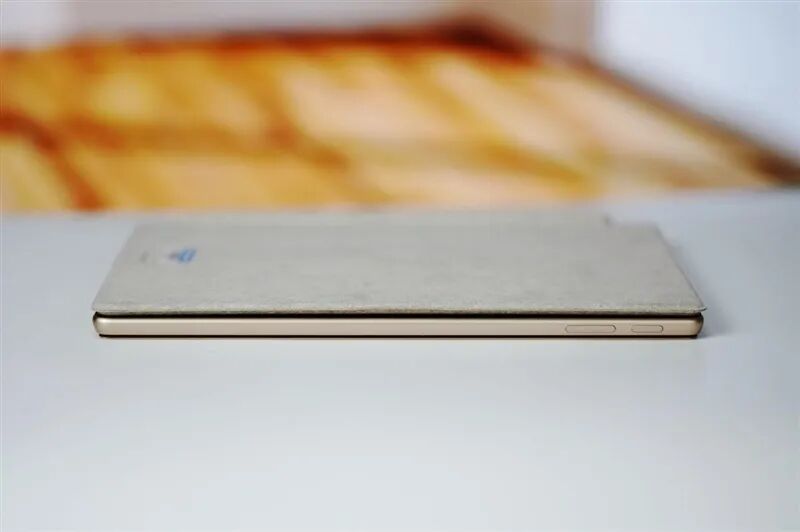
Running Windows 11, the new 13-inch Surface Pro is better suited for landscape use but also includes smartphone-like power and volume buttons on the side, following the same logic as smartphone power buttons for easy familiarity.
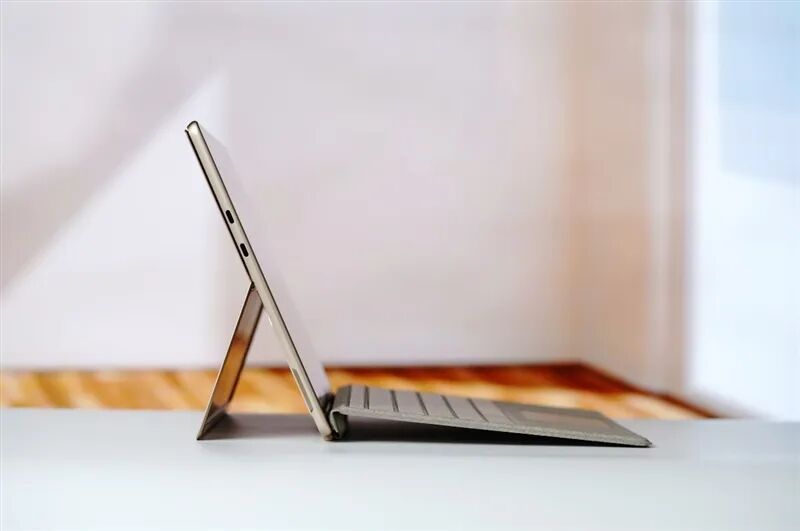
After attaching the magnetic keyboard and opening the rear kickstand, the new 13-inch Surface Pro transforms into a laptop form, virtually indistinguishable from a traditional laptop.
From this angle, you can also see the two USB-C ports on the side of the chassis. Both ports are identical, supporting full-featured USB4, enabling expansion for three 4K@60Hz displays and 60W fast charging.
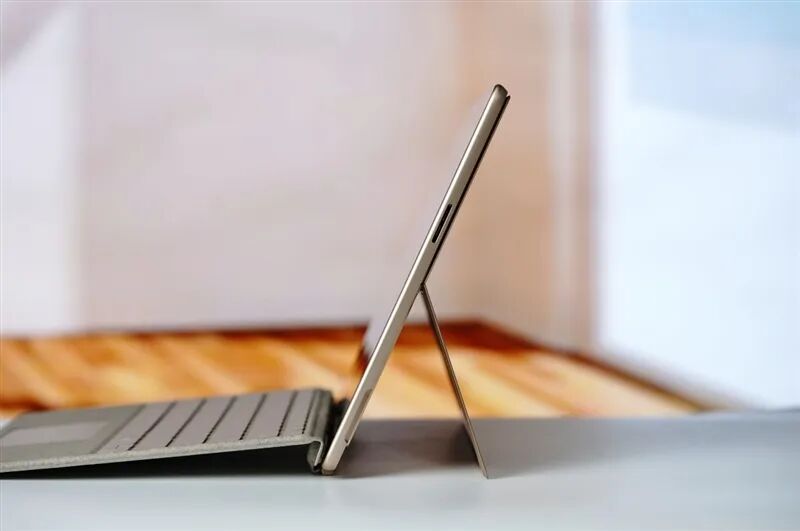
The narrow slit on the other side resembles an SD card reader port but is actually the magnetic charging port for the original charger, supporting bidirectional insertion. The charging cable direction can be adjusted based on usage form.
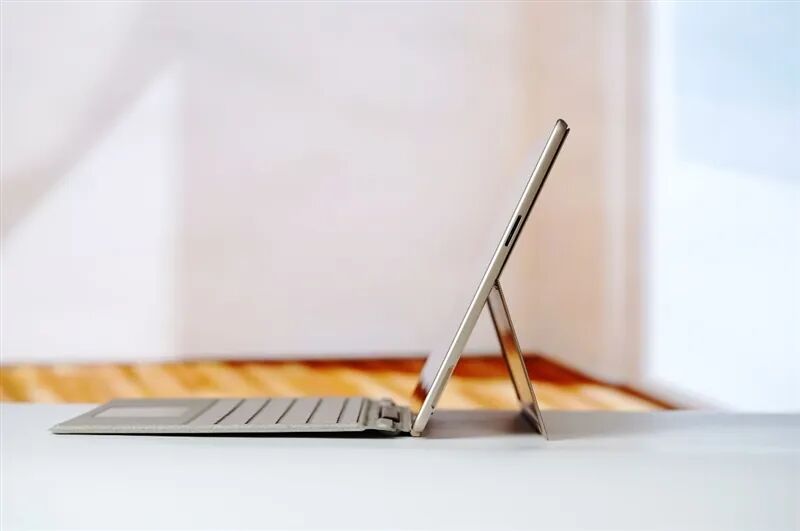
The magnetic keyboard defaults to folding up a section and adhering to the screen, creating a slope for more ergonomic and comfortable typing. Users can also fully open it to reveal the hidden stylus compartment inside.
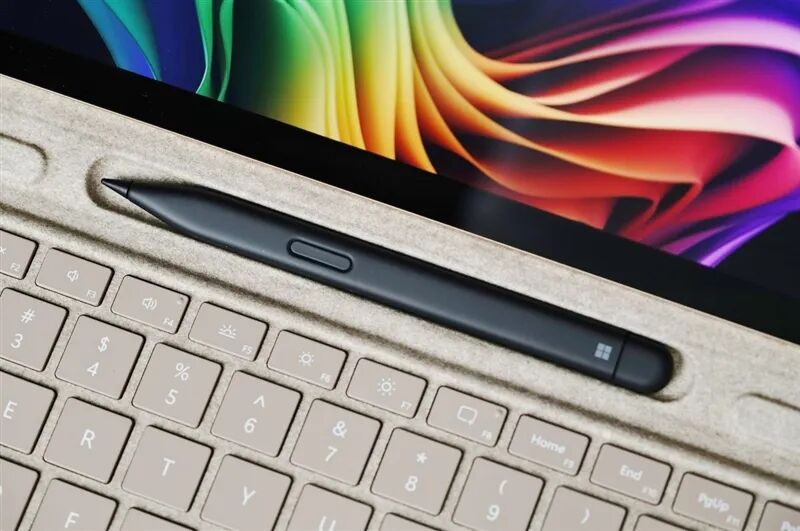
The included stylus with the magnetic keyboard is the Surface Slim Pen 2. Its flat body fits perfectly into the magnetic charging compartment at the top of the keyboard, charging the stylus while stored to keep it fully powered at all times.
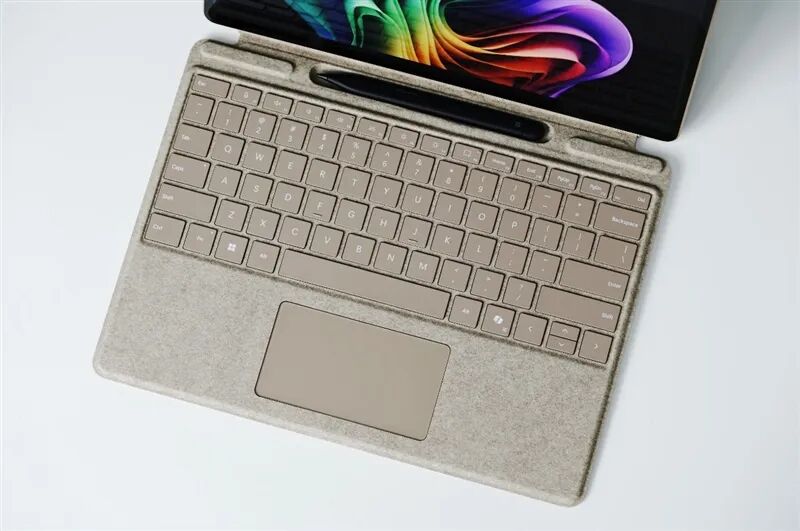
The magnetic keyboard of the new 13-inch Surface Pro maintains the eco-friendly characteristics of Surface products, featuring a paper-like material with an excellent handfeel. The keyboard caps are wide, with moderate key travel and responsive rebound, reducing fatigue during prolonged input. Although the trackpad area is slightly small, considering that Surface products support touch and include a stylus, this has minimal impact on usage.
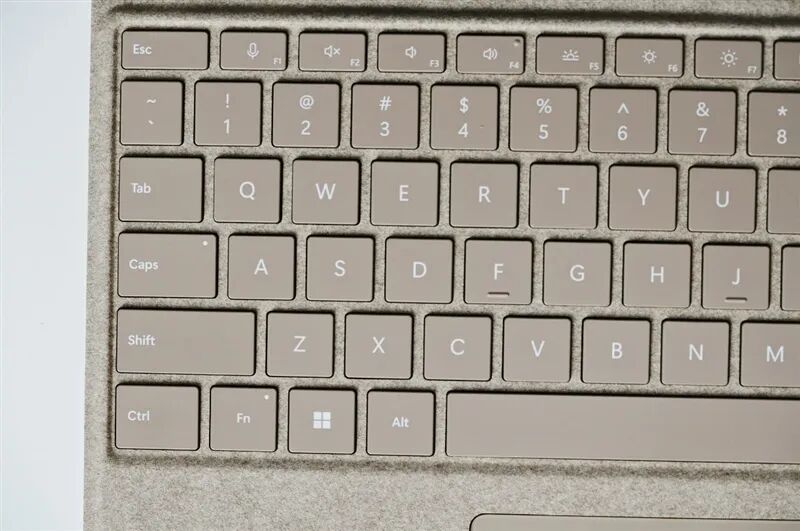
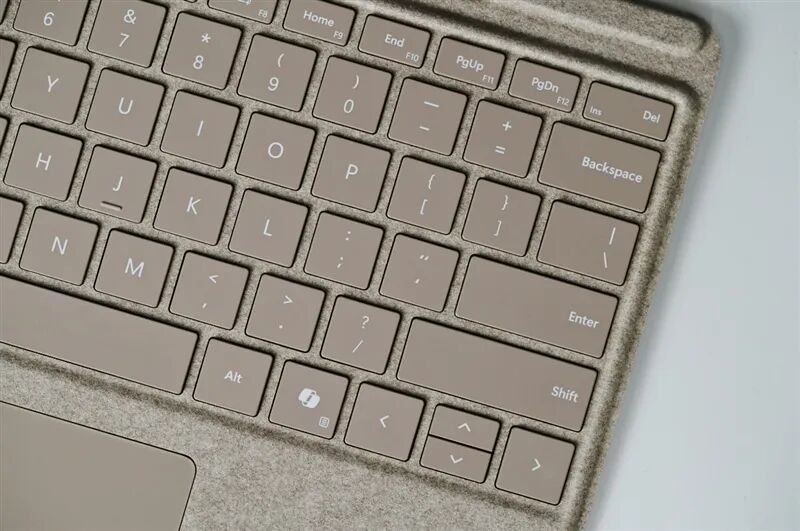
Close-up of the magnetic keyboard caps.
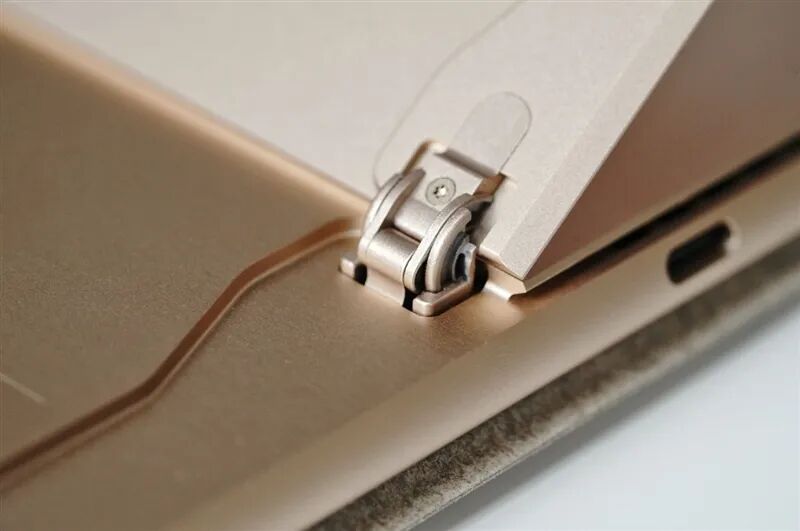
Close-up of the hinge on the rear kickstand of the new 13-inch Surface Pro. The all-metal structure is stable and reliable, with moderate opening and closing resistance, allowing it to stay fixed at various angles for flexible placement.
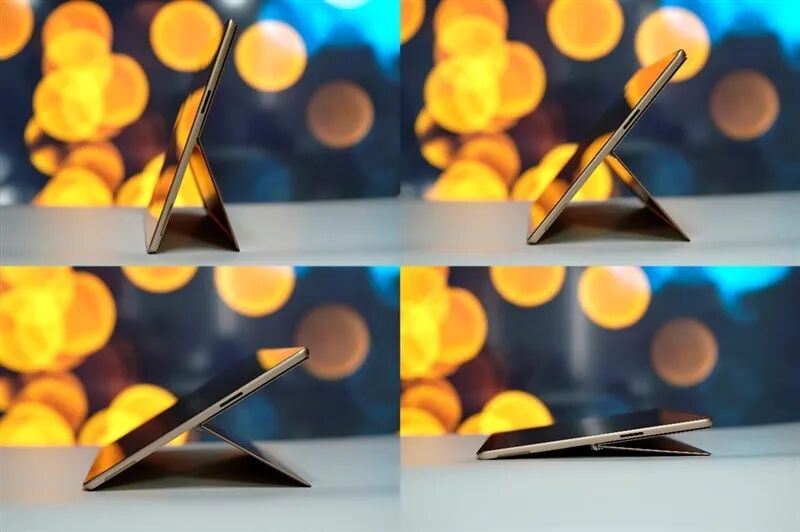
The kickstand hinge can open up to 165 degrees, providing stable support at any angle. Users can prop up the new 13-inch Surface Pro vertically for video viewing or lay it flat for better writing and drawing.
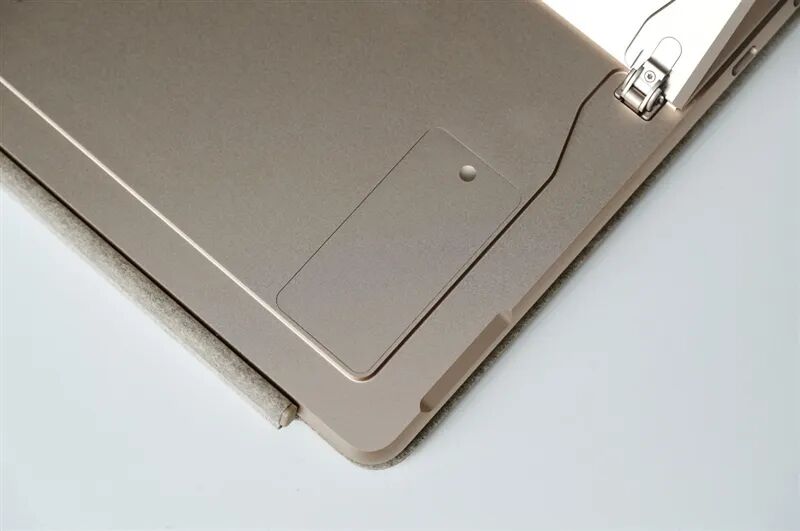
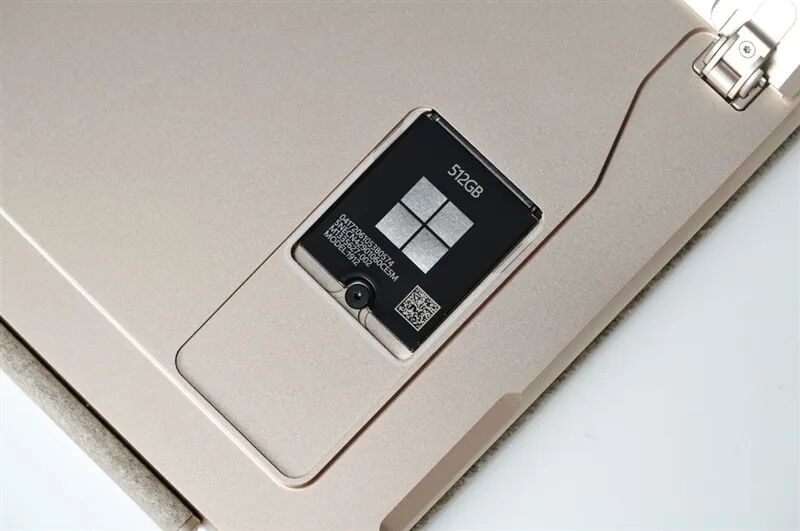
Below the kickstand, removing the magnetic cover reveals the custom SSD. Our unit of the new 13-inch Surface Pro comes with a built-in 512GB SSD.
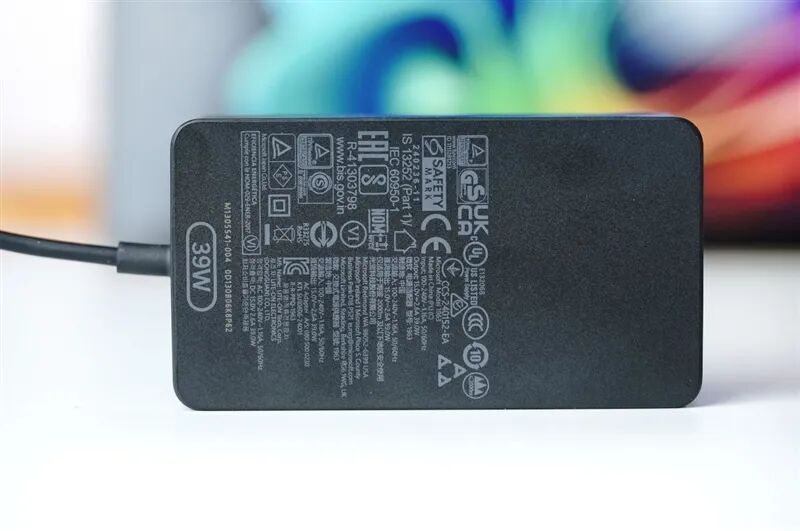
The new 13-inch Surface Pro comes with a compact 39W charger, ideal for travel. Of course, users can also charge it via USB-C using a higher-wattage smartphone charger. Note that while the standard charger is only 39W, the USB-C port requires a charger above 60W for fast charging.
3. Processor Performance and Compatibility Testing: Improved Translation Efficiency and Noticeable Performance Gains
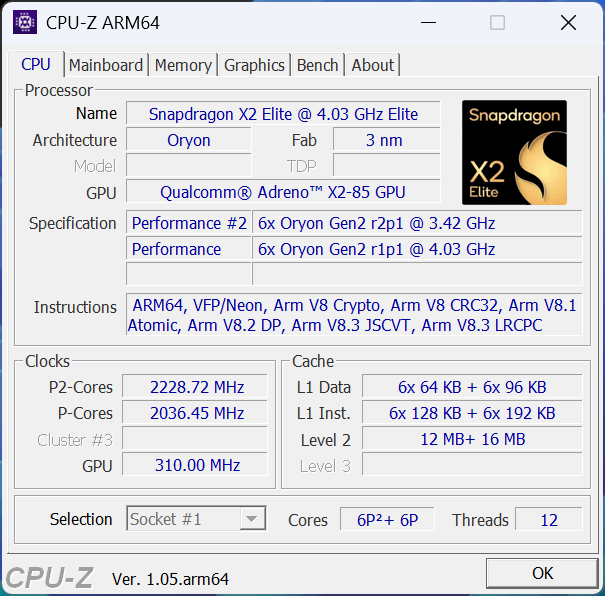
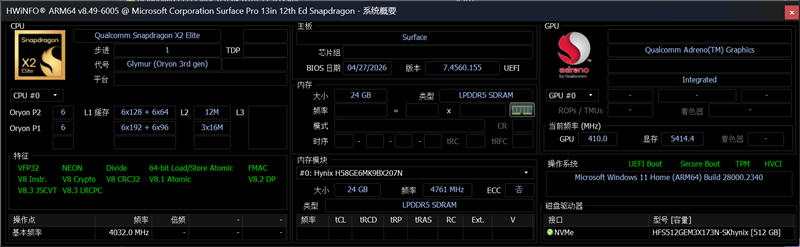
The new 13-inch Surface Pro is powered by Qualcomm's Snapdragon X2 Elite processor, featuring an enhanced Oryon 2 architecture with a 6+6 configuration (12 cores, 12 threads). Manufactured using TSMC's 3nm process, it offers superior thermal control.
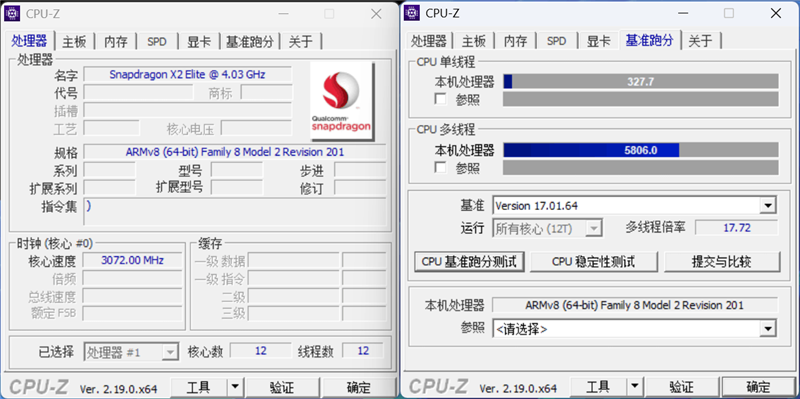
As ARM versions of CPU-Z become more mature, the X64 version shows weaker recognition of ARM processors but can still run normally in compatibility mode and complete benchmarks. In compatibility mode, the Snapdragon X2 Elite processor scores 5806.0 in multi-thread performance and 327.7 in single-thread performance.
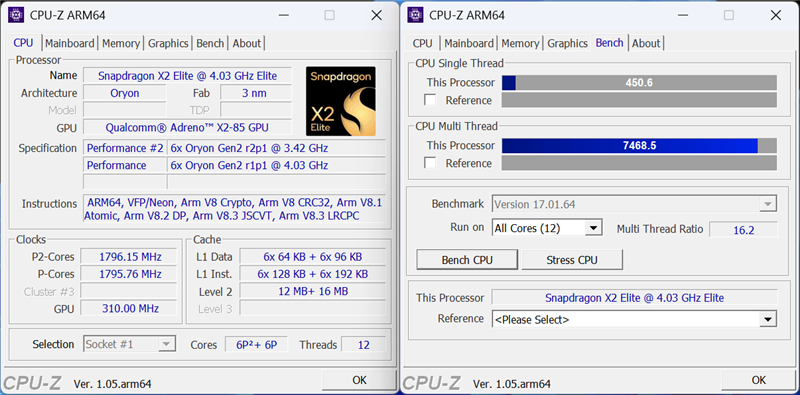
Using the native ARM version of CPU-Z reveals detailed processor information. In native mode, the Snapdragon X2 Elite achieves a benchmark score of 7468.5 in multi-thread performance and 450.6 in single-thread performance.
Compared with the native ARM version, the translation process resulted in approximately a 22% performance loss, which is still within an acceptable range.
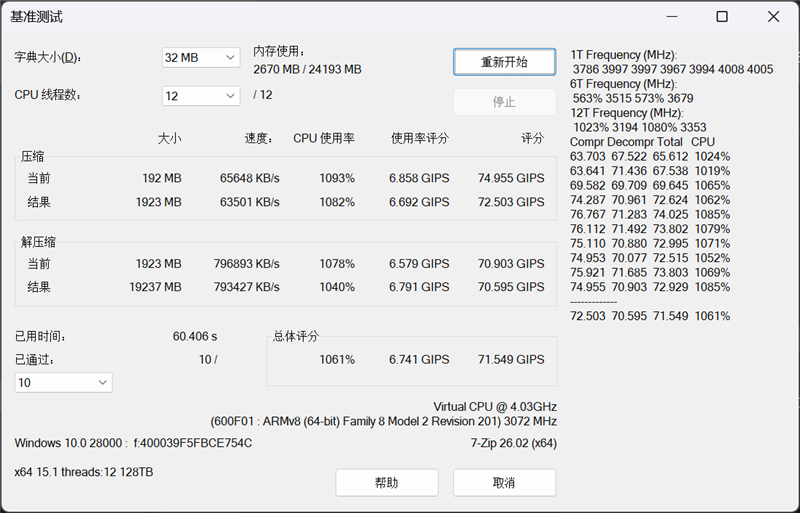
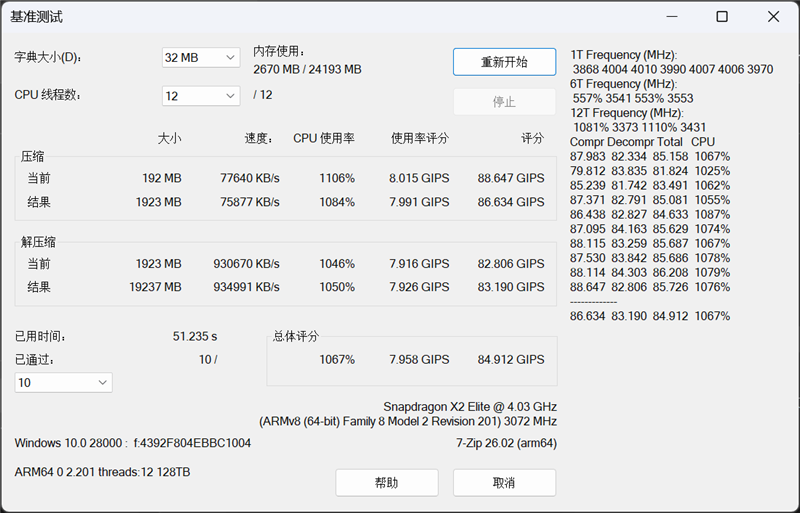
In the 7-Zip benchmark test, the native ARM version took 51.235s, with an overall score CPU usage of 1067%, a usage score of 7.958 GIPS, and a total score of 84.912 GIPS.
The X64 version ran the benchmark test under translation conditions in 60.406s, with an overall score CPU usage of 1061%, a usage score of 6.741 GIPS, and a total score of 71.549 GIPS. Compared to the native version, the translation process resulted in approximately a 16% performance loss.
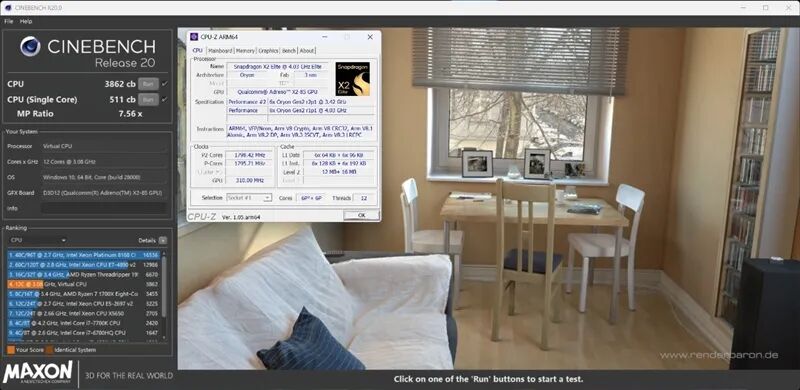
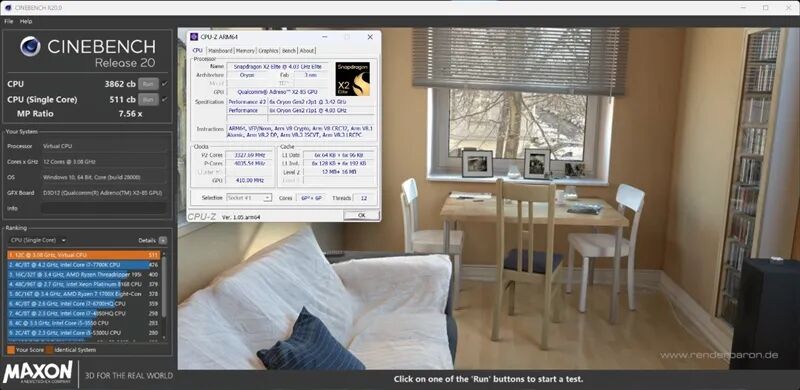
In the CINEBENCH R20 test under translation conditions, the single-core score was 511cb, and the multi-core score was 3862cb.
It can be seen that the Qualcomm Snapdragon X2 Elite processor has a certain lead in multi-core performance and significantly surpasses the AMD Ryzen 7 1700X processor in single-core performance, with astonishing energy efficiency.
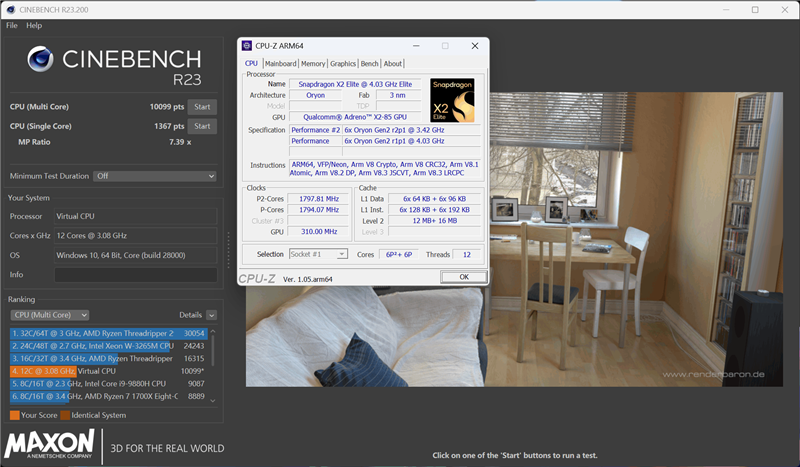
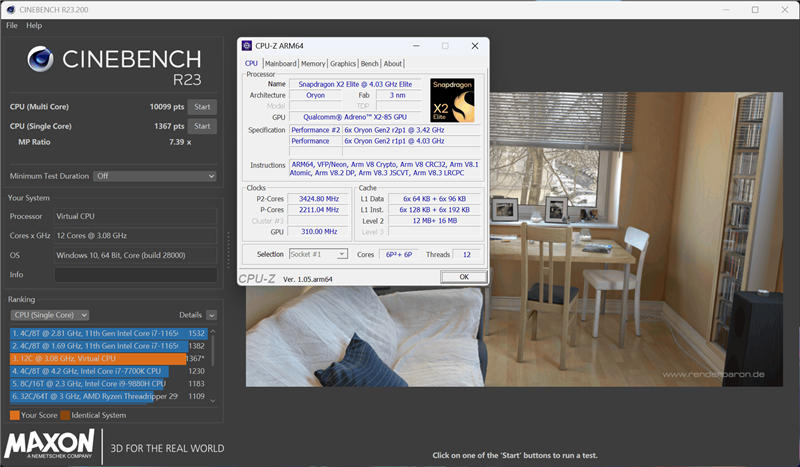
The CINEBENCH R23 test scores under translation conditions were similar, with a single-core score of 1367pts and a multi-core score of 10099pts. After translation, the performance significantly surpasses that of the Intel Core i9-9880H processor in both single-core and multi-core tests.
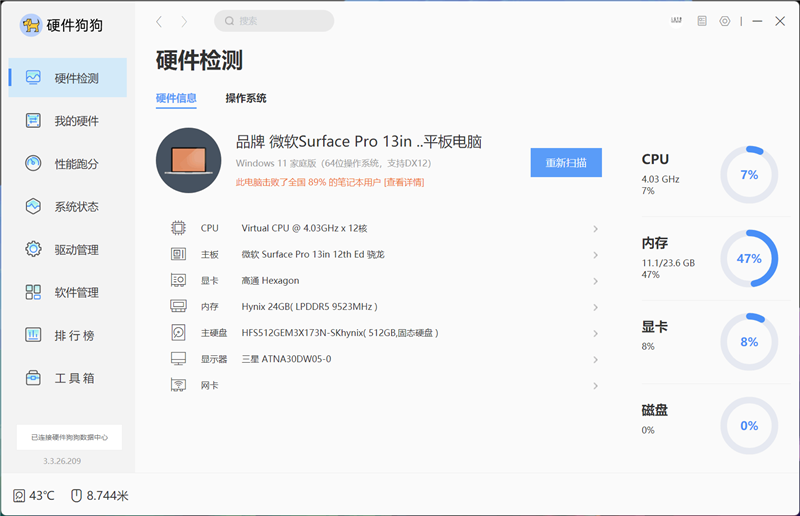
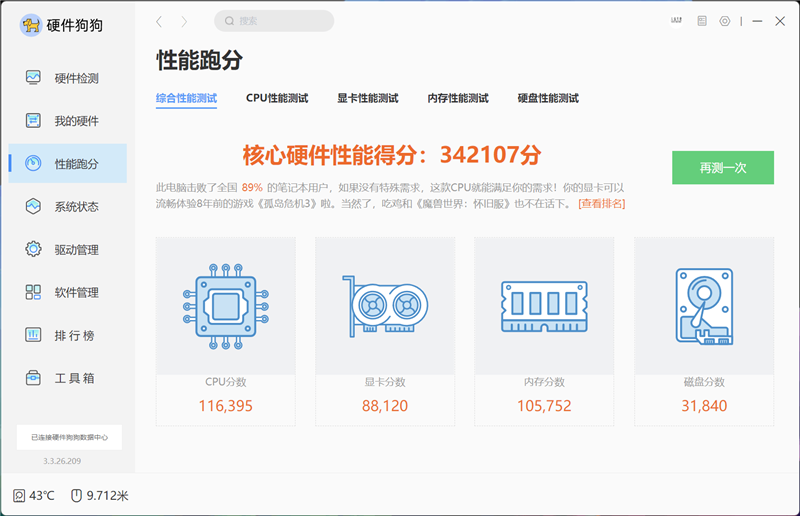
Hardware Dogg can also run smoothly and complete tests under translation conditions. Although the identification of ARM devices is inaccurate, it is judged that the translated performance can also beat 89% of notebooks nationwide.
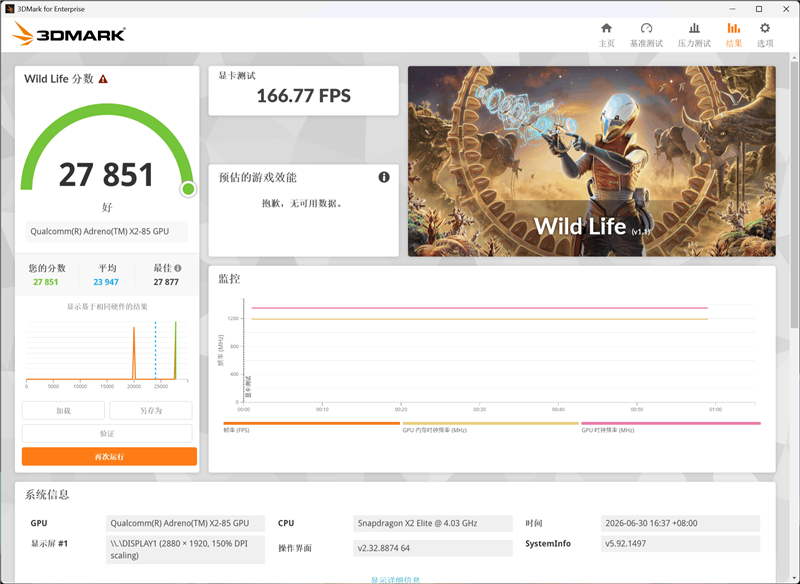
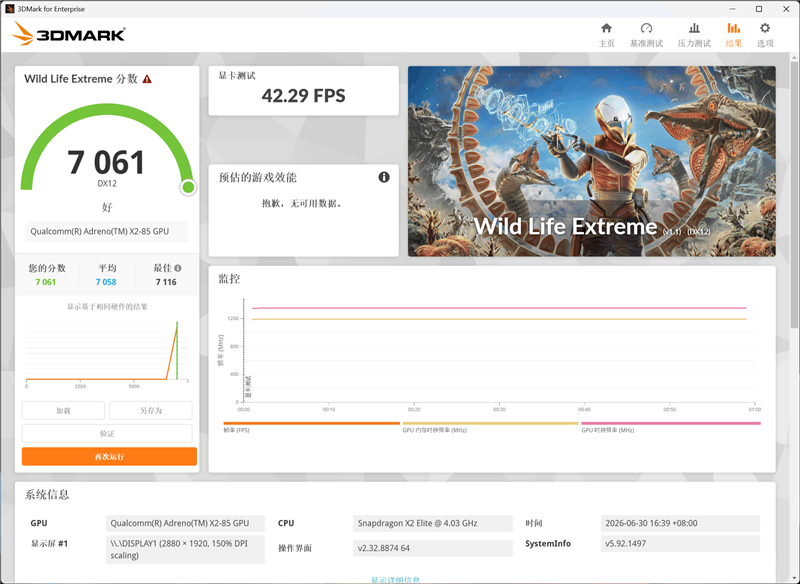
In 3Dmark tests, only some items can run in translation mode. We first ran the cross-platform tests Wild Life and Wild Life Extreme in 3Dmark, with scores of 27851 and 7061, and frame rates of 166.77fps and 42.29fps, respectively.
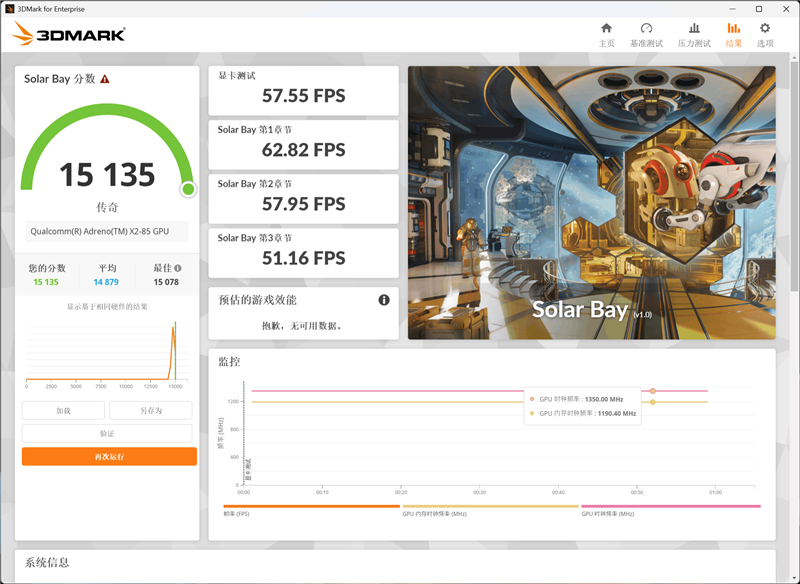
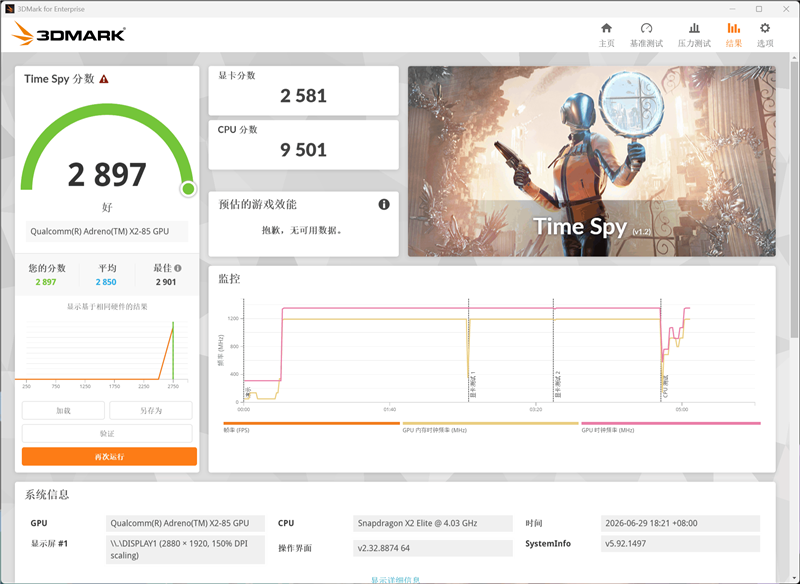
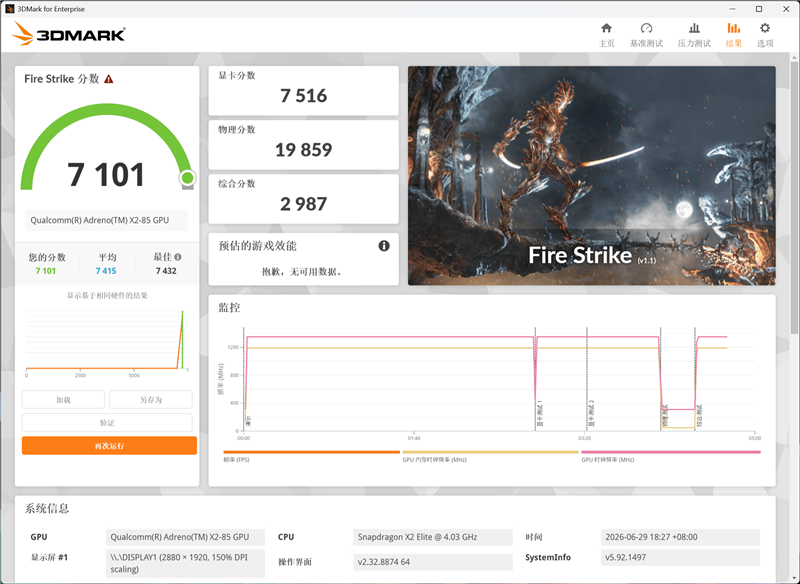
The DX12 test Time Spy and DX11 test Fire Strike can also run under translation conditions. The Qualcomm Adreno X2-85 GPU built into the Qualcomm Snapdragon X2 Elite processor scored 2581 and 7516 in the graphics tests, respectively.
This performance is already comparable to the integrated graphics performance of the latest generation of mobile platforms from Intel or AMD, allowing for hassle-free operation of some simple games under translation conditions.
IV. Other Performance Tests: Stylus System Support is Comprehensive and Convenient to Use in Tablet Mode
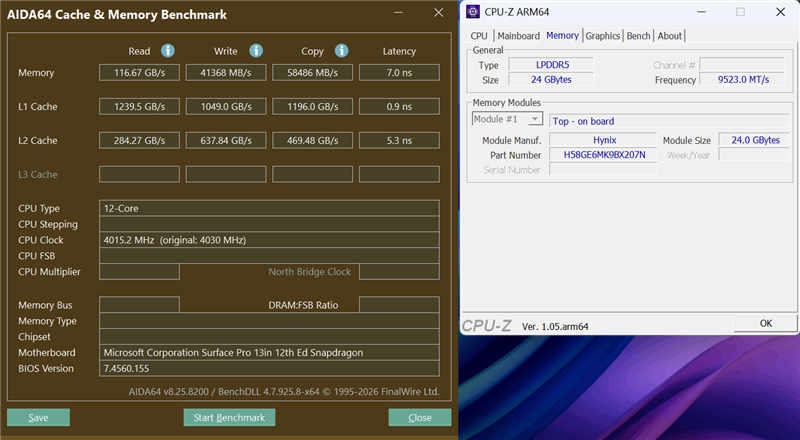
The new generation Surface Pro, with a 13-inch display, has 24GB of LPDDR5 memory built-in, operating at a frequency of 9523.0MT/s. Running the AIDA64 memory test under translation conditions, the results are for reference only.
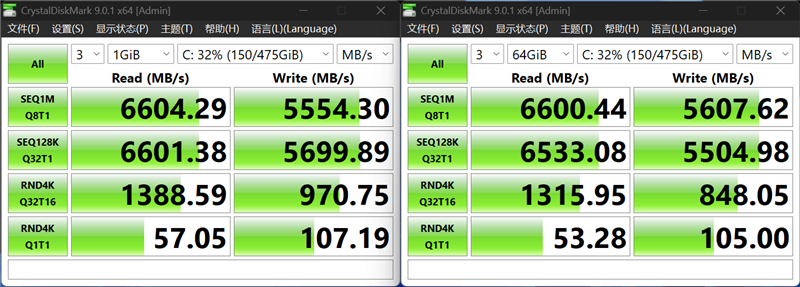
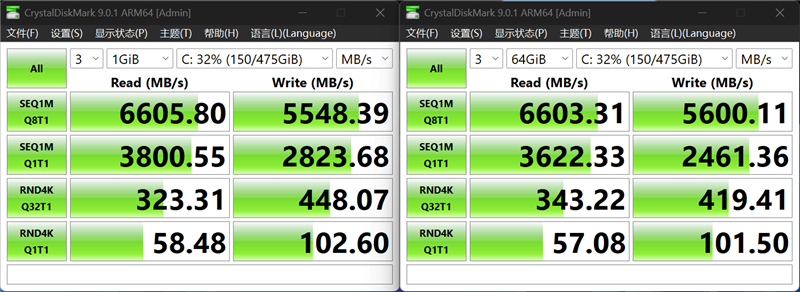
CrystalDiskMark, used for SSD testing, has a native ARM version and can also run the X64 version through translation, with test results largely unaffected. The SSD speed built into the new generation Surface Pro, with a 13-inch display, basically reaches the average level of PCIe 4.0 SSDs.
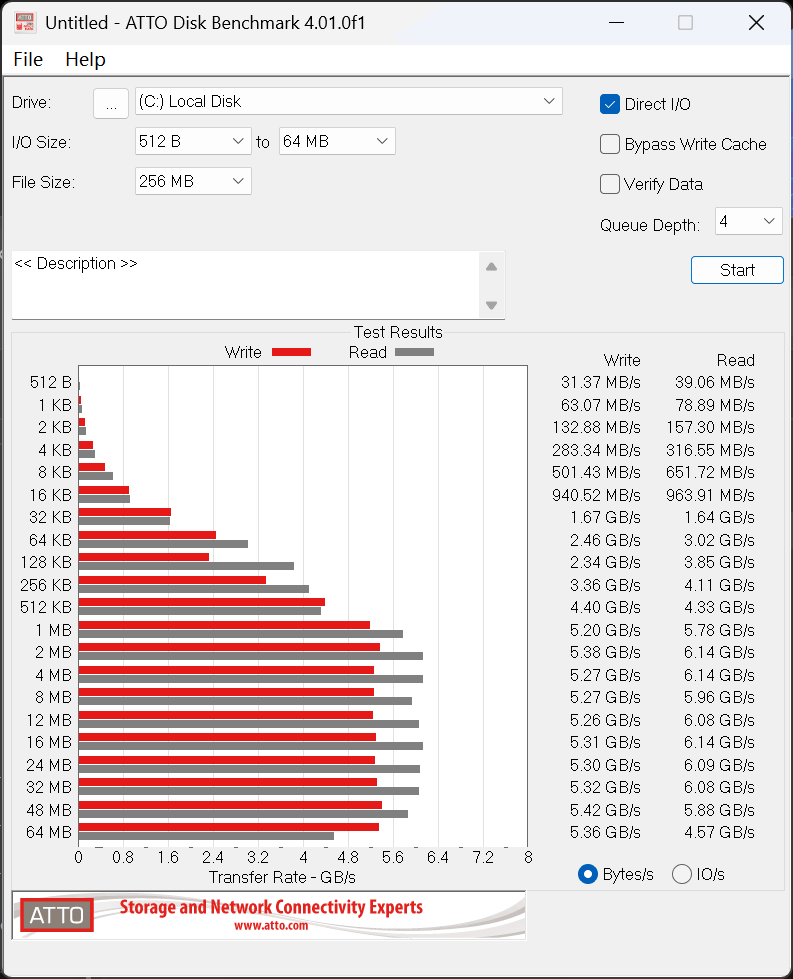
The ATTO Disk Benchmark only showed abnormal results at the end, possibly due to the exhaustion of the intelligent cache of the 512GB capacity SSD.
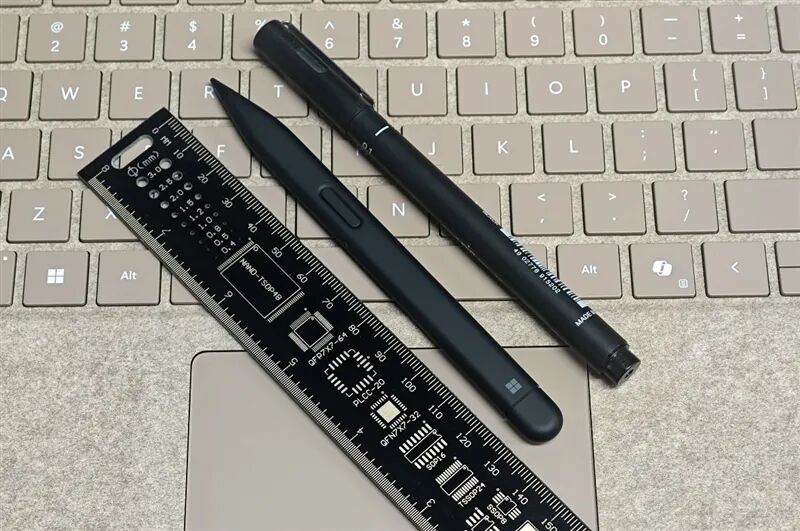
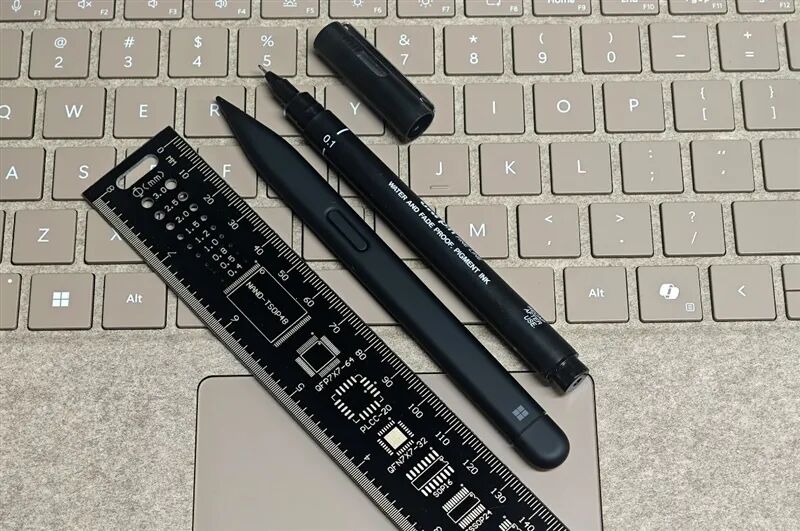
The Surface Slim Pen 2 paired with the new generation Surface Pro, with a 13-inch display, is approximately 135mm long, with a unique flat design that makes it look shorter, but it is actually equivalent in length to an ordinary pen, providing a comfortable grip, much better than expected.
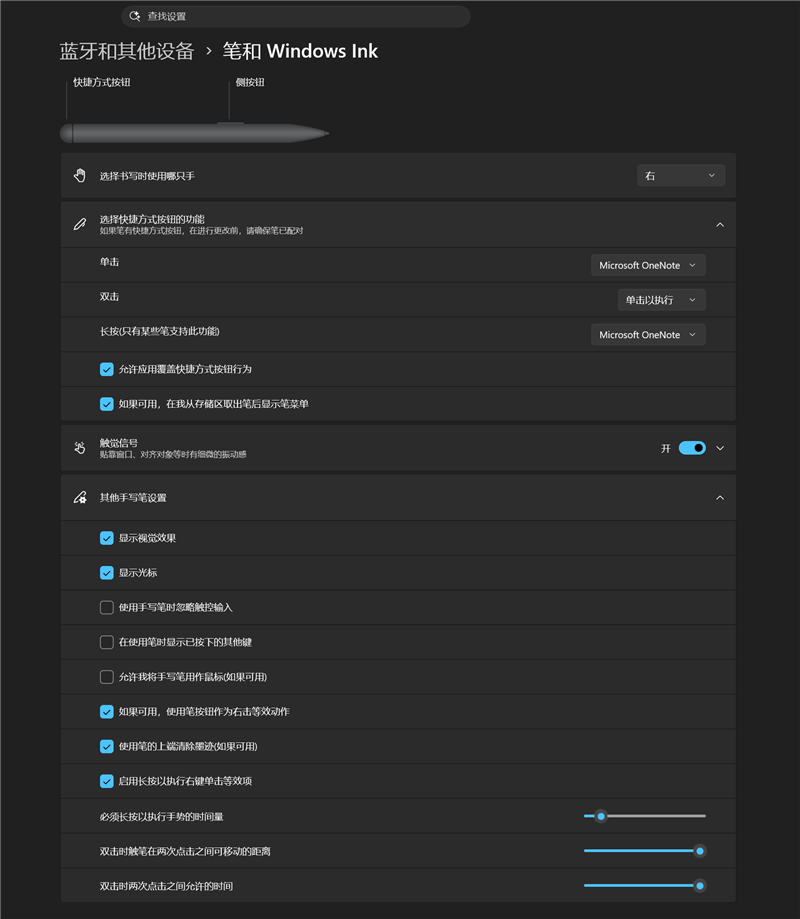
As a first-party peripheral accessory from Microsoft, it naturally has native support in the Windows 11 system, with almost all functions directly settable without the need for additional software installation, making it very convenient to use.
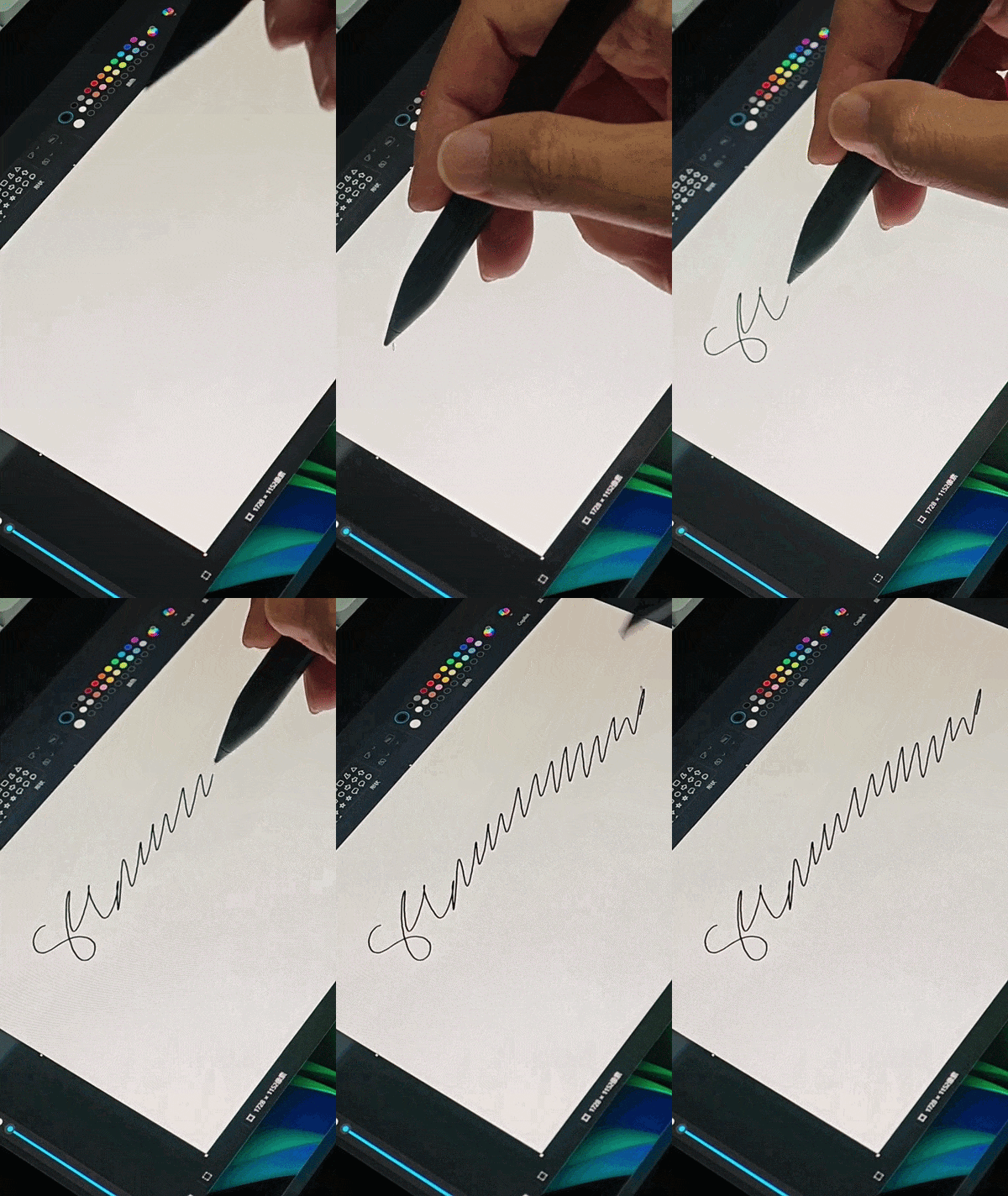
A simple test in the Paint tool shows that the writing delay is almost imperceptible.
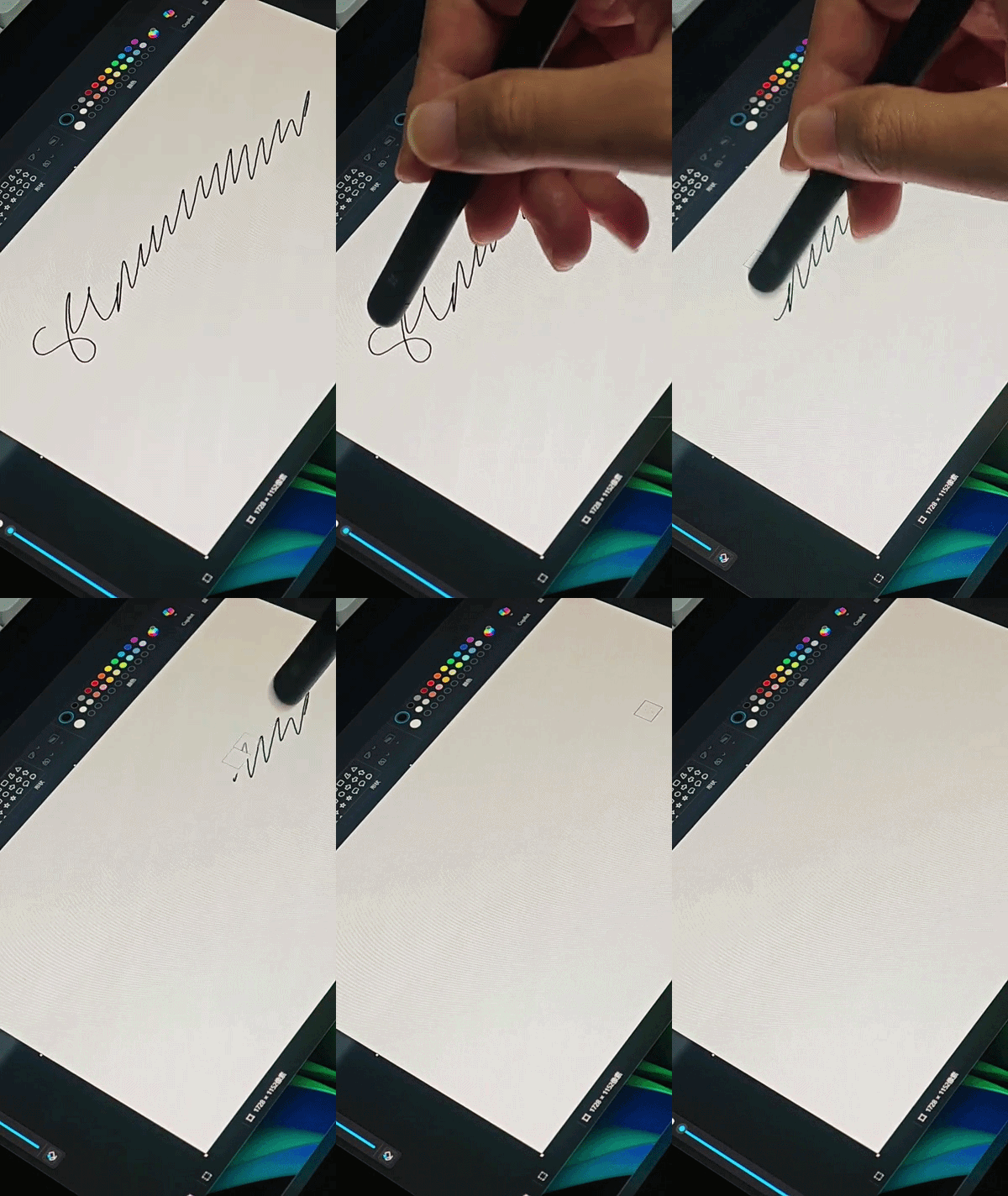
Under default settings, the end of the stylus functions as an eraser, allowing content on the screen to be erased by simply inverting the pen tip.
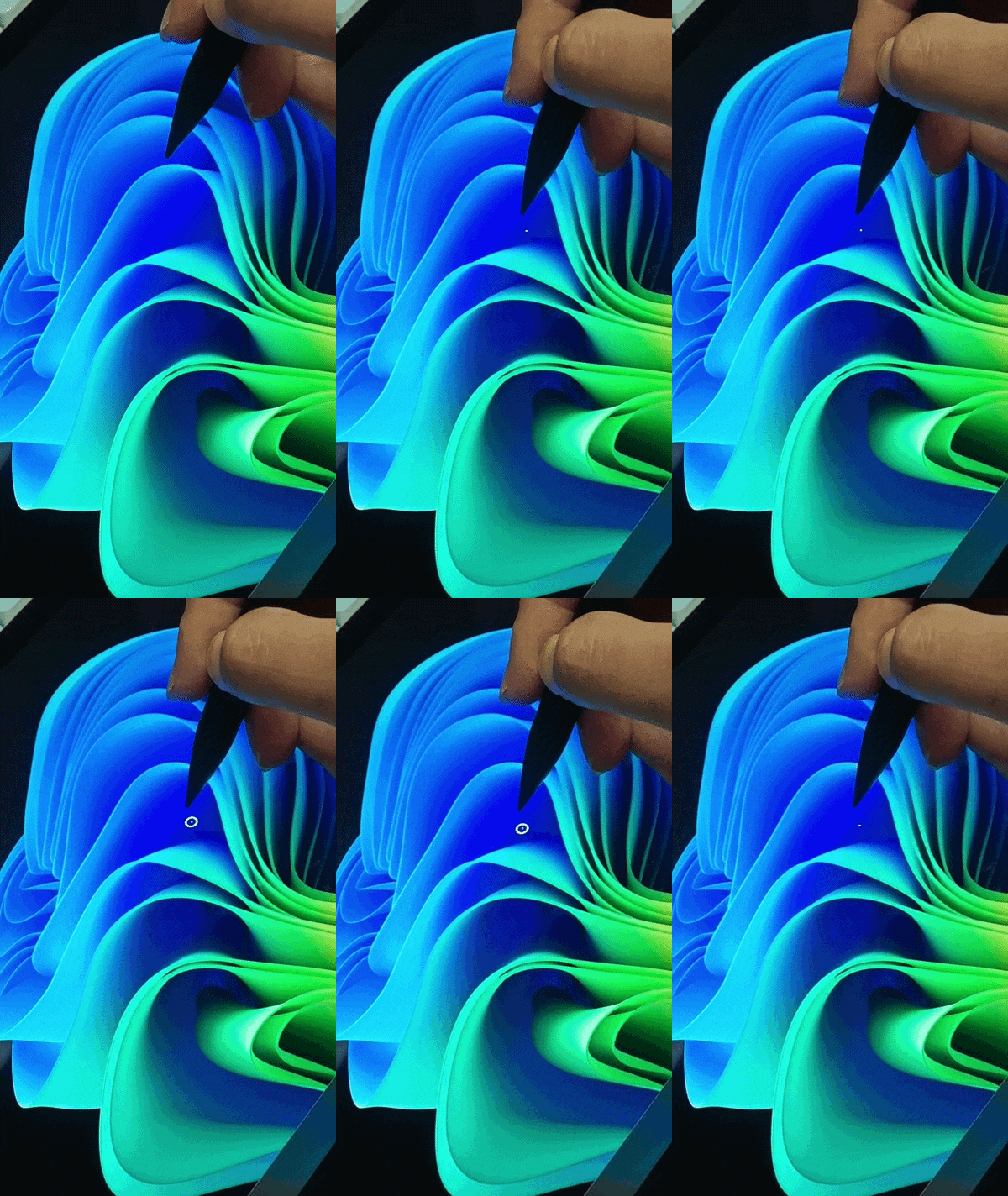
The Microsoft Surface Slim Pen 2 provides two buttons, with the end button defaulting to activate Microsoft's OneNote note-taking tool with a single click and long press, and double-clicking to activate the "Click to Execute" AI tool built into Windows 11.
The side button defaults to right-click switching, with the pen tip anchor point (positioning point) on the screen changing to a circle when pressed. At this point, clicking the screen is equivalent to a right-click, bringing up a shortcut menu.
V. Stress Testing and Battery Life: ARM Platform Energy Efficiency is Astonishing, with Battery Life Exceeding 20 Hours
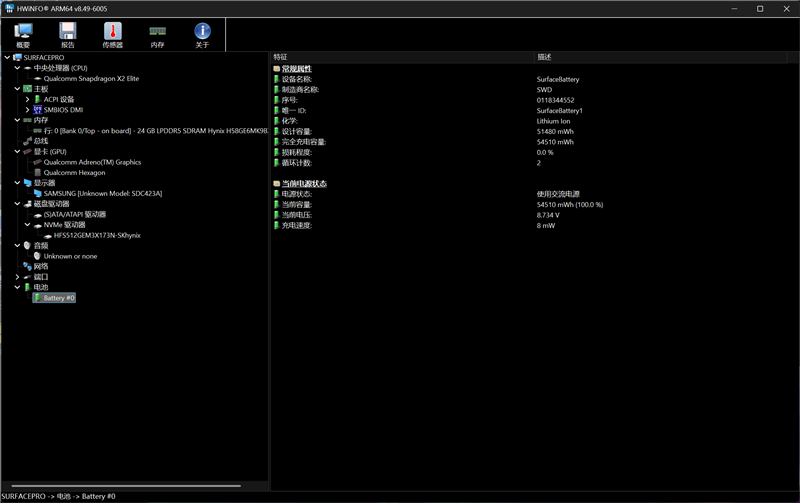
The precision craftsmanship consistent (consistently) seen in the Microsoft Surface series prevents us from disassembling it to view the internal components. However, from the ARM version of the HWiNFO tool, we can see that the built-in battery capacity of the new generation Surface Pro, with a 13-inch display, is 54.5Wh.

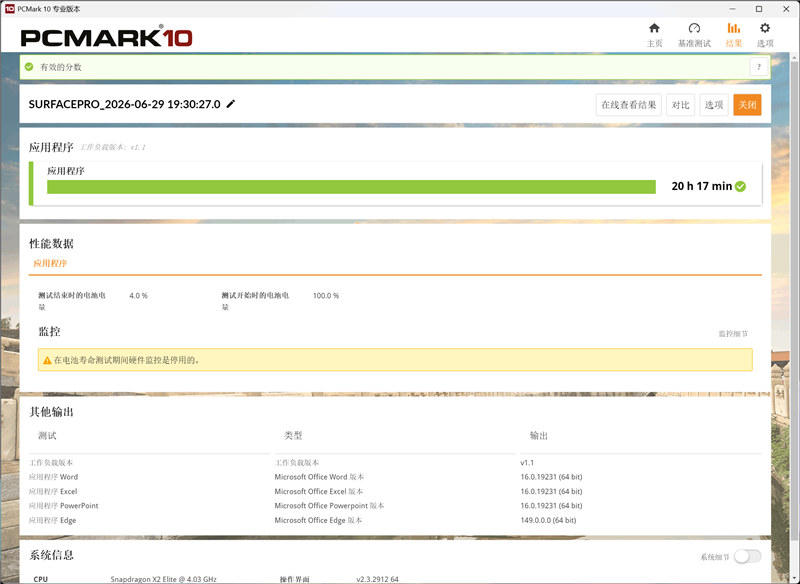
Note that only some items in the PCMark10 test can run on the ARM platform under translation conditions. For battery life testing, we selected the Applications project, using Microsoft Office software to simulate daily office tasks for users. This differs from the daily office mode commonly used in our previous notebook battery life tests and cannot be directly compared.
In the Applications mode for battery life testing, the new generation Surface Pro, with a 13-inch display, ran continuously from 100% battery to automatic shutdown at 4% battery, taking a total of 20 hours and 17 minutes. The energy efficiency of the Qualcomm Snapdragon X2 Elite processor is extremely astonishing.
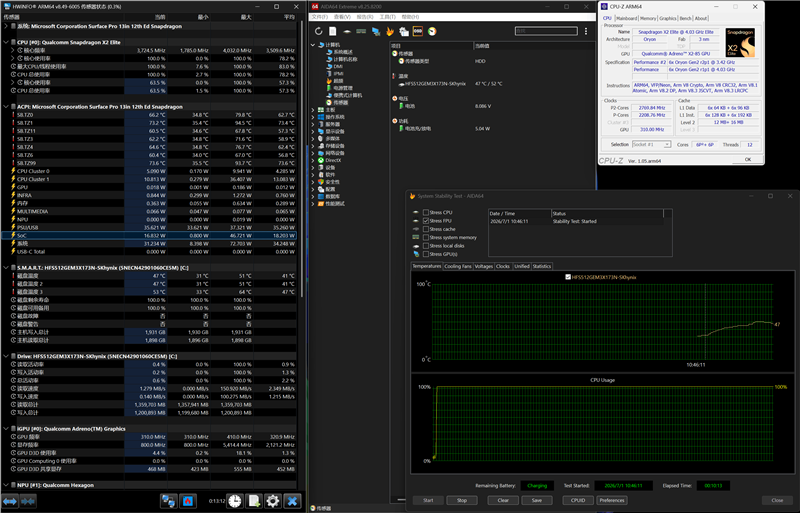
We conducted stress testing using AIDA64. Due to incomplete functionality under translation conditions, AIDA64 was unable to read CPU frequency and temperature information. The ARM version of HWiNFO could read the SoC's power but lacked temperature information. At the same time, the frequencies read by the ARM versions of CPU-Z and HWINFO were also different. The stress testing results are for reference only.
At the beginning of the stress test, the power consumption of the SoC can reach up to 46.7W, then gradually decreases, and finally stabilizes at 16.8W. The tablet form factor of the Surface imposes certain limitations on heat dissipation, which has a certain impact on performance release.
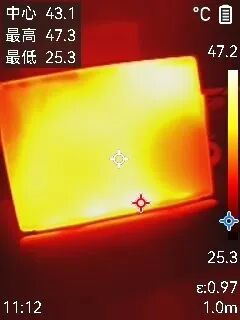
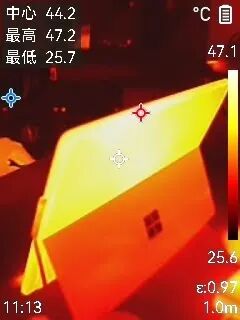
Considering the tablet form factor of the Surface itself, during the stress test, the new-generation Surface Pro 13-inch demonstrates good temperature control. The temperature of the all-aluminum alloy casing is very uniform, with the temperature of the front screen mainly concentrated in the edge areas, while the temperature near the rear heat dissipation vent is slightly higher than the overall temperature.
VI. Conclusion: Significant Progress in ARM Platform Performance and Energy Efficiency, No Issues for Daily Use
Last year, when we tested the Microsoft Surface Laptop 13-inch notebook, we focused on testing the compatibility of the ARM platform with traditional X86 software. At that time, it was already proven that under translation conditions, program operation had almost no issues. Except for a few professional software programs that would indicate they could not run, the vast majority of ordinary daily software could run well. Professional software has also started to provide ARM versions, so compatibility issues no longer need to be a concern for users.
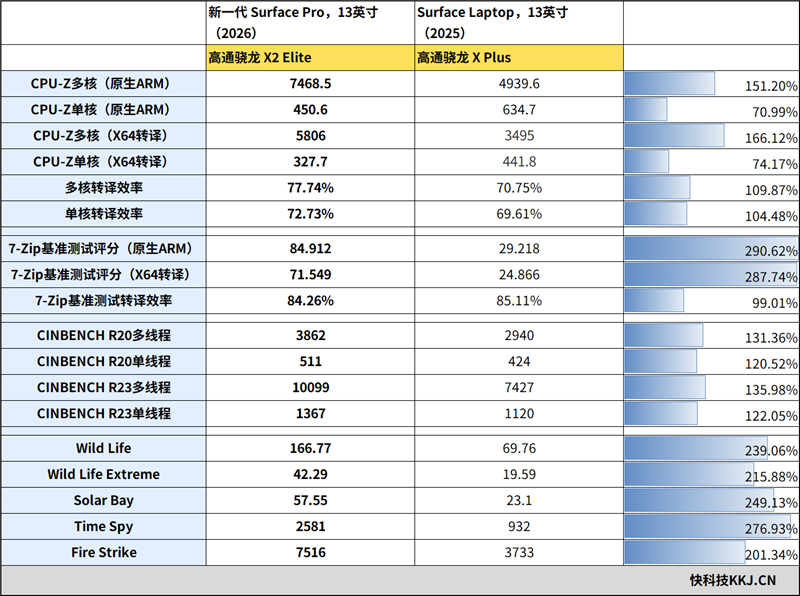
Moreover, when running X86 programs under translation conditions, the performance loss of the new-generation Qualcomm Snapdragon X2 Elite processor is lower than that of the previous generation. Taking CPU-Z as an example, the benchmark test scores under translation conditions have reached 77% and 72% of the native versions, respectively. Although the gap is not negligible, the practicality is already very good.
Although the Qualcomm Snapdragon X Plus processor used in the Surface Laptop 13-inch notebook we tested last time is not completely equivalent to the Qualcomm Snapdragon X2 Elite processor used in the new-generation Surface Pro 13-inch this time, and it is not entirely suitable for direct comparison, the performance changes between the two generations of products, which are one year apart, are still very astonishing.
Whether in native ARM or X86 translation, CPU-Z's benchmark performance tests show around a 50% improvement in multi-core performance. The decrease in single-core performance scores may be related to architectural changes. In CineBench R20 and R23 tests, there are 20%-30% improvements in both single-thread and multi-thread performance, indicating a significant performance boost.
The biggest surprise this time is the Qualcomm Adreno X2-85 GPU built into the Snapdragon X2 Elite. In the cross-platform Wild Life test in 3Dmark, the scores directly doubled. When running DX11 Fire Strike and DX12 Time Spy projects under translation conditions, the scores are comparable to the GPUs in the latest generation of Intel mainstream mobile processors, allowing ARM-based Windows PCs to run simple games just like X86 thin-and-light laptops, filling the gap in entertainment capabilities beyond office use.
Although it is not rigorous to compare them directly, using the results of the Surface Laptop 13-inch notebook we tested last year and comparing them with this year's model, we can also see the speed of progress of Qualcomm Snapdragon PC processors.
The new-generation Surface Pro 13-inch using the ARM platform has no issues with performance and compatibility, making it very suitable for business professionals who need mobile office capabilities. Especially with the ultra-high energy efficiency of the ARM platform, its battery life easily exceeds 20 hours, eliminating concerns about battery life during mobile office use.
After the GPU performance improvement, it is comparable to the latest generation of Intel's mainstream integrated graphics, giving the new-generation Surface Pro 13-inch excellent entertainment and gaming performance beyond office use. The ARM-based Surface is no longer exclusive to business professionals; casual gamers, especially mobile gamers, now find ARM-based PCs a very suitable choice.
-
![]()
Model Giant Jieyue Xingchen Steps into Smartphone Arena: A Strategic Alliance with Huaqin Technology
-
![]()
Big Model Firm Dives into Phone Market: StepFun and Wingtech Forge a ‘Dynamic Duo’
-
![]()
Zhongrun Optics Makes a Bold Move with 1 Billion Yuan Investment: Is a Turning Point on the Horizon for the Precision Optics Industry?
-
![]()
Deploy CLBO Crystals and YIG Single Crystals! Erythritol Leader Invests 30 Million in Youwei Optoelectronics
-
CXMT’s July 16 Subscription: Leading Domestic Memory Manufacturer—What’s the Earning Potential per Lot?
-
![]()
Rhythm Discrepancy and Premium Value Erosion: Foreign Luxury Brands Must Re-evaluate Their China Strategy
-
![]()
Half-Year, 1 Billion Yuan Financing, 7 Billion Yuan Valuation: A New Dark Horse Emerges in the Embodied AI Sector
-
![]()
Strong Rebound for Tech Stocks in Hong Kong Stock Market: Is It Time to Bottom-Fish?