Troubleshooting Silent Authentication Failures in the Login Chain
 11/13 2026
 472
Series: "Writing High-Quality Code with AI: AI Werewolf Development Record." This article covers versions v1.9.3 → v1.9.8 | Date: 2026-10-23
Introduction
The first six articles were all about "playing." This one is about "staying": match history must be remembered, identity must be recognized, and friends must be findable.
Handing these requirements to AI didn't seem difficult—there's an SDK for login and a cloud database for match history. Once it was done, the feature demo worked perfectly.
That is, until I used it from a real user's perspective for the first time: I clicked "Get verification code," and the page did nothing. And the explanation was always "not logged in," with no reason why.
Prologue: The hardest bugs to investigate are the ones where "nothing happens"
What I ran into at the time wasn't one bug; it was a string of them. They all manifested in exactly the same way: not a single error was reported.
Enter a phone number, click "Get verification code"—no spinner, no prompt, nothing happens. I finally logged in another way, refreshed, and "My Match History" said "login session has expired." Server logs were completely normal, but the server just couldn't recognize who I was.
Errors tell you where to look. Silent degradation doesn't—it just treats you as an anonymous user and then everything continues as usual.
This is what makes "identity" truly difficult: it's not about adding a button, but about a chain that runs from the browser to the database—and several points along this chain will quietly swap you for someone else. This article walks through "four substitutions along the chain"—how to find each one, how to fix it, and how to prevent AI from making the same mistake again.
Root cause: there are four places along this chain that will swap you out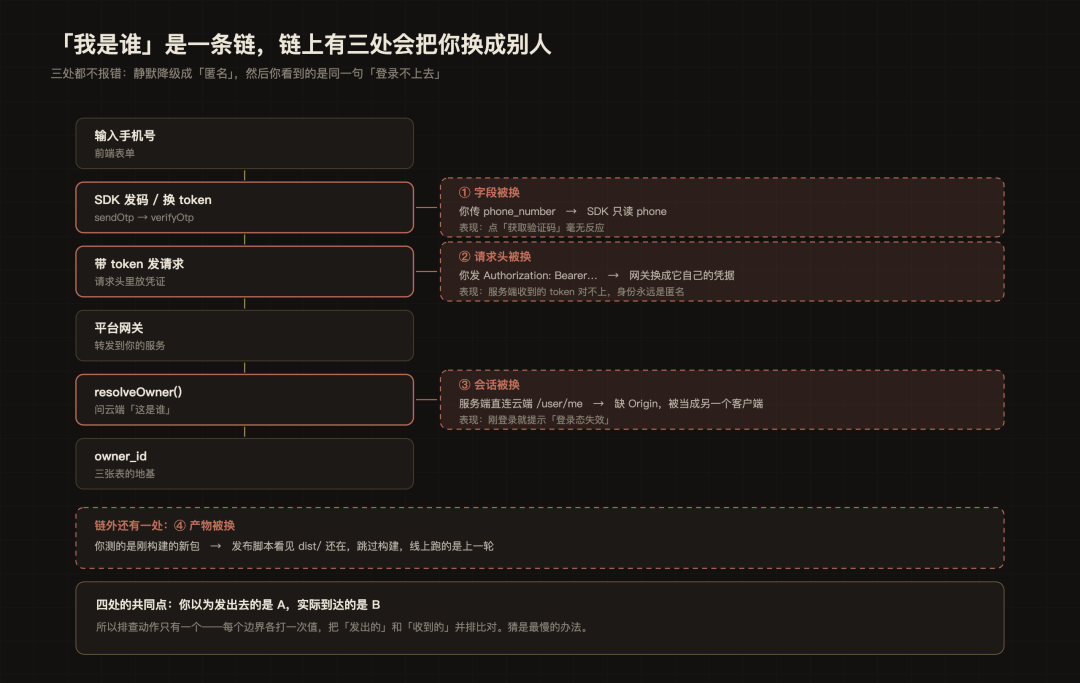
Figure: There are three places along this chain that will "swap you for someone else," and one more outside the chain (build artifacts). None of the four reports an error; all you see is the same message: "can't log in."
Identity has to go through six steps from the browser to the database (see the figure above). If any link in this chain breaks, all you see is the same message: "can't log in"—because every link is designed to "treat you as anonymous if it can't recognize you," and no link reports an error.
Solution: four substitutions, four comparisons
Below, we go through them one by one in the order ①②③④ in the figure: for each one, the symptom → how to locate it → root cause → fix → codify it into a rule. This is the real main thread of this article—discovery relies on people, action relies on AI, and verification relies on tests.
① Field substituted: the SDK recognizes the implementation, not the comments
Symptom: Click "Get verification code"—no spinner, no error, nothing happens. Location: There were no errors in the logs, and the request was sent. Have AI read the runtime implementation in node_modules directly to see which field it actually recognizes. Root cause: The comment in the type declaration (.d.ts) says phone_number, but the runtime only reads credentials.phone; when neither is passed, the SDK returns sendOtp requires exactly one of email or phone, and this error was swallowed by the frontend's catch, so "nothing happened." Fix: Pass the field according to the runtime implementation—sdk.sendOtp({ phone }) (correct) rather than sdk.sendOtp({ phone_number: phone }) (incorrect).
Codify: Write this into the hard prohibitions in AGENTS.md—
Do not use third-party SDK fields based on .d.ts comments. You must read the runtime implementation: sendOtp only recognizes {phone} / {email}; passing phone_number will fail silently.
② Request header substituted: the Authorization you send is not what the server receives
Symptom: Login succeeds, but after refreshing it says "login session has expired"—exactly the same symptom as section ③ below. This is the most important thing to note in this article: the same symptom, two completely different causes.
Location: This one cannot be found by reading code; it can only be found by comparison. Have AI compute the SHA-256 of the token actually received on the server, print the first 8 characters, and compare it side by side with the token sent by the frontend. Result: they don't match, and they differ on every request.
Root cause: The platform gateway overwrote the Authorization header with its own credentials. In other words, the user identity never reached the server, and the account loop had actually been broken since v1.5—it just manifested as "silent degradation," so no one noticed.
Fix: Switch to a custom header that the gateway won't touch. Have AI change the credential-reading logic to prioritize X-WW-Token:
// Server: prioritize the custom header, while remaining compatible with Authorization (convenient for local curl debugging)
const token = req.headers['x-ww-token'] ?? bearer(req.headers.authorization);
The frontend sends both headers, and the server uses X-WW-Token as the source of truth. In actual testing, the custom header was passed through unchanged, and the hashes matched.
③ Session substituted: without Origin, you are another client
Symptom: Exactly the same as ②—you are logged in, but the server can't recognize you.
Location method: Call the cloud /user/me directly from the command line and see what it returns:
HTTP 401 {"error":"invalid_grant","error_description":"the session was issued for another client"}
Root cause: Without Origin, the gateway treats it as another client and directly returns 401; ownerId is always null, silently degrading to anonymous.
Fix: Have AI add Origin and Referer to server requests, with values equal to the application's public domain.
④ Artifact substituted: what you test is not the same as what runs online
Symptom: The code is fixed and runs locally, but online it's still the same as before. Location method: First rule out caching (clear cache, incognito, switch phones)—if all are ineffective, then it's not a browser issue; it's that what the server delivers hasn't changed: compare the JS hash referenced online with the artifact just built locally.
Root cause: To "save time," the deployment script skipped the build if dist/ existed (if the artifacts were there, it wouldn't rebuild), and the sandbox directory is persistent, so dist/ would remain unchanged until the next release, and the old package kept being served online.
Fix: Have AI change it to rebuild on every startup; if the build fails but old artifacts still exist, degrade by using them (better an old page than a 504).
One discipline: install an observation point for the chain
After investigating all four places, I realized there was a common reason these four pitfalls could hide for so long: every troubleshooting session required re-reasoning "at which segment this value was substituted." So I had AI add a very small endpoint, GET /api/whoami, which returns only four things: whether you are recognized (signedIn), why you are not recognized (reason), what status code the cloud returns, and the first 8 characters of the SHA-256 of the token you actually received (tokenHint).
It compressed troubleshooting that would have taken hours into seconds. The frontend also reuses it: when the match history page recognizes an anonymous user, it writes the reason directly to the interface instead of giving you 0 matches.
Effect: from hours to seconds
The direct evidence that the chain is working is the whoami above: it went from "unknown" to "recognized / not recognized + reason."
Then there are the visible changes in the interface:

Figure: "My Match History" in v1.9.5. When not logged in, it is not blank; it is an explanation plus an entry point; after logging in, this is where match history, win rate, and ongoing matches appear.
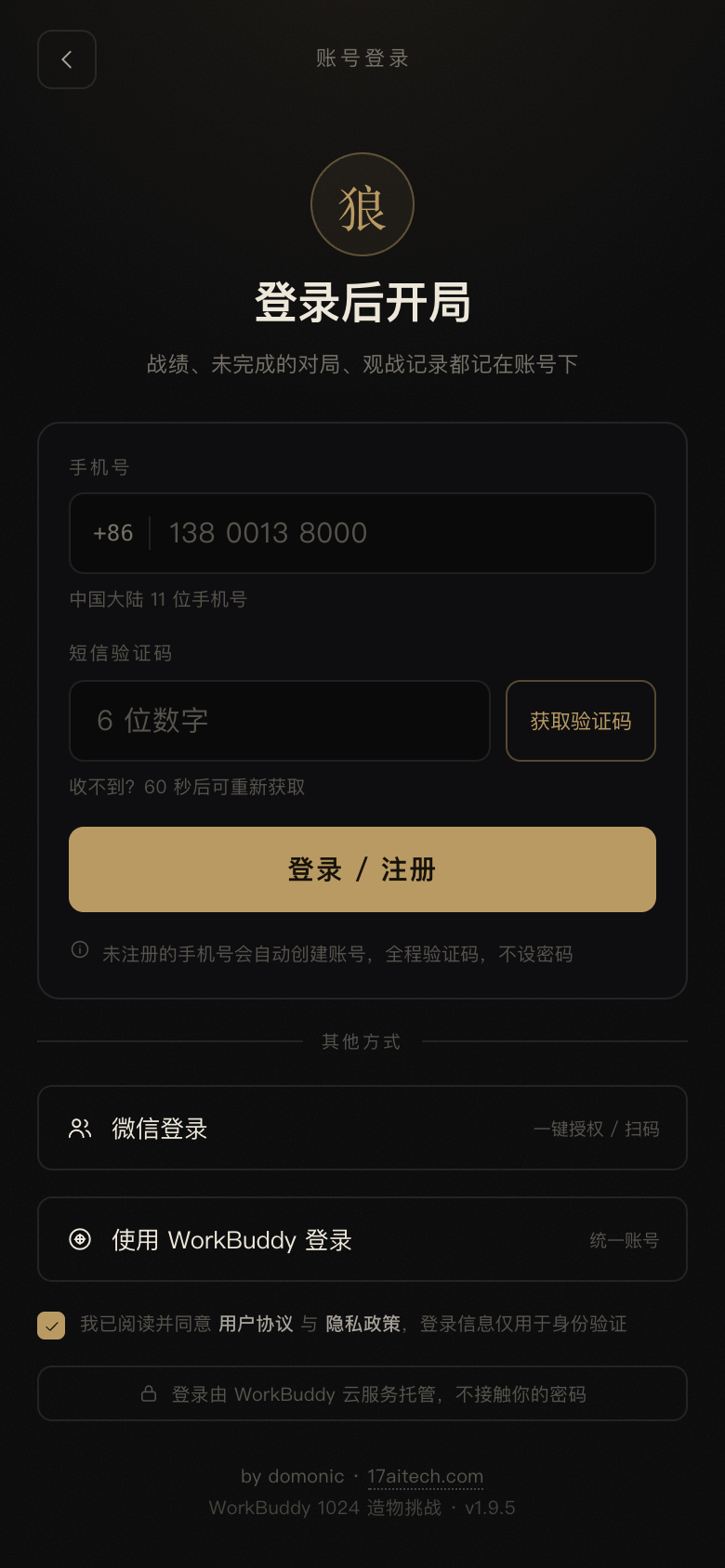
Figure: The login page in v1.9.5 (run from the commit at that time). Three methods, field hints, and error messages are placed below the button—all of these were added after running into pitfalls.
Summary
1. Identity is a chain, not a button: input → token → request header → server parsing → database. Whichever link breaks, the result is "can't log in."
2. Silent degradation is harder to investigate than errors: if it can't recognize you, it treats you as anonymous, and the program keeps running. First make failures visible, then talk about fixing them.
3. Troubleshooting relies on comparison, not guessing: print the value once at each boundary and look at "sent" and "received" side by side—that's how all four problems were pinned down.
-
![]()
Can Honda Thrive Without Leaning on China?
-
![]()
After Orders Exceed 10,000, It Suffers a Fierce Paid Poster Attack: Whose Turf Did the Second-Generation Blue Mountain Step On? | Mingjing Pro
-
![]()
Land Rover Loses First Round: Dutch Court Rules BYD Raid Was a "Fishing Expedition," Ti7 Copying Allegations Still Unresolved | Mingjing Pro
-
![]()
In October, AITO Sold 21,115 Units: Between the M6 and M9, Who Is Driving the Brand's Sales?
-
![]()
Changan Automobile's Domestic Terminal Sales Hit 104,000 in October: Qiyuan Begins to Drive Volume, Deepal at 20,000, Avatr at 2,858
-
![]()
Who in France Is Buying Chinese Cars?
-
Africa's Phone King Transsion, Pushed to a Transformation Crossroads by Memory Price Hikes
-
Apple Emerges as the Biggest Winner of Double 11, Crushing All Domestic Phone Brands, with Xiaomi Taking Second Place