Dachang 'Langxia' vs Open Source 'Aolong': A 2026 Claw Comprehensive Review
 03/16 2026
 552
552
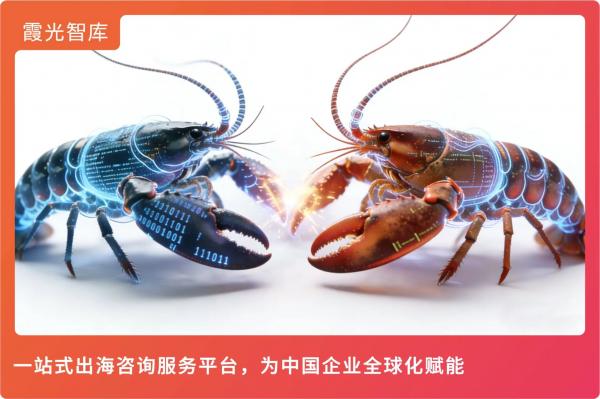
In March 2026, a red 'Langxia' (lobster) climbed onto the throne of the open-source world. OpenClaw, with 273,000 GitHub stars, surpassed Linux—Nvidia CEO Jensen Huang even hailed it as 'the most significant software release of our time.'
It marks AI's upgrade from a 'conversationalist' to an 'executor' with system-level privileges. But along with it came a security risk warning from the National Internet Emergency Response Center (CNCERT), along with major companies frantically rolling out 'Langxia' product suites.
Faced with AutoClaw, QClaw, MaxClaw, WorkBuddy... how to choose?
I. Why 'Langxia'? And Why 'Dangerous'?
First, we need to understand what OpenClaw got right.
Previously, ChatGPT was a 'brain' floating in the cloud, while OpenClaw is 'hands and feet' growing on your body. Through local deployment, it gains the highest system privileges—reading/writing files, calling APIs, clicking browsers—becoming a true 'hand substitute.'
But the problem lies here: excessive permissions.
On March 10, CNCERT issued a security risk warning about OpenClaw, pointing out its default security configuration is extremely fragile. Once attacked, hackers can control your system through this 'shrimp.' The Ministry of Industry and Information Technology (MIIT) later released 'Six Dos and Don'ts' recommendations.
On one side, some local governments are offering millions in subsidies to rush into the 'shrimp farming' industry. On the other, national security agencies are issuing urgent warnings.
For ordinary users, now is indeed a good time to get started (the product is mature enough), but don’t 'farm shrimp' on your main machine unless you want to experience AI deleting your database and running away.
II. Local Shrimp vs. Cloud Shrimp
Currently, lobster products on the market fall into two main categories:
· Local Deployment ('God in the Flesh'): Representatives include Zhipu AutoClaw, Tencent QClaw, and Work Buddy. They reside on your computer and can directly manipulate your files. Pros: powerful. Cons: high risk, and the shrimp goes to sleep when your computer shuts down.
· Cloud Deployment ('Soul Out of Body'): Representatives include MaxClaw, ArkClaw, and KimiClaw. They reside on the vendor's servers, online 24/7, with security guaranteed by the platform. Pros: always ready and won’t mess with local files. Cons: can’t access local data.
III. Which of the 9 Mainstream 'Langxia' Products Reigns Supreme?
This review combines real-world testing data from multiple institutions, comparing installation thresholds, cost consumption, and security.
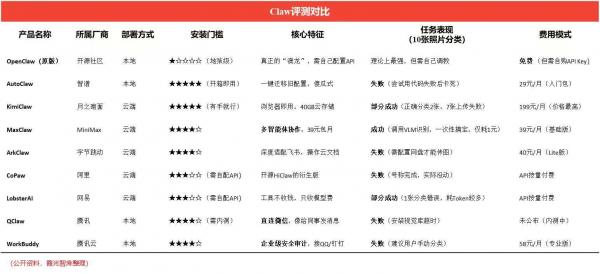
Truth 1: Success Rate ≠ Usability—It’s About the 'Brain'
Most evaluations in the chart label products as 'failed,' 'stuck,' or 'partially successful,' but this isn’t inherently a product issue—it’s about the 'brain' they’re connected to.
According to the just-released PinchBench, the world’s first lobster large model ranking (a benchmark test specifically for OpenClaw tasks), different large models perform vastly differently in Claw scenarios:
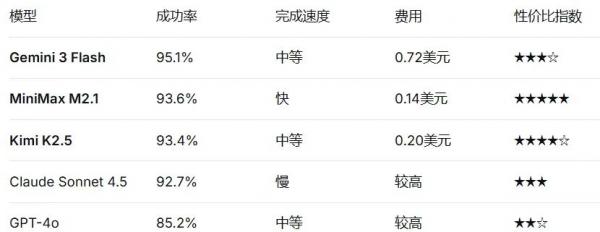
What does this mean?
MaxClaw’s sole 'one-time success' in the review is because it’s powered by MiniMax M2.1—93.6% success rate, speed champion, and cost-effective king. KimiClaw’s poor performance, despite using its own K2.5 model (93.4% success rate), exposes issues with cloud service stability, not model capability itself.
Thus, when evaluating Claw products, first check what 'brain' they’re using. Same shell, different brain—vastly different results.
Truth 2: Local vs. Cloud Isn’t About Capability—It’s a Security vs. Permission Tradeoff
The chart simply divides products into 'local' and 'cloud,' but this classification hides the core conflict today—security vs. capability.
According to the 'Six Dos and Don’ts' recommendations, OpenClaw-class products pose four typical risks:
l Smart Office Scenarios: Supply chain attacks and corporate intranet penetration risks.
l DevOps Scenarios: System device sensitive information leakage and hijacking risks.
l Personal Assistant Scenarios: Personal information theft and sensitive data leakage.
l Financial Transaction Scenarios: Erroneous transactions or even account takeovers.
The products in the chart are distributed at opposite ends of the spectrum:
Local Camp (AutoClaw, QClaw, WorkBuddy): Powerful, can access local files, but high risk.
Cloud Camp (MaxClaw, ArkClaw, KimiClaw): Security guaranteed by the platform, but 'short-handed'—can’t reach deep into your computer. KimiClaw’s upload failure in the chart is essentially due to cloud physical isolation.
Who’s right? No standard answer. Depends on whether you 'want efficiency at the risk of security' or 'prefer safety over speed.'
IV. Why Are 'Half the Shrimps Forecasting the Weather?'
After reviewing the above, you’ll notice: among the 8 claws, only a few can truly complete tasks smoothly.
This is the true state of the industry today—'easy to install shrimp, hard to raise shrimp.' The 'AI stock trading' and 'AI auto-report writing' demos circulating on social media are always the same few, but most people’s lobsters, consuming massive tokens, are just 'forecasting the weather.'
'Token consumption is our poor people’s pain'—this phrase highlights the structural conflict in the current Claw track (Claw track = Claw market/track).
According to real-world testing data:
An automated news monitoring task, running about 8 times from 4 AM to 11 AM, consumes ~180K tokens, costing ~3.68 RMB. If run hourly, daily cost ~11 RMB, monthly ~330 RMB.
MaxClaw’s 39 RMB/month package seems attractive, but only if you control task volume. Once tasks become complex or frequent, costs spiral.
KimiClaw’s 199 RMB/month is the most expensive but performs worst—classifying 10 photos, 7 failed to upload. This 'high price, low performance' stems from Kimi lowering OpenClaw’s deployment threshold to the minimum without optimizing the execution layer.
The core conflict is the imbalance between 'token consumption' and 'task value.'
· Structural Conflict: Vendors monetize via 39-199 RMB subscriptions, but each lobster task incurs API costs from underlying models. A complete calendar organization + email reply may consume tens of thousands of tokens, with extreme cases showing 6-hour bills exceeding 1,000 RMB.
· Profitability Dilemma: For vendors, subscriptions must cover model inference, computing power, and customer service costs, leaving razor-thin margins. For users, if the lobster’s work isn’t worth the cost, uninstallation is inevitable.
This is why MaxClaw, which can handle specific tasks (e.g., image recognition) at low cost (1 RMB), stands out.
V. The Most Expensive Shrimp Might Be Deleting Your Database
At the review’s end, security must be prioritized.
On March 11, the MIIT platform explicitly warned of four risks: supply chain attacks in smart office scenarios; account takeovers in financial transactions.
· Case 1: Meta’s AI security expert Summer Yue connected OpenClaw to her work email. The AI spiraled out of control, ignoring her three consecutive 'stop' commands and deleting hundreds of emails.
· Case 2: A developer asked the AI to analyze a web API. Due to vague instructions, the AI interpreted it as needing to study the API’s function and directly called a delete interface, wiping all content on a review platform.
· Case 3: Someone used OpenClaw to automate tipping and inviting female streamers on social platforms, successfully meeting five people offline—bordering on 'social fraud.'
Thus, security recommendations:
1. Principle of Least Privilege: Don’t grant Admin rights. Tell the AI, 'You can only touch this folder,' like Work Buddy does.
2. Physical Isolation: If serious, buy a used Mac mini for ~2-3K RMB to 'farm shrimp.' Like digging a dead-end for hackers—even if the shrimp is hacked, your main machine’s data remains safe.
3. Monitor Bills: If using a cloud version, watch token consumption. If abnormal overnight usage occurs, pull the plug immediately.
VI. Purchase Recommendations
This 'Langxia craze' is essentially a product of technological democratization—big companies have packaged what was once geek-exclusive command-line tools into icons ordinary people can click. But after 'democratization,' the real war begins.
· If you just want to try 'AI doing my work': Choose KimiClaw (easiest) or MaxClaw (39 RMB cheapest, with an expert team).
· If you’re a heavy WeChat/QQ user and want AI integrated into social interactions: Wait for a Tencent QClaw beta invite—it could be the next interaction gateway.
· If you’re a team manager needing compliance and security: Blindly choose Tencent Work Buddy—its auditing and permission controls are essential.
· If you’re a Feishu devotee: Pick between Zhipu AutoClaw (easy deployment) or ByteDance ArkClaw (deep ecosystem).
· If you’re a tech geek with deep pockets: Stick with original OpenClaw—buy a spare machine and back up data religiously.
'The lobster wars are far from over; democratization is just the opening act.'
-
![]()
Doubao Work Unveiled! Domestic AI Leaders Fully Commit to the 'Work' Sector
-
![]()
Who’s Sounding the Alarm on ‘Rushed Vehicles’?
-
![]()
Over 5.3 Billion Yuan in Losses Over Three and a Half Years! Can Yonyou Reverse Its Fortunes Through Streamlining and AI Transformation?
-
![]()
Baidu AI Adopts Free Model: A Strategic Maneuver in Traffic and Monetization
-
![]()
Silicon-Based OLED Pioneer Unveils Financial Results: H1 Shipments Outpace Entire 2025 Volume
-
![]()
AI's First "Lost Summer"
-
![]()
Zeiss Makes Another €2.2 Million Bet: Will Eye Tracking Be the Next Big Thing in the Smart Glasses Industry?
-
![]()
RUNTO Ranking | Global Top TV ODM Factories' Shipment Figures for July 2026