Why Does Your Phone Slow Down After Long-Term Use?
 10/12 2026
 406
406
Have you ever experienced this? When you first get a new phone, apps open instantly, and gaming runs smoothly without any lag.
However, after a year or two, it takes several seconds to open WeChat, scrolling through short videos often lags and skips frames, and even typing feels sluggish. Clearing storage by deleting numerous photos and apps doesn't seem to help much.
Many people blame this on CPU aging or outdated hardware, but that's not accurate. CPUs are not mechanical components with gears or pistons.
A chip with a base clock speed of 3.0GHz when new will still operate at 3.0GHz after three years, maintaining consistent benchmark scores.
So, what really causes your phone to slow down? Here are four key factors.
01 Software Becomes More Resource-Intensive
The apps you initially installed on your phone are vastly different from the ones you have now.
WeChat has officially confirmed that its installation package has grown several hundred times larger over the past decade.
WeChat explained that to meet user demands, it has continuously added features, resulting in more code, logic, and resources such as images and emojis, which objectively increases the size of the installation package.
Phones from a few years ago were optimized for the software versions of that time, with sufficient performance. However, after numerous updates, the software's demands have multiplied, leaving old hardware struggling to cope.
02 Storage Space is Nearly Full
This is a primary reason for phone slowdowns, yet few people realize it.
Flash memory chips in phones have a characteristic: when available space drops below 10% to 15% of total capacity, read/write speeds significantly decrease.
This occurs because writing data to flash memory requires finding empty storage blocks. The fuller the space, the harder it is for the system to locate contiguous areas, forcing it to inefficiently piece together fragments.
Image Source: Internet
According to the "2024 Android Terminal Experience White Paper" jointly released by IDC and AnTuTu, when storage space falls below 15GB, system-level service call delays increase by an average of 42%.
A 128GB phone with only a few GB left, cluttered with photos, videos, and caches, will experience lag when opening any app.
Additionally, long-term high-frequency writing accelerates flash memory degradation.
Academic research confirms that some phone flash memory chips periodically experience significant drops in write performance, with completion times increasing tenfold or more.
Even with available space, aged flash memory operates much slower than new.
03 Background Apps Consume Resources
Many apps secretly restart and awaken each other in the background, even after you close them.
The domestic Android ecosystem lacks a unified push channel, so apps like WeChat and Alipay need to run constantly in the background to receive messages promptly. Closing one may trigger another to relaunch it, leading to an accumulation of background processes.
A phone with 16GB of RAM can heavily run up to 15 or more large apps simultaneously before the system frequently clears backgrounds and reloads processes, causing lag when switching apps.
Coupled with accumulated cache files, logs, and temporary data from various apps, the system must navigate around them, increasing its burden.
04 Aging Battery Slows Down the System
Lithium batteries degrade over time, losing capacity and increasing internal resistance.
Under full load, voltage can drop suddenly, potentially causing the phone to shut down abruptly.
To prevent this, the system actively limits the processor's peak performance when battery health drops below 80%, sacrificing speed for stability.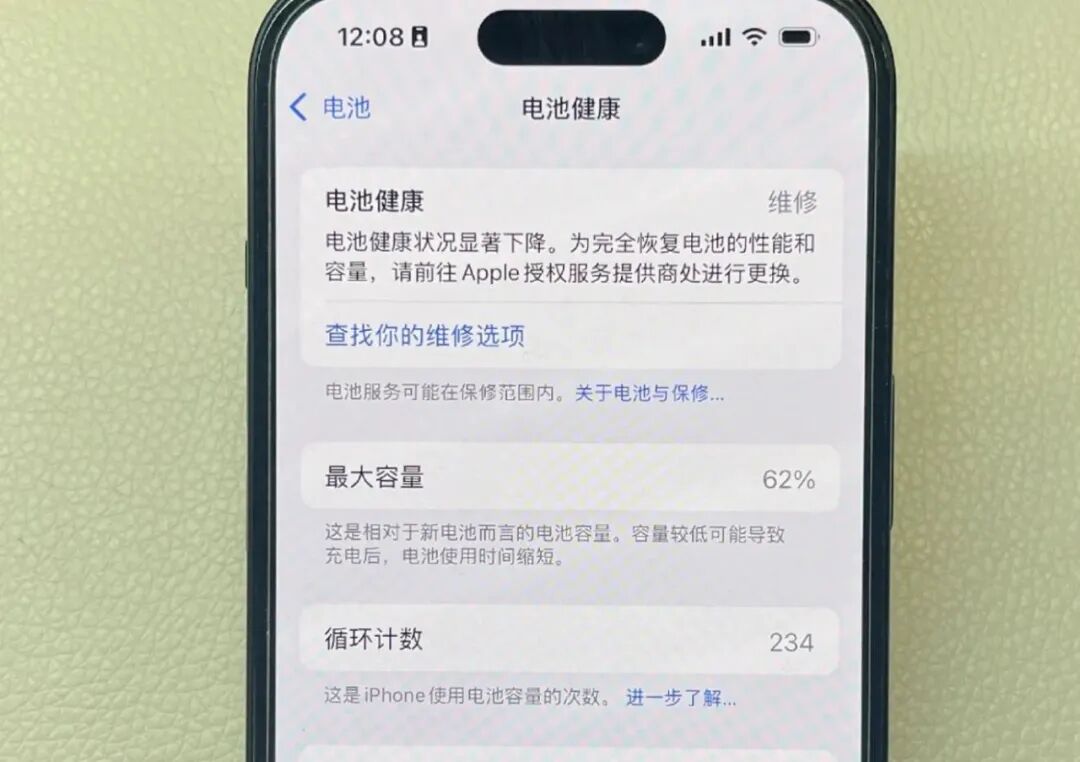
Image Source: Internet
Take the iPhone 15 Pro Max as an example: when battery health drops from 81% to 79%, its Geekbench 6 multi-core score falls from 9,200 to 8,700, a decrease of approximately 5%.
In Genshin Impact at max settings, frame rates drop from a stable 60fps to 45-50fps, a decrease of approximately 17%-25%; ProRes 4K video export times increase by approximately 19%. Overall battery life shrinks by approximately 30%-40%.
Many users notice improved smoothness after replacing the battery—not because the battery itself affects speed, but because the system stops limiting performance due to battery aging.
05 Why Does a Factory Reset Help?
Whether flashing firmware or restoring to factory settings, the essence is wiping the software environment clean.
Third-party apps, caches, and background processes are cleared, freeing up storage and returning the system to its pristine state.
The CPU remains the same, but the reduced burden instantly restores speed.
This proves that previous lag was caused by software, not hardware aging.
However, if the primary cause of slowdown is battery aging, a factory reset won't help. The system's speed limit is tied to battery health; replacing the battery is often more effective than flashing firmware.
06 How to Prevent Phone Slowdowns?
First, leave storage space. Keep available space above 15% of total capacity.
WeChat chat history and caches are major space hogs; regular cleaning frees up significant storage.
Second, manage background apps. In settings, find app management and disable auto-start and associated launch permissions for unused apps.
The number of background apps can reduce by 15-20, significantly lowering RAM usage.
Image Source: Internet
Third, check battery health.
If maximum capacity is below 80%, replacing the original battery can restore smoothness to approximately 85%+ of a new phone.
Fourth, avoid frequent one-click acceleration.
Many cleanup tools run constantly in the background, hogging resources while cleaning. Built-in system cleaners are usually more restrained than third-party tools.
The true causes of phone lag aren't aging chips but heavier software, fuller storage, messier backgrounds, and older batteries.
You can manually address the first three issues, and a battery replacement solves the fourth.
Next time your phone lags, don't rush to buy a new one—clean it up first, and it might last much longer.
#PhoneSlowdown
-
![]()
BYD Takes the Lead, Li Auto Lags Behind: Are Joint Ventures Making a Comeback? September’s New Energy Vehicle Sales Data Reveals Stark Divisions
-
![]()
New Forces Top Annual List, Tesla Holds Three-Year Reign! September's Pure Electric Model Resale Value Rates: A Tale of Contrasts
-
![]()
Lei Jun’s Bold Claim Proven: Xiaomi Tops Resale Value Charts, with NIO and Li Auto Close Behind!
-
![]()
Has Zunjie 'Stumbled', Paving the Way for Xiaomi's Success?
-
![]()
Before Launch: How Does a Chinese Rocket Stand or Lie?
-
![]()
Zunjie V800 Brake Bracket Fracture: With the Same 40% Glass Fiber-Reinforced Plastic, Where Does the Disparity Arise?
-
![]()
Why Does Your Phone Slow Down After Long-Term Use?
-
![]()
The Comprehensive Guide to Tariffs on Chinese Automobile Exports: A Stark Contrast to Japan