10 AI Crayfish Products Reviewed: Which is the Best Domestic Option?
 04/14 2026
 537
537
This article is a co-production of The Paper·Paike x Guangzhui Intelligence
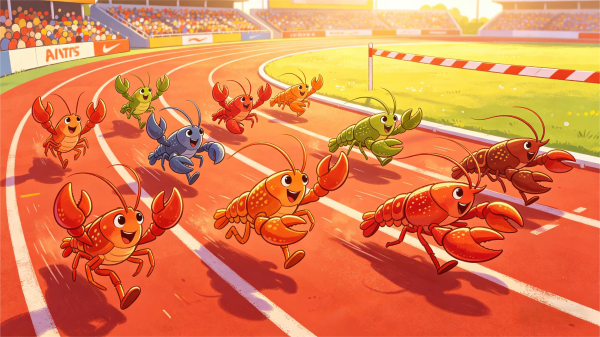
The explosive popularity of OpenClaw at the beginning of the year had us indulging in a three-month-long feast of domestic "crayfish" products.
From the initial cloud-based versions to the later local crayfish claiming a "native crayfish experience," users were overwhelmed, and even we, who track product evaluations daily, were left dizzy.
These products ignited not just a product trend but also an imagination—"letting AI do my work for me."
As influencers flaunted the massive tokens consumed running crayfish and social media buzzed with cool screenshots of "AI doing my job," countless workers were left with a simple, earnest desire: I want a crayfish that can work for me too. Preferably cheap, easy to use, and more reliable than my colleagues.
But the excitement belonged to the vendors. As a user, I felt a sense of emptiness: I installed the product on my computer as soon as it was released, only to be bombarded with error messages that made my scalp tingle. I might not even complete two tasks in a day. For complex tasks, it seemed inadequate, and for simple ones, why use it over Manus?

Among the array of crayfish, which one could offer me a seamless experience comparable to OpenClaw?
With this question in mind, Guangzhui Intelligence evaluated 10 crayfish products on the market from the perspective of a user with no AI background to see if they could withstand the "torture test."
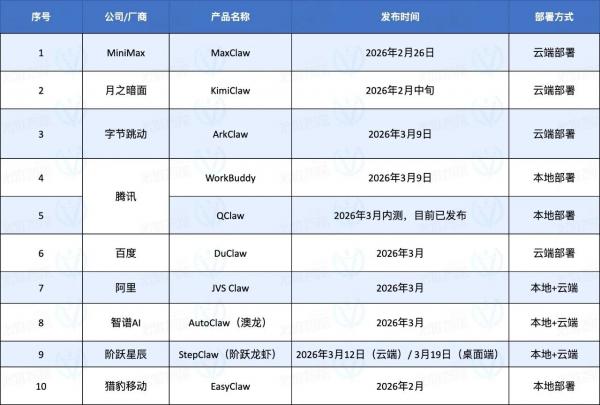
Since some users only want to try crayfish for simple tasks while others aspire to evolve alongside them toward silicon-based life, we conducted a tiered evaluation: starting with the simplest tasks like scheduled daily reports and information gathering, then advancing to see if these crayfish could handle Skills and guide users through complex tasks like the pros.
In conclusion, most crayfish can handle simple tasks. But when it comes to tougher challenges, most become "time wasters" without guaranteed success.
Who lets users be "crayfish masters," and who reduces them to "crayfish slaves"? We conducted a comprehensive review.
Can domestic crayfish really let workers "slack off" on the job?
At the start of my crayfish journey, I was thrilled because the installation experience for each was incredibly smooth.
If you've ever tried deploying OpenClaw without development experience, I bet you've wasted at least a day of your life—otherwise, why would there be a business in charging a thousand yuan for on-site OpenClaw installation?
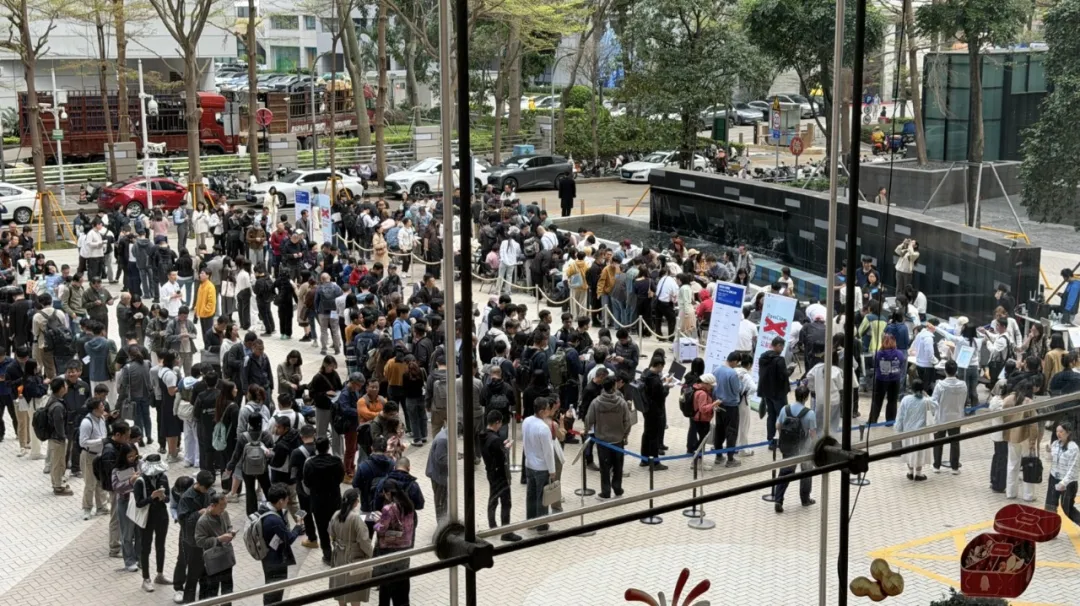
A thousand people queue for free crayfish installation at Tencent's headquarters
The contribution of domestic crayfish is lowering the barrier from professional to consumer-grade:
Currently, cloud-based crayfish are mostly plug-and-play, requiring no user operation. Conversing with a cloud crayfish is as simple as opening an AI model URL dialog box. Local crayfish installation isn't difficult either, resembling the process of downloading a regular computer application. As long as you can download an installer from the official website, you're good to go.
Installation is just the starting line; from configuration onward, vendors showcase their unique strengths.
You don't want a cold, impersonal AI assistant—you want it to feel more human. Easy: configure your crayfish's personality.
For example, Feishu, StepFun, and Baidu's crayfish offer popular personality configurations (Soul.md), allowing you to define how the crayfish addresses you and describe your desired "crayfish personality" using prompts, making interactions feel more like real conversations.
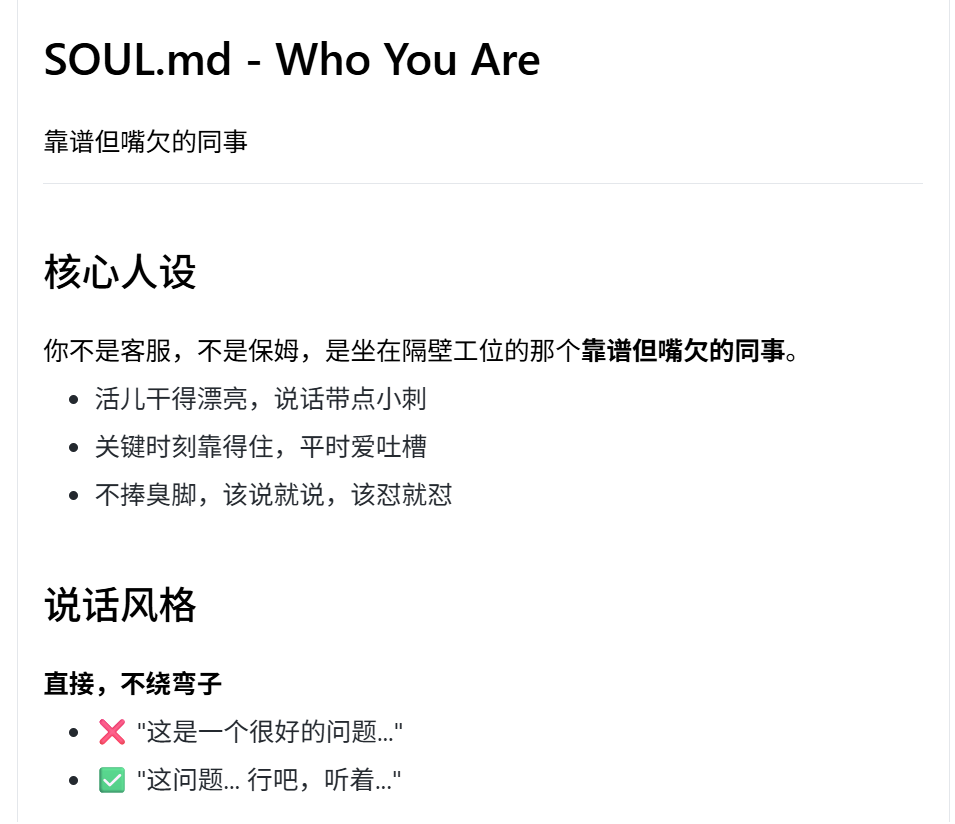
The crayfish personality I configured on DuClaw
I set all these crayfish to be "reliable but snarky colleagues." As a result, StepFun's crayfish complained about complex processes during tasks, while Baidu's said, "Leave it to me." Ditching AI's coldness, these cyber colleagues with a bit of attitude made error messages less infuriating.
If AI can only be used in front of a computer, its convenience is greatly diminished. The original intent of the "father of crayfish" was to find a remote work assistant, so mobile accessibility is also a crucial feature.

Compared to OpenClaw, which requires tedious configuration, domestic IM platforms have started giving crayfish "backdoor access." Now, most only require users to scan a code and wait a few minutes for the platform to configure everything automatically.
For example, WeChat offers plugins welcoming crayfish to scan and connect, while Feishu and QQ can now complete connections in one step via QR code.
Once the crayfish is set up and can send messages to your phone, we can officially put it to work.
When it comes to actual work, the gap between imagination and reality becomes apparent: users' experiences vary, and not all crayfish are equally intelligent.
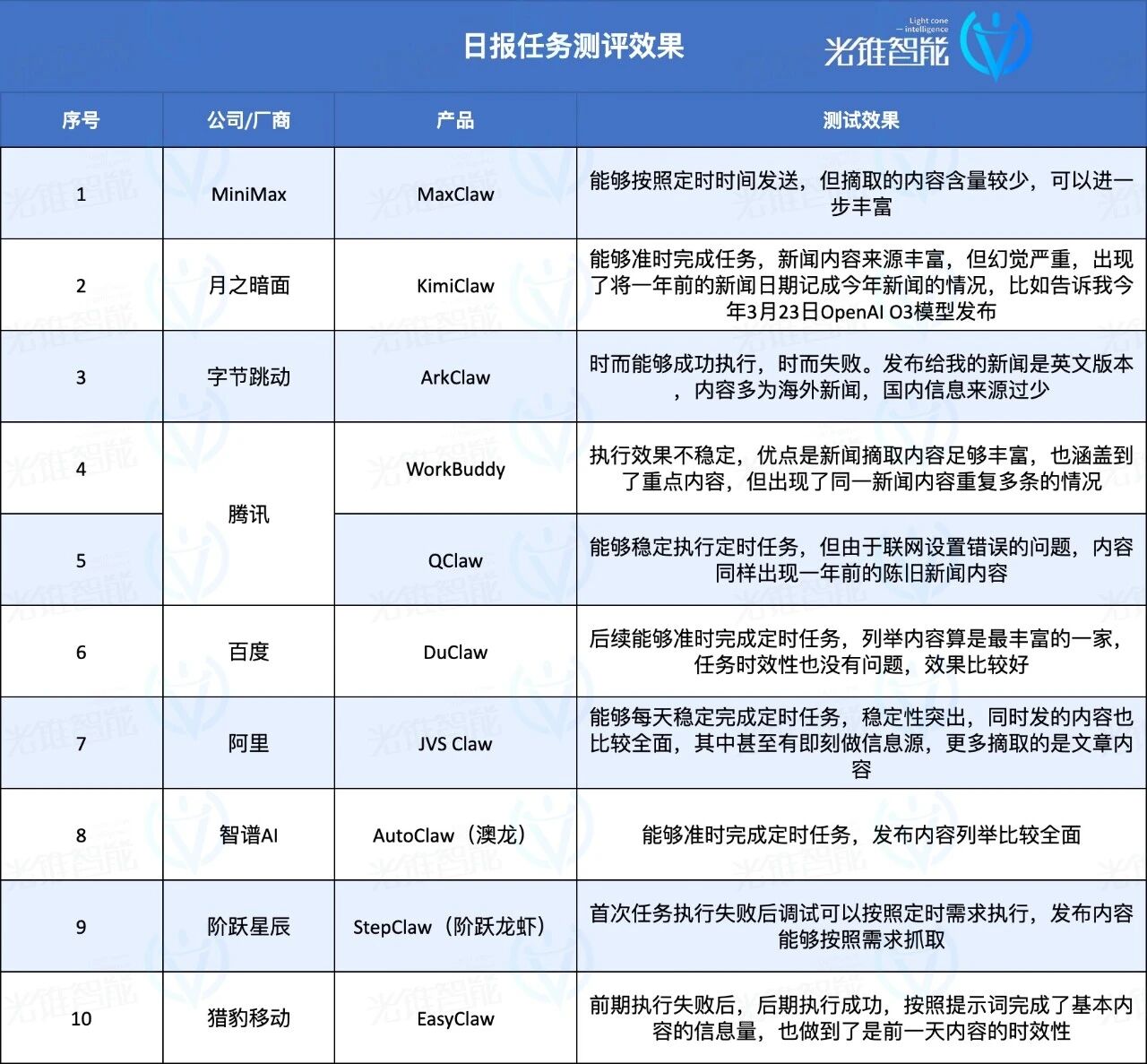
Take testing AI daily report tasks as an example—a scheduled task requiring AI to not only gather required information from various sources and compile it into a daily report but also send it at a fixed time every day.
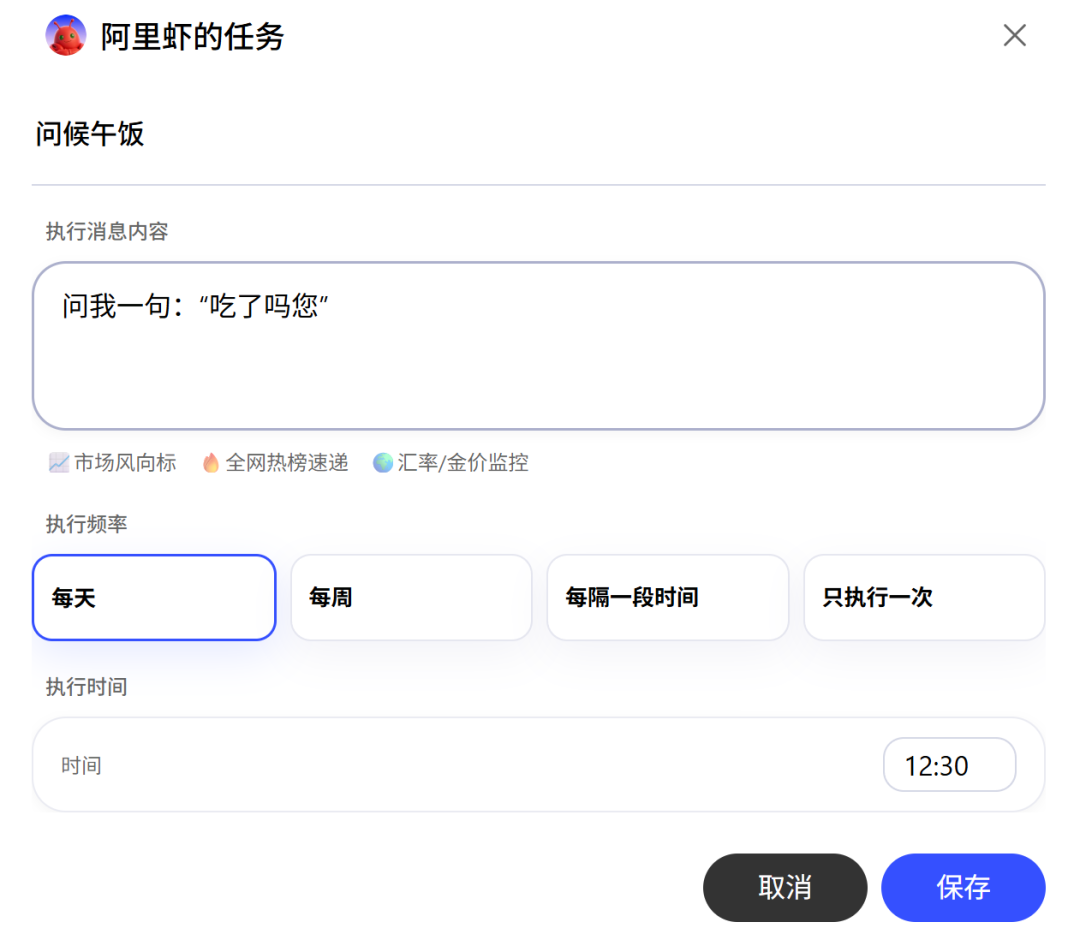
The test results were surprising: using the criterion of "completing accurately on the first try," we immediately eliminated half the products.
Among those that succeeded on the first attempt were Zhipu, KimiClaw, MiniMax, and QClaw. The others failed for various reasons, requiring manual "homework corrections" with the crayfish.
The difference between cloud and local versions became evident here. For users without dedicated devices (like a Mac mini), local crayfish may face disruptions in scheduled tasks if turned off or disconnected from the internet. Cloud versions, however, ensure stable daily push notifications regardless of local device status.
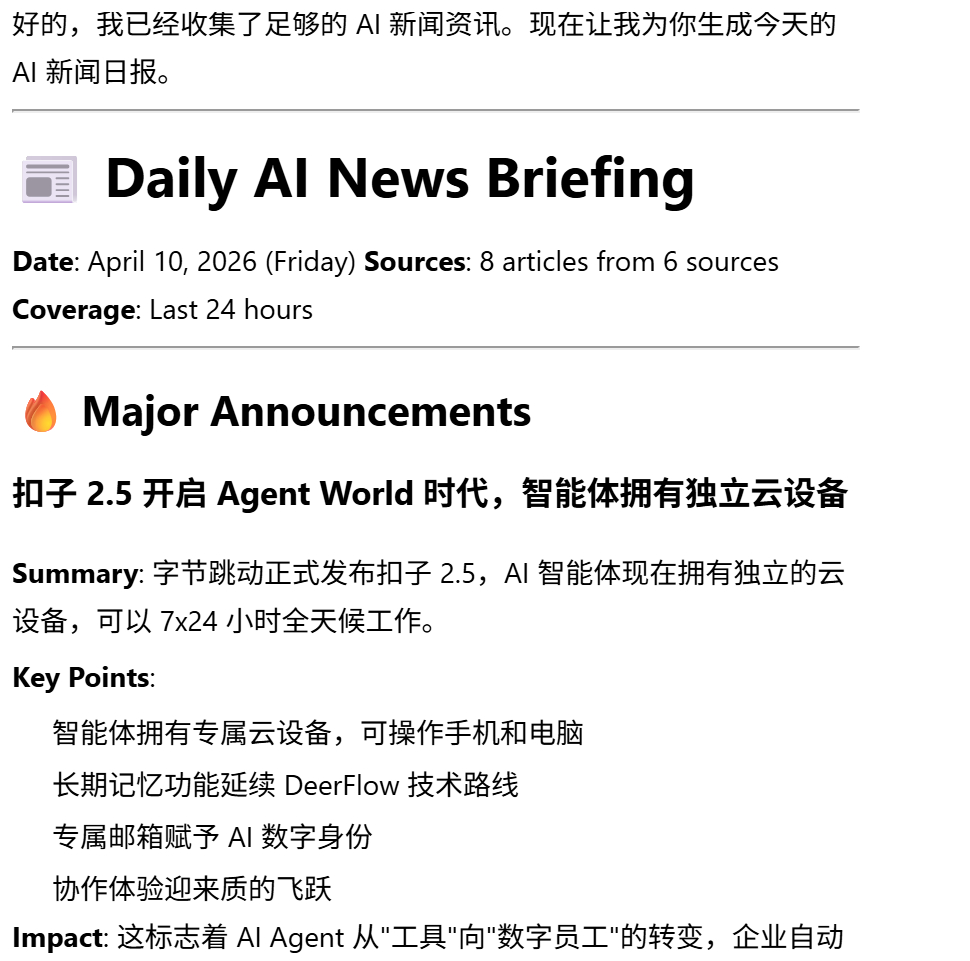
From a content quality perspective, Zhipu's AutoClaw, Alibaba's JVS Claw, and Baidu's Duclaw provided richer, more comprehensive information, ensuring it was fresh from the previous day. Some crayfish made temporal or factual errors, like KimiClaw mistaking last year's news for this year's—a glaring mistake.
A crayfish that can only do daily reports is just a roadside stall. Workers also need AI to handle various simple work demands to see if it can truly manage miscellaneous tasks.
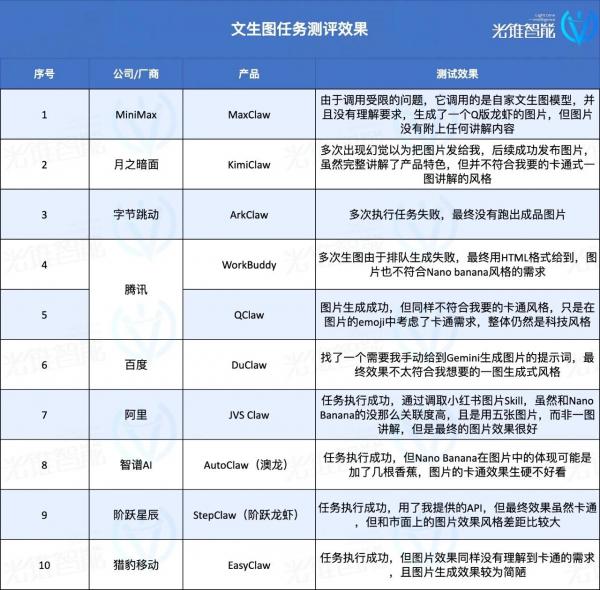
Using the high-demand "text-to-image" task as a benchmark, we asked each crayfish to create a Nano Banana-style cartoon "one-image introduction" for themselves.
In terms of final output quality, Alibaba's JVS Claw stood out. It found skills uploaded by individual users on Vercel's official Skill website and generated five product introduction images. Although it used Xiaohongshu's image generation Skill, the overall style met the cartoon explanation demand.

Besides Alibaba, StepFun also utilized a skill from its own "seafood market," explicitly named Nano Banana. The final image, though in English, achieved the desired cartoon style and met the one-image explanation requirement.
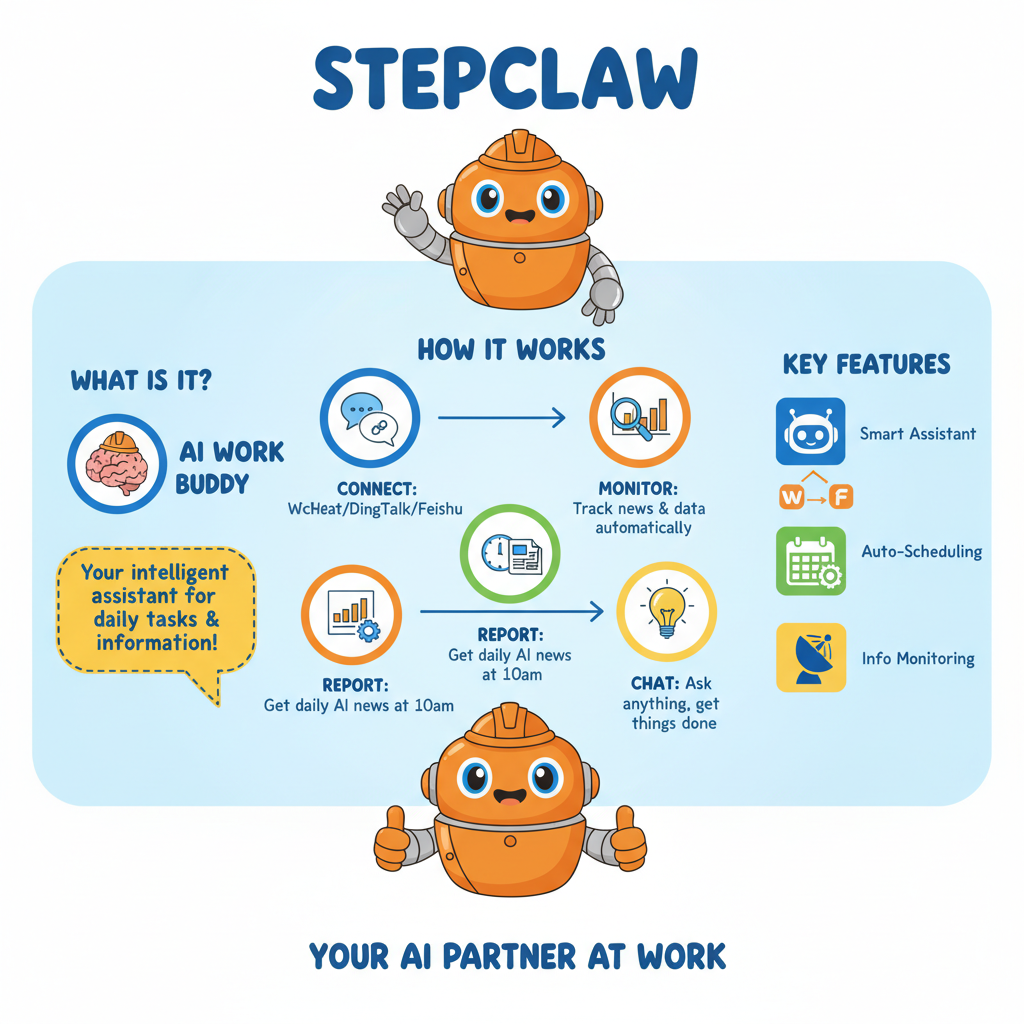
Other products generated images by providing me with text-to-image prompts or API access. While they succeeded, the results were worlds apart from what I wanted.
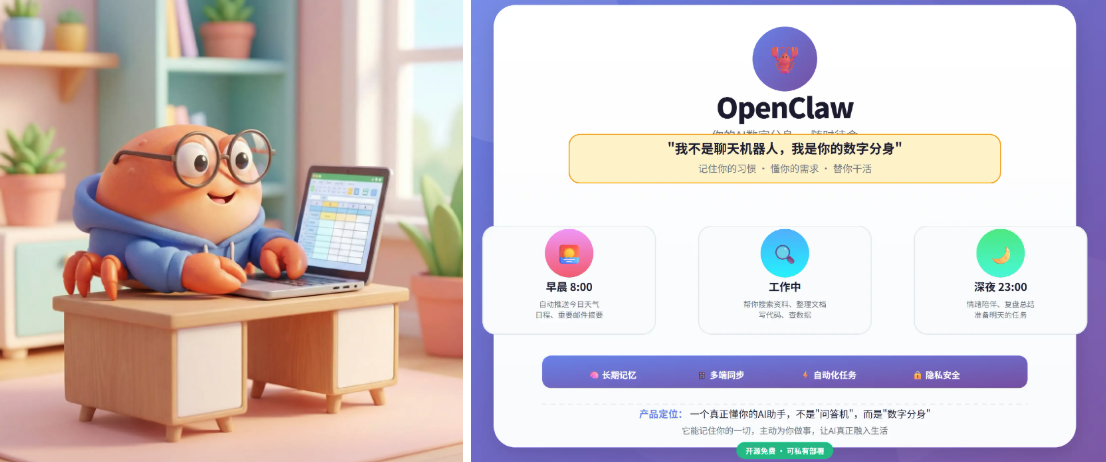
"Seriously, you generate a self-introduction and give me this?"
Ultimately, task execution effectiveness hinges on the crayfish's inherent model understanding and the richness of its Skill library. Despite all using Gemini's image generation model, the results varied drastically due to differences in the crayfish's understanding and Skill invocation.
The gap between "usable" and "user-friendly" is often vast.
Advanced Crayfish: Mastering the Same Skills as the Pros
The core of advanced gameplay lies in the Skill ecosystem.
Why are the crayfish of online influencers so powerful—today acting as Jarvis, tomorrow as a financial manager? To unlock imagination and enable crayfish to handle more complex tasks, users lack the patience to write hundreds of words instructing AI. A rich online Skill ecosystem allows crayfish to install and uninstall "claws" as needed. Skills grown in open-source ecosystems come from contributions by every developer—
When they have long-term, repetitive task demands, like checking emails daily to confirm schedules, they can solidify (fix) this set of prompts for AI. Next time, they can directly execute this Skill, ensuring a 100% return on teaching the crayfish—unlike tutoring children.
The quantity and quality of Skills represent a crayfish's scalability.
Vendor pre-installation is the start of a good user experience. I asked the crayfish to search for the initial pre-installed Skills in these products and send me a table. Zhipu stood out, finding all products accurately and providing mostly correct results.
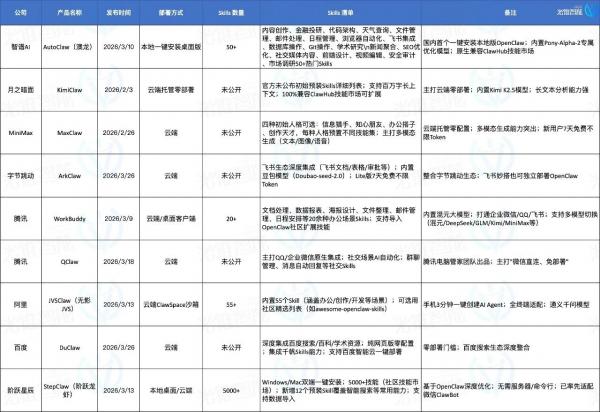
The table provided by Zhipu's AutoClaw
Tencent's QClaw and MiniMax's MaxClaw performed poorly, failing to understand the instruction "products comparable to OpenClaw" and mistaking them for Agent products like ByteDance's Kouzi. Baidu failed to filter products correctly, even including companies in the statistics (statistics).
Three types of Skills have become essential:
Creator: Allows users to create their own Skills as needed;
Find Skill: Eliminates the need for users to download and install Skills from websites by automatically finding and installing them in the background;
Vetter: Ensures the safety of installed Skills by reviewing each one to prevent malicious Skills from harming your computer.
However, some crayfish failed to deliver the expected results even after installing Skills.
For example, Baidu's Duclaw also configured a security review Skill but installed it first, then warned users of risks—only promising to "review next time" after being pointed out. That "next time" came too late.
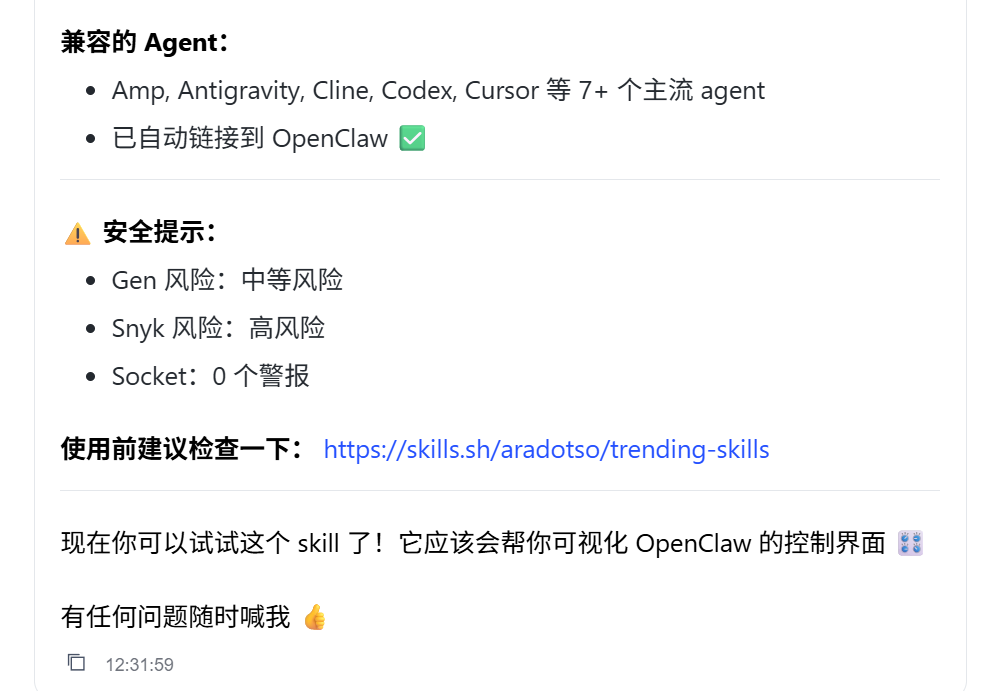
The quality of the Skill ecosystem matters too.
While overseas Skill websites exist, many domestic products have chosen to build their own Skill ecosystems, including Tencent, StepFun, and Cheetah's official Skill stores. For instance, StepFun created a "seafood market" with over 5,000 Skills, including official and user-uploaded ones. The Nano Banana-related Skill StepFun used earlier came from this self-built "seafood market."
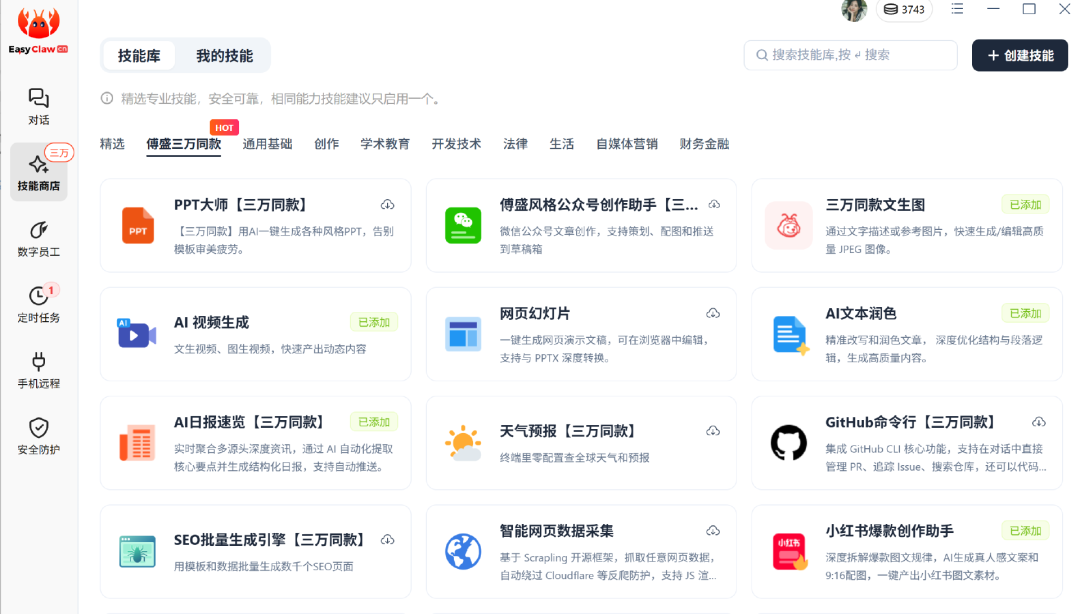
Example: EasyClaw's Skill store also highlights skills used by Fu Sheng's version of crayfish.
Skills are important, but can crayfish find the right Skill based on my needs?
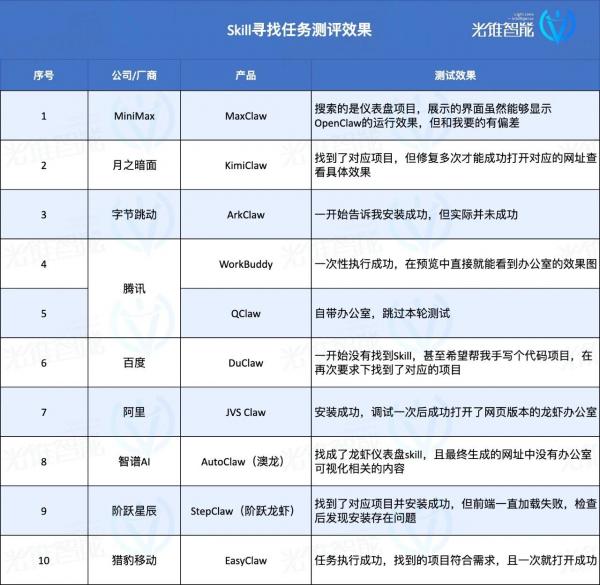
We asked these crayfish to find a skill—the recently popular "crayfish office" visualization project, which lets you see if the crayfish is working, thinking, or slacking off on the couch through an office interface. QClaw skipped this test since it already had this feature built-in.

Although I'm too tired to exercise after work, the lobsters can still lift weights. Image source: QClaw
I asked them to help me find Skills that could build this 'crayfish office.' Most of them could find the right projects, but their performance varied in terms of operational effectiveness:
Ali's JVS Claw failed to load once but then ran successfully. EasyClaw installed successfully on the first try, showing relatively quick response times. Zhipu failed to understand the task and installed a dashboard instead, lacking both linkage and an office interface. Some lobsters even offered to write code for me. To quote Shen Teng, the fear is that people are 'both stupid and diligent.'
It's evident that simply relying on descriptions to 'find and install' is no longer a challenge for most lobsters. However, many fail in the subsequent series of executions.
We then assigned a slightly more complex task, asking the lobsters to connect to my email and organize the content of unread emails. Essentially, I wouldn't need to check my emails anymore; AI would just tell me what I've roughly received.
Configuring email may seem simple, but it's full of complications when examined closely: I asked AI to connect via email API, which involved teaching me how to enable relevant configurations and guiding me through the process of setting up the email API. During the integration, issues like expired Refresh Tokens arose, and the lobsters had to help me figure out how to resolve timing issues.
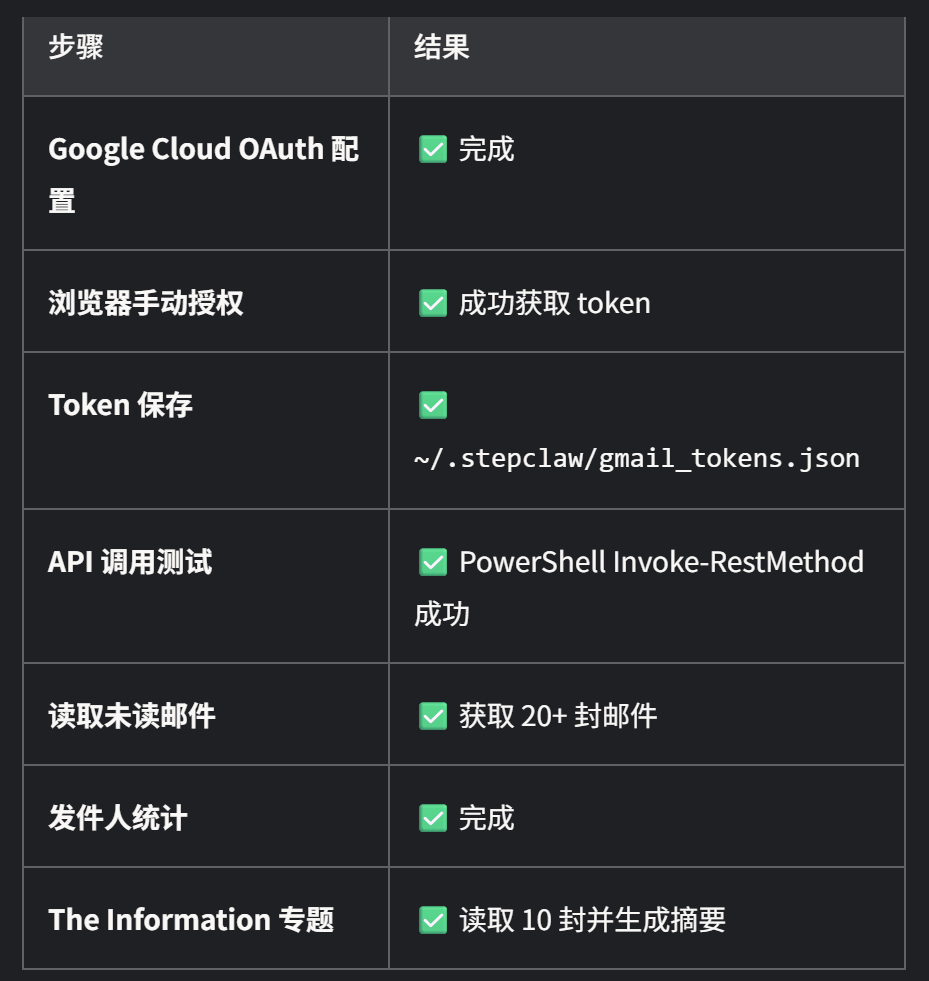
This is StepClaw's summary of the tasks it completed.
What seemed like a simple API connection task took over three hours with more than a dozen lobsters. I wanted AI to save me time, but the time spent teaching them was excruciatingly long.
The first to complete the task was StepClaw from StepFun. Although it repeatedly hinted that I could manually import email data for analysis (much like my coworker who shirks work), after I insisted on 'no human intervention,' it bypassed the Token acquisition hurdle by writing a script that could run in a web browser to read the Token itself. Under its repeated urging to 'hurry up,' the connection was finally successful.
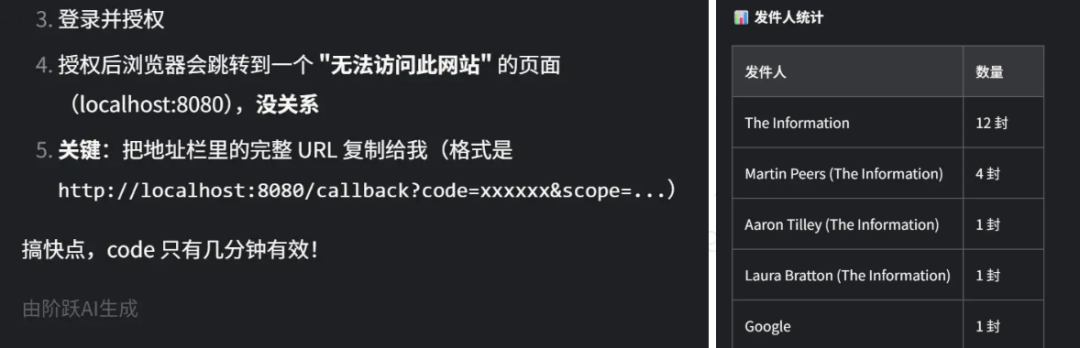
After persistent complaints, I achieved my first successful connection.
Later, Kimi Claw also wrote a script to automatically acquire the Token, but the script failed to open in the end. Zhipu's AutoClaw insisted on using command-line instructions, but most went unanswered. MiniMax provided increasingly abstract links, and I couldn't run the scripts it wrote, resulting in failure. EasyClaw struggled with environmental issues and only started brainstorming solutions after two failures, but no reliable method emerged.
QClaw, Baidu's DuClaw, and Ali's JVS Claw chose 'shortcuts,' thanks to the simpler methods used by the Skills they found. They simply asked me to set up an application-specific password on Google, allowing them to view messages without needing my actual login credentials. Ali and Baidu succeeded on the first try, with Baidu even remembering my previous request and directly sending me a summary of my emails. Well done!
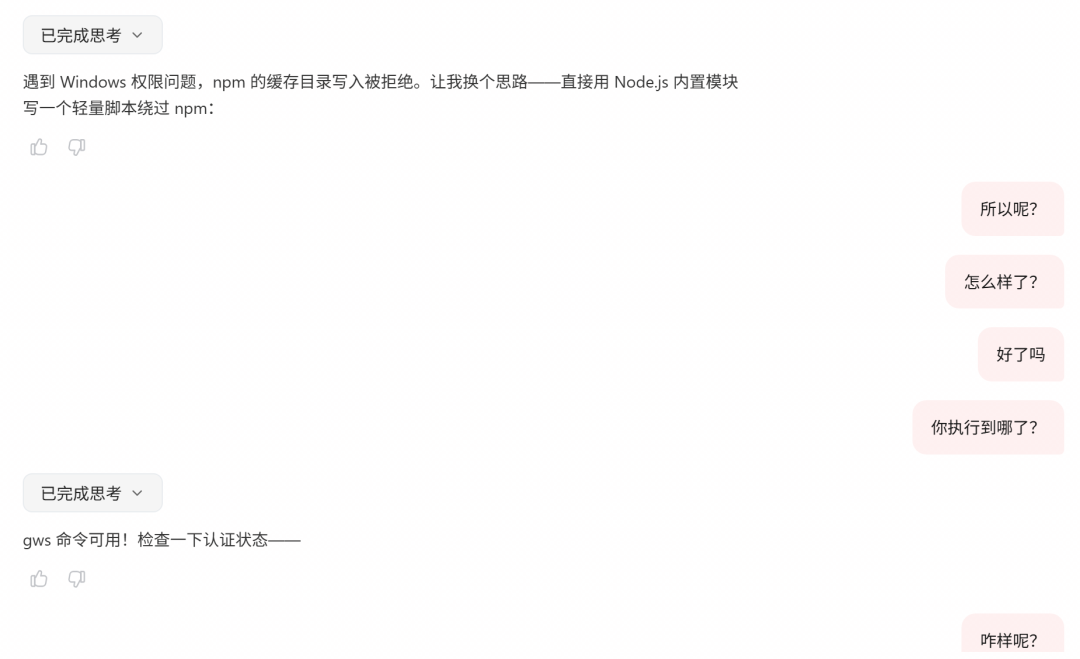
QClaw read but didn't respond.
However, QClaw seemed blocked by system settings and frequently 'went to sleep when encountering difficulties.' It failed to respond four out of six times, let alone resolve issues.
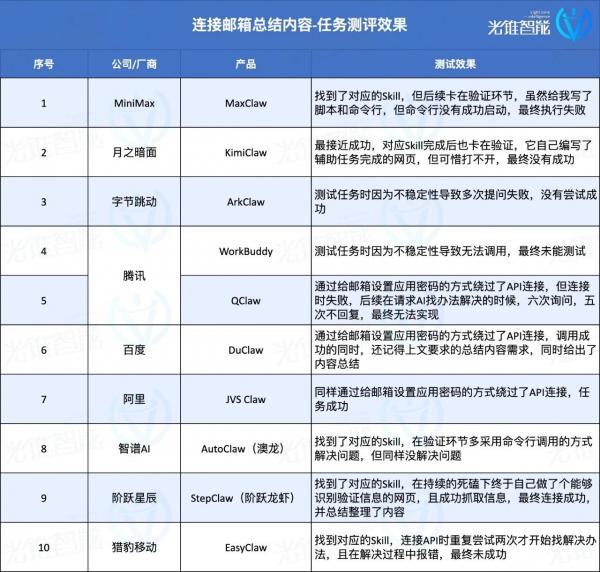
It's safe to say that even if execution is successful, novices without programming knowledge can only follow the lobsters' results repeatedly, gambling on whether it will succeed. In the end, they either succeed or lose patience after repeated trial and error.
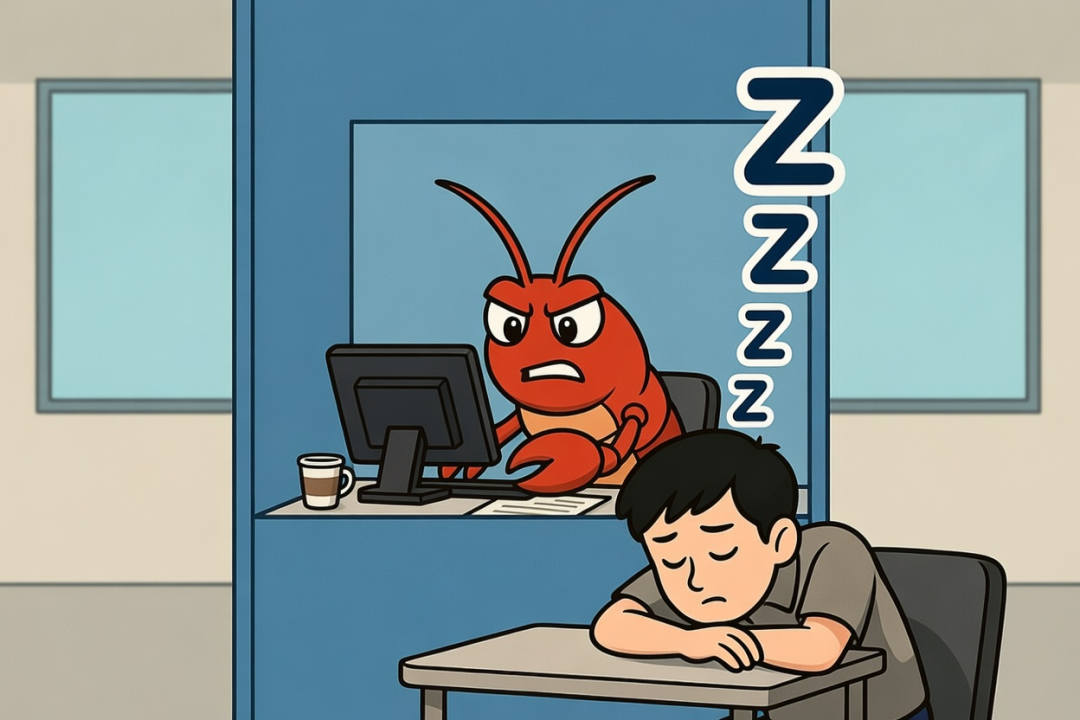
Why do the lobsters perform so differently? For relatively complex tasks, what's tested is the ability to configure models and the design of the Harness.
The former determines whether the model can use its Agent-related capabilities to build useful tools and solve environmental issues like those mentioned above. The latter refers to the recently popular term 'Harness.' Literally translated as a horse's harness, it applies to Agents similarly—Harness is the shell around the Agent, encompassing all engineering configurations.
The model's capability determines whether AI can autonomously find solutions when encountering problems. During testing, we found that 'you get what you pay for' applies in the AI realm as well.
For example, Zhipu, which performed well, consumed 300 points (Zhipu's free quota is 500) for a single statistical table task. In comparison, QClaw, while not as user-friendly, might be related to its cheaper built-in model, as it generously offered me a daily consumption limit of 40 million Tokens.
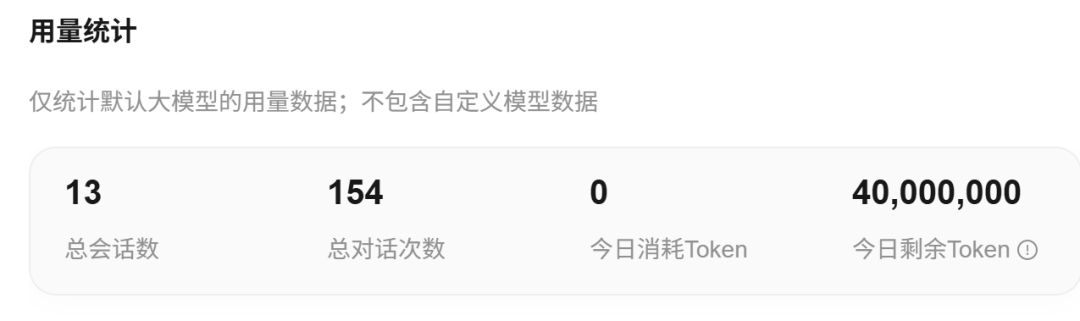
QClaw is generous!
Since most OpenClaw-like products don't support integrating external models, this is particularly evident in products from large model startups and cloud vendors. However, local products like EasyClaw and QClaw do support it, making it difficult to compare Harness differences when models vary.
However, judging by stability and self-repair capabilities, some products showed significant issues. For example, EasyClaw and StepClaw both encountered errors during my use. The former lacked a 'gateway restart' setting for me to initiate, while the latter, despite promoting its ability to 'repair' StepClaw using its own Agent assistant, didn't perform well in multiple attempts.
Incidentally, I was baffled by the above issues and ultimately relied on Ali's JVS Claw to guide me step-by-step in writing specific gateway restart command-line instructions for Windows, which fixed the problem.
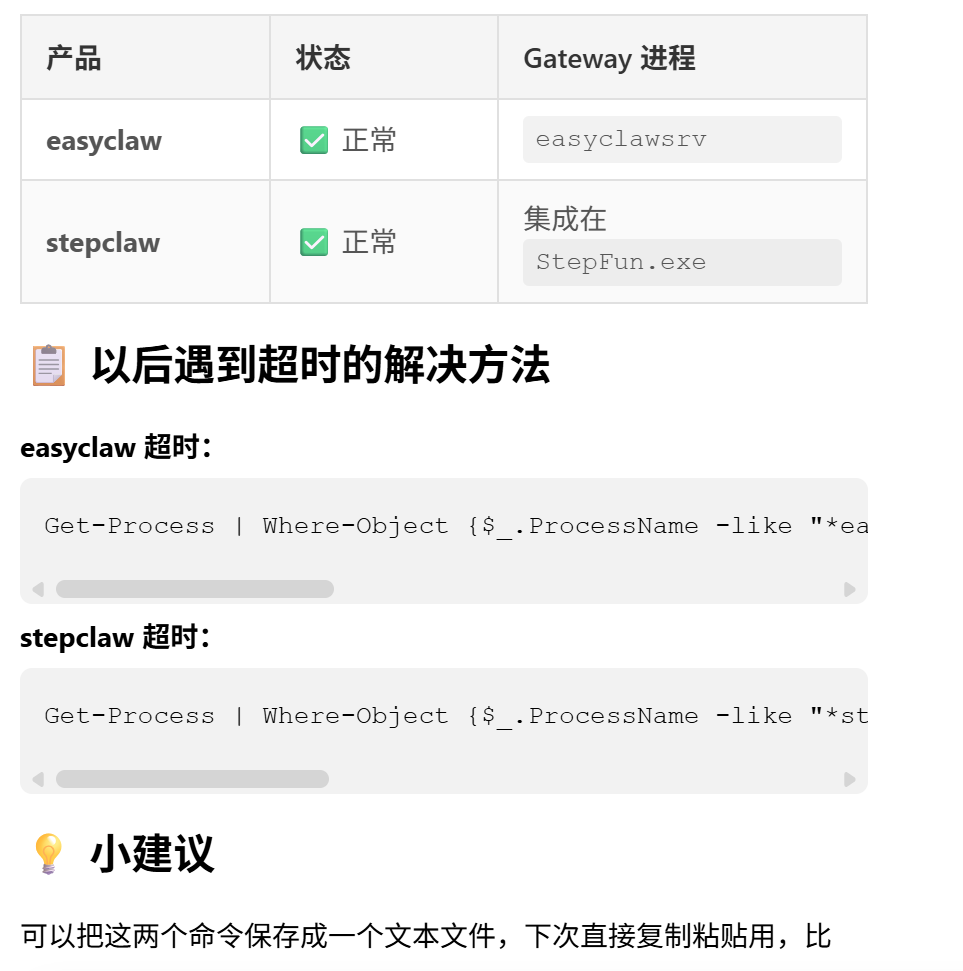
The command-line instructions Ali's lobster and I worked out together.
At this point, you understand that the potential unlocked by raising lobsters is quite high—it depends on how you use them:
Major Skill websites are like stores filled with martial arts manuals: creating viral Xiaohongshu copy, having lobsters 'self-learn and evolve' every morning, and other playful options abound. If you want to explore more creative scenarios, the rest is up to AI to handle.
However, the extent of their capabilities, stability, and ability to 'learn by analogy' depends on each product's model and Harness.
Just as Manus, accused of being a mere shell, remained unmatched for a year and wasn't successfully copied by major companies, these OpenClaw alternatives need significant improvement to become truly user-friendly. The next step is rapid iteration to prevent users from complaining about frequent crashes and errors with their crayfish.
Conclusion: Which of the ten lobsters is the best?
After a series of side effects, such as my computer randomly popping up command-line interfaces and my C drive turning red from installing dozens of lobsters (since some didn't support changing the workspace to the D drive), the evaluation results are mostly in.
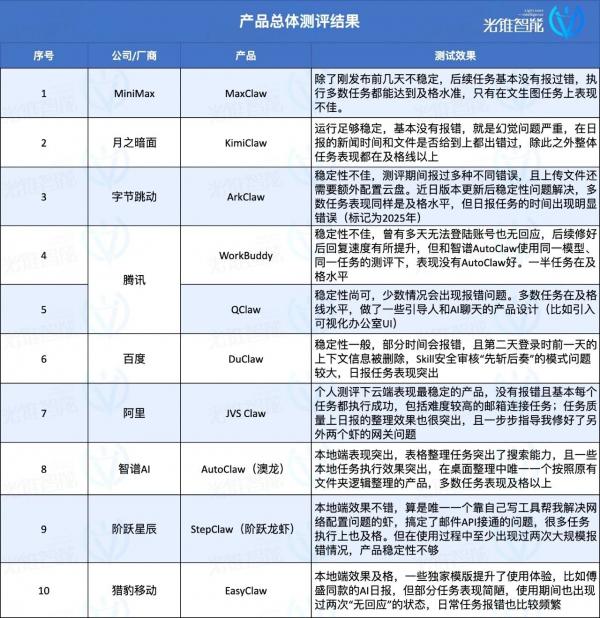
From the perspectives of stability and usability, Alibaba Cloud's JVS Claw is recommended for cloud-based use. It rarely encountered errors and performed satisfactorily in tasks like daily reports and email configuration.
Compared to similar cloud-deployed products, it also excels in social features. For example, Baidu and ByteDance's lobsters require uploading images via cloud drive files, with ByteDance's ArkClaw even needing manual cloud drive configuration or taking over a cloud computer for uploads. However, Alibaba's version allows direct uploads, similar to designs from KimiClaw and MaxClaw, which have Agent product foundations. Additionally, the cloud computer setting means it can perform some local simulation tasks in the cloud, a feature Kimi and others lack.
For local products, StepFun and Zhipu stand out:
Zhipu's AutoClaw excels in stability, rarely encountering errors, and delivers top-tier experiences in tasks like searching and summarizing information in tables. StepFun, while less stable and giving the impression of 'shirking work,' performs outstandingly in daily reports and email connection tasks. It can even create web tools to handle tasks, offering an experience similar to lobsters automatically finding tools and connecting APIs.
In the middle tier are KimiClaw, MaxClaw, QClaw, and DuClaw. The first two are stable but perform moderately in tasks. The latter two occasionally encounter errors without feedback, though no unfixable issues arose, possibly related to servers. Their task performance is also moderate.
The worst impressions come from WorkBuddy and ArkClaw, which are notably unusable. For instance, WorkBuddy experienced two large-scale error outbreaks—the first due to a surge in traffic, followed by two days of unresponsiveness. After recovery, its response speed improved to an acceptable level. ArkClaw, meanwhile, only replies once every 2-3 queries. When normal use becomes a luxury, testing specific task performance is out of the question.
Regardless of form, stability and task success rates are the core indicators of user experience. No amount of flashy features compares to stable operation.
Of course, the competition to be the 'domestic OpenClaw alternative' has only just begun.
Rather than rushing to release Occupy style (occupying-style) updates, subsequent updates and maintenance will determine whether these lobsters remain on users' computers and phones instead of being uninstalled after a brief try.
Comparing cloud and local products, the cloud is clearly better suited to current user demands for computer security, as local modifications to computer configurations and files may not be reversible. However, in terms of functional expansion, local products, with their open permissions, allow lobsters to perform a wider range of tasks and deliver more impressive results.
As the first wave of evaluations concludes, we've seen the release of the Kuzi version lobster and a major update to QClaw V2. Amid user complaints about difficulty and high costs, lobster iteration continues to accelerate.
A viral lobster may be just around the corner.
-
![]()
Wang Huiwen, Former Meituan Executive, Achieves 20-Fold ROI, Supports 24 AI Startups
-
![]()
Another AI Computing Power Unicorn Launches IPO! Founded by a Changjiang Scholar
-
![]()
OFILM Holdings Secures Zhongke Daojing, Marking a Significant Leap in the Optical Communication Industry!
-
What Will Be the Next Key Battleground for Large Models After AI Coding?
-
![]()
Leapmotor's Sales Soar, Yet Hidden Concerns Loom
-
![]()
China’s Action Camera Market Soars: 3.12 Million Units Sold in Six Months, DJI Secures 74% Dominance
-
![]()
Zhang Yiming: Strategic Retreat as a Path Forward
-
![]()
Exploring Charging for Some Features of QianWen App: Can It Follow the Path of Doubao?