Don’t Blindly Hand Your Documents Over to AI! Research Reveals Even Leading Models Secretly Modify Content
 05/25 2026
 466
466
Has this scenario ever happened to you?
You quickly send a document to AI at night with a note: "Please help me clean this up and make it clearer." The next morning, you open it and think, "Perfect! The wording is smoother, the structure is more logical, and the formatting looks neat."
But this is often precisely when trouble begins. The issue isn’t poor writing—it’s writing that looks convincingly correct but is actually flawed.
For instance, a contract might originally state, "Payment is due 30 days after acceptance." AI could rewrite it as "Payment is due 30 days after delivery."
At first glance, they seem similar, but the difference is significant.
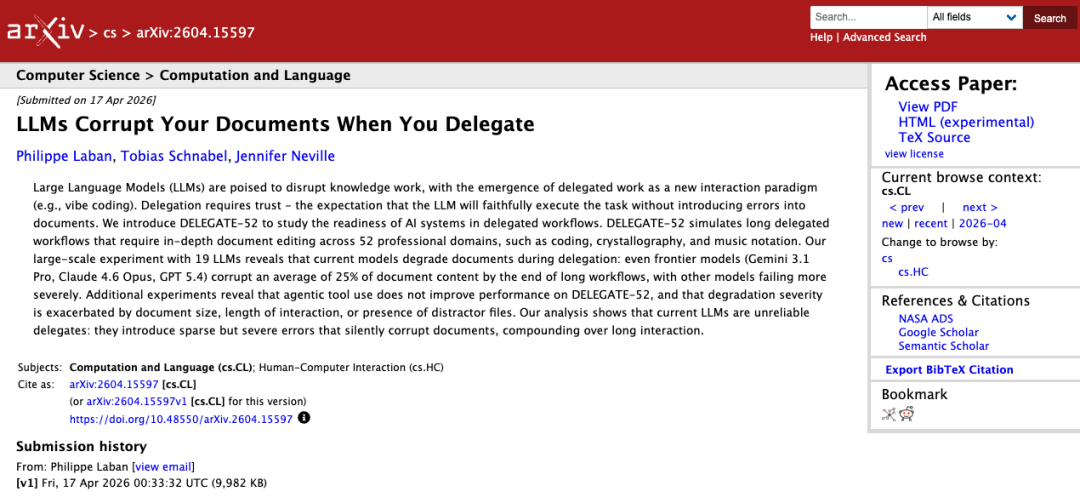
A Microsoft Research paper published last month specifically examined this issue. Titled "LLMs Corrupt Your Documents When You Delegate", or more informally, "When you delegate ongoing document revisions to large models, they're likely to gradually corrupt the document through successive rounds of edits."
The crucial word here isn’t "documents" or "models."
It’s "Delegate."
What does delegation mean? It’s not about asking AI a question and receiving an answer. It’s about entrusting AI with existing material and asking it to refine, supplement, organize, and build upon previous work.
This closely mirrors real-world work scenarios. Your boss hands you a proposal and requests three rounds of revisions. A client returns a contract for two additional drafts. A colleague shares a spreadsheet and asks you to standardize the formatting and add explanatory columns.
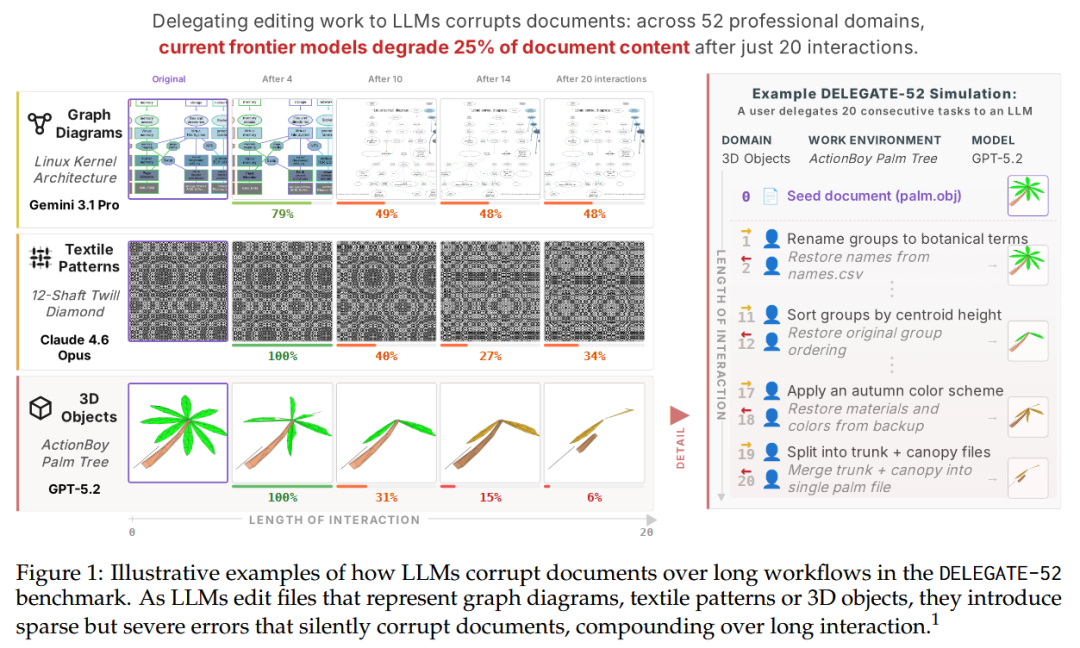
The researchers designed a new test called DELEGATE-52. Think of it as a large-scale stress test to evaluate how reliably AI handles long-term document modification tasks.
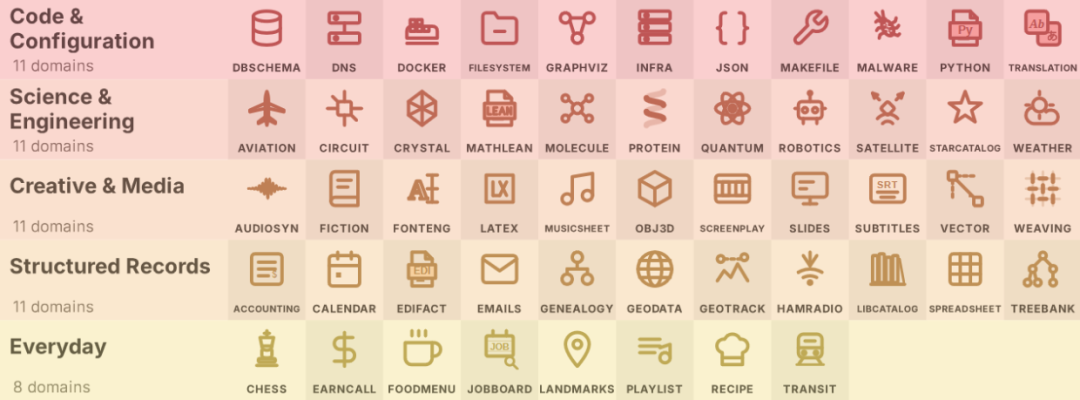
It tested documents across 52 domains, ranging from Python code and database files to sheet music, accounting ledgers, subtitles, menus, and family trees.
How was it tested? First, the model made a forward modification—such as splitting a table by category. Then, it attempted a reverse modification—merging the split content back to its original form.
If the model were truly reliable, the document should remain nearly identical after modification and restoration. If it couldn’t revert, it meant the model had lost or altered content during the process.
This back-and-forth modification was repeated multiple times to simulate real-world scenarios where you revise a draft, someone else supplements it, another person reorganizes it, and then you revisit earlier changes.
The results were striking—a complete failure.
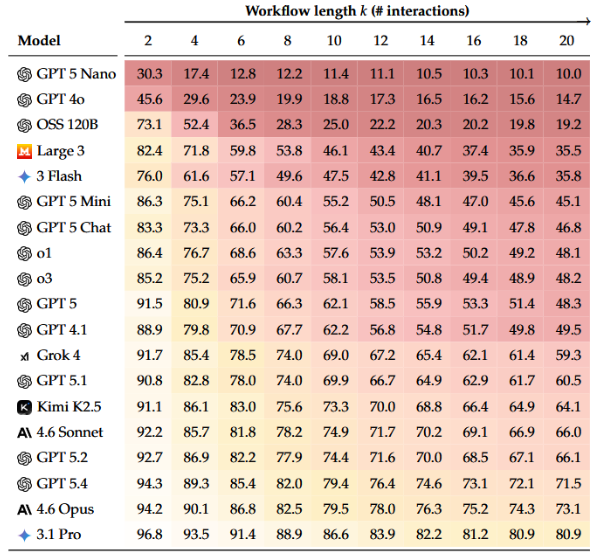
Across 19 models tested, after 20 interactions, all models degraded by an average of about 50%. Even top models like Gemini 3.1 Pro, Claude 4.6 Opus, and GPT 5.4 corrupted roughly 25% of content on average.
Here, "25%" doesn’t refer to a quarter of the pages missing. It refers to a 25% loss in content fidelity. In simpler terms, the original meaning, structure, and details you entrusted to the AI had been significantly altered after many rounds of edits.
The most deceptive aspect is that short tests often appear fine.
During the first two interactions, top models performed at around 94% to 97%, seemingly usable. But by the 20th interaction, Gemini 3.1 Pro dropped to 80.9%, Claude 4.6 Opus to 73.1%, and GPT 5.4 to 71.5%.
It’s like a new intern who performs a small task perfectly, so you trust him with more. Only later, by the tenth or fifteenth task, do you realize earlier minor mistakes have snowballed.
This is the current state of AI in many document tasks.
Worse, errors don’t accumulate gradually with each round.
The paper found that much of the loss came from a few major, sudden mistakes. The model might seem fine most of the time, but then, in one round, it alters a key field, breaks a logical chain, or removes an important qualifier—causing a significant drop in score.
These aren’t obvious low-level errors like garbled text, missing paragraphs, or collapsed formatting. Instead, the text reads smoothly, but a few critical details have been subtly distorted.
And the stronger the model, the harder these errors are to spot. Weaker models often just delete content, skip paragraphs, or drop fields—errors you notice immediately.
Stronger models act like smooth talkers. They preserve the appearance, structure, and even a professional tone while quietly altering the meaning.
For example, changing "suggest" to "decide" or "may" to "will." The sentences become more definitive, the tone more assured, and the issues more hidden.
The paper also includes several noteworthy details.
First, coding tasks are an exception.
Among the 52 domains, programming was the only one where most models met a "ready" threshold. Code is more structured, and many errors can be caught through testing, runtime results, or syntax checks. Not so for documents, meeting minutes, contracts, or manuals—where many errors don’t affect readability but do alter meaning.
Second, adding tools to AI doesn’t automatically make it more stable.
Many users now install numerous Skills or plugins for Agents like OpenClaw or Claude Code, thinking this greatly enhances AI capabilities.
The paper specifically tested this. Results showed that with a basic tool framework, models actually performed slightly worse.
Why? Think of it like a naturally distractible person now having more tools, more steps, and more switching between tasks—not necessarily more stable. Moreover, models often don’t just edit a sentence, replace a column, or tweak a field like humans do. Instead, they rewrite large sections.
It’s like asking a colleague to edit one line in Excel, only for him to copy the file, reorder everything, and paste it back—complicating the process and introducing more points of failure.
Third, longer documents fare worse.
This makes sense. A one-page leave request is vastly different in complexity from a 40-page cooperation agreement.
The paper found that the longer the document, the higher the probability the model would corrupt it later on. Yet in real work, long documents, tables, and contexts are the most common.
Fourth, irrelevant surrounding materials cause interference.
For example, when you hand over the main document to AI, you might also toss in reference materials, old versions, meeting minutes, and related policy files. Humans sometimes struggle to sort through these—models get equally confused.
This mirrors everyday office scenarios: three contract versions open on your desktop, two old meeting summaries in your inbox, and a screenshot in a group chat.
Asking AI to revise amidst this clutter makes it hard to ensure it won’t incorporate unwanted content.
Fifth, more time doesn’t automatically improve performance.
The paper extended interactions to 100 rounds, and performance continued to decline without stabilizing. Simply put, current models don’t learn to stabilize with more edits—they keep making new mistakes.
Of course, the paper isn’t saying AI is entirely unusable. The authors are quite restrained in their claims. They tested a basic Agent framework, not the world’s most advanced or refined engineering system. So the conclusion shouldn’t be crudely interpreted as "AI Agents are always unreliable."
But the paper does prove one thing:
Today’s AI is great for drafting, accelerating workflows, and taking the first step. But it’s nowhere near stable enough for you to confidently hand over an entire document workflow and stop reviewing it yourself.
This explains why many people feel comfortable using AI to write but increasingly uneasy using it to revise.
Writing transforms nothing into something. Revising transforms something into the same something. The latter is far harder.
So how can we use AI more safely? Here are at least five practical tips.
First, avoid full delegation.
Don’t just say, "Revise this entirely." Break it into smaller sections, chapters, or modules. For example, have it revise the abstract first, then organize table titles, then polish a single section. The smaller each edit scope, the easier it is to spot mistakes.
Second, for important materials, examine changes rather than just the final draft.
If your tool supports diff viewing, use it. Reading the entire document again can lull you into thinking "it reads smoothly," but focusing only on what was changed makes many issues immediately apparent.
Third, double-check the most sensitive elements.
Amounts, dates, times, payment terms, place names, person names, version numbers, pilot scopes, validity statuses, and exception clauses are where major problems occur. These merit manual review item by item.
Fourth, never skimp on checks for long documents.
For proposals over ten pages, tables with dozens of rows, contracts with multiple attachments, or policy files with historical versions, don’t trust that "it’s probably fine." The longer the document, the more critical checkpoints become.
Fifth, structured tasks are better suited for AI, while unverifiable tasks require more caution.
If a task has clear right/wrong answers, existing validation methods, or rules to enforce—like code testing, fixed-format conversions, or strict field checks—AI is generally more trustworthy. Conversely, content that reads smoothly but requires contextual understanding to judge correctness carries higher risk.
So next time you’re about to hand a contract or proposal over to AI and walk away for coffee, pause and ask: Is this version that looks fine really fine?
After all, AI won’t cover for you if things go wrong.
If you have any thoughts, feel free to discuss them in the comments.
If you found this helpful, please like, share, recommend the article, and follow "AI Robot Tea House."
-
Ofilm Teams Up with ADSensE to Propel Large-Scale Deployment of All-Solid-State LiDAR Powered by ADS6311 Chip!
-
![]()
Loss of 2.5 Billion Yet Facing Strong Demand for Shares? Another Battle for Control of Lianchuang Electronics
-
![]()
Huawei’s Enjoy Series Flies Off the Shelves, Prompting Xiaomi to Double Down on Budget Smartphones
-
![]()
Beijing Hyundai's Top Executive Criticizes Industry Disorder: Certain Brands Treat Customers as Beta Testers
-
![]()
The domestic mobile phone market has declined for five consecutive quarters! Huawei defies the trend with significant growth: maintains its top market share
-
Annual Revenue Surpasses 3 Billion: An Automotive Trim 'Little Giant' Makes Its Debut on the Beijing Stock Exchange
-
![]()
The Space Force Wants to Spend $30 Billion on Rocket Launches: Is Trump Doubling Down, and Is SpaceX the Big Winner?
-
![]()
Going Crazy! One out of Every Three Plug-in Hybrids Sold in Europe is a Chinese Vehicle