The New Battle for 'AI Workstations' Among Tencent, Google, and Others: Can Marvis and Its Peers Replace Human Workers?
 06/01 2026
 445
445
AI? A 'Workhorse'!
Recently, my X homepage has been acting a bit strangely, with a noticeable increase in posts about Agents. But unlike the previous 'model evaluations,' people seem less concerned about how well a model answers questions and more interested in a more practical matter: which Agent can help me complete this task at hand?
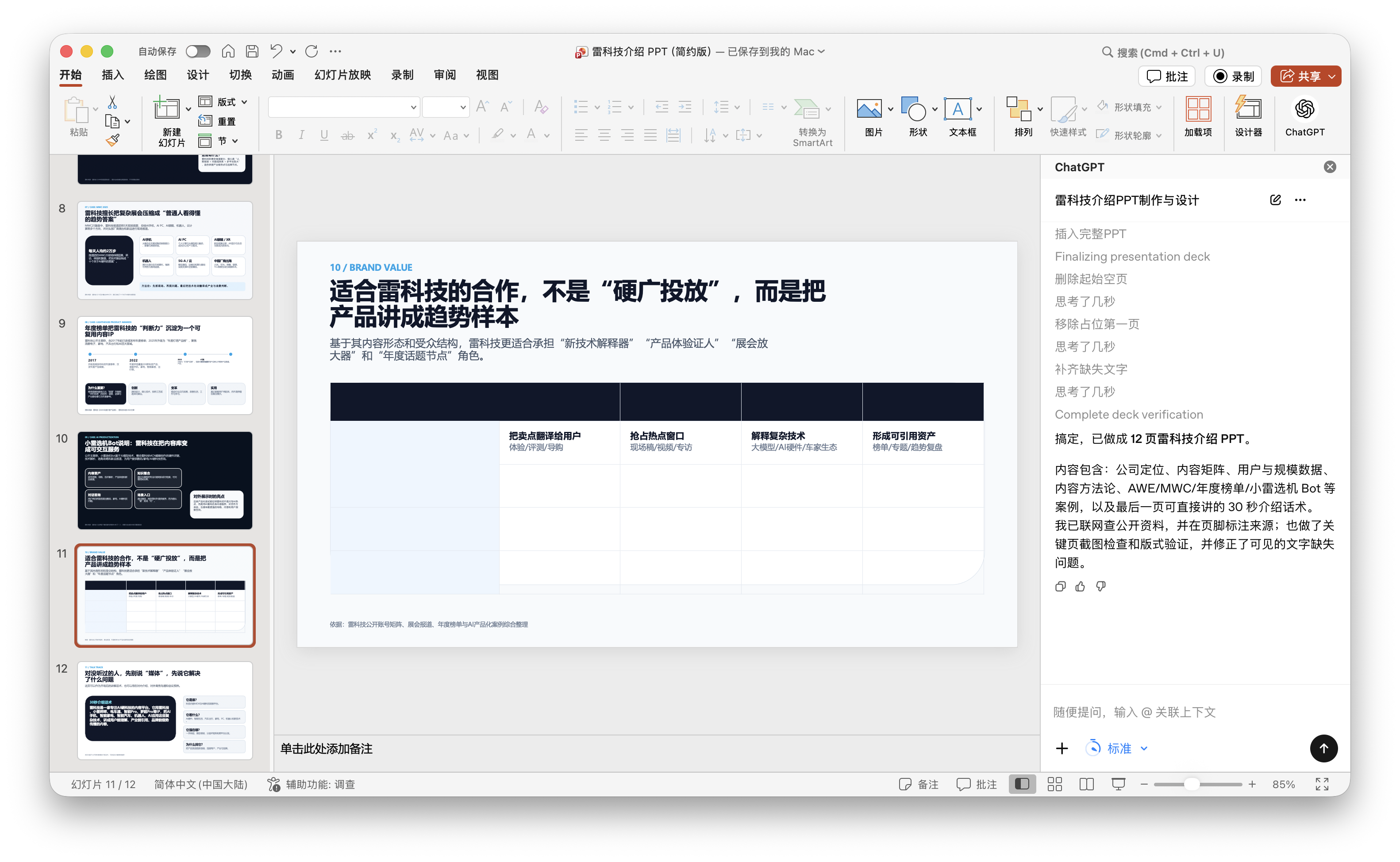
In the recently concluded month of May, 'strange things' started to happen more frequently. On May 20th, Tencent launched something called 'Marvis,' officially positioned as an 'operating system-level AI assistant.' It went live simultaneously on Windows, macOS, and Android, featuring six specialized Agents available 24/7, each responsible for a specific area: files, browsers, applications, search, and computer control. They are ready to use right out of the box. The next day, on May 21st, OpenAI announced that ChatGPT would be integrated into Microsoft PowerPoint as an add-in, available to both free users and Business subscribers. It opens a sidebar in PowerPoint, allowing users to generate or modify PPTs using natural language.
During the same week, Google introduced Gemini Spark at I/O 2026, a personal Agent that can run continuously for 24 hours on a dedicated Google Cloud virtual machine. It can read your emails, modify your documents, and operate web pages through Chrome. You don't even need to keep an eye on it; it can get all these tasks done.

(Image Source: Leikeji Graphics)
It's not hard to understand why the trend has shifted so quickly. Bombarded by a plethora of AI tools, most ordinary people are no longer as concerned about how many math problems a new large model can solve correctly. Instead, they are more interested in what tasks Agents can perform.
Take ChatGPT for PowerPoint, for example. After adding the add-in, a ChatGPT sidebar appears on the right side of PowerPoint. Tell it, 'Create a product presentation for investors, using project progress from last week's Outlook,' and it will pull data, generate content, and arrange the layout without leaving PowerPoint. It can connect to Gmail, Outlook, and SharePoint, meaning it's attempting to 'help you integrate information,' not just 'help you generate.'
In practice, generating a structurally complete first draft is quick, and it's basically sufficient for scenarios where you need a PPT at the last minute before a meeting. OpenAI has also admitted that complex template handling and font formatting are not yet supported. Leikeji has previously conducted a detailed experience report on this plugin, which interested readers can click to view.
(Image Source: Leikeji Graphics)
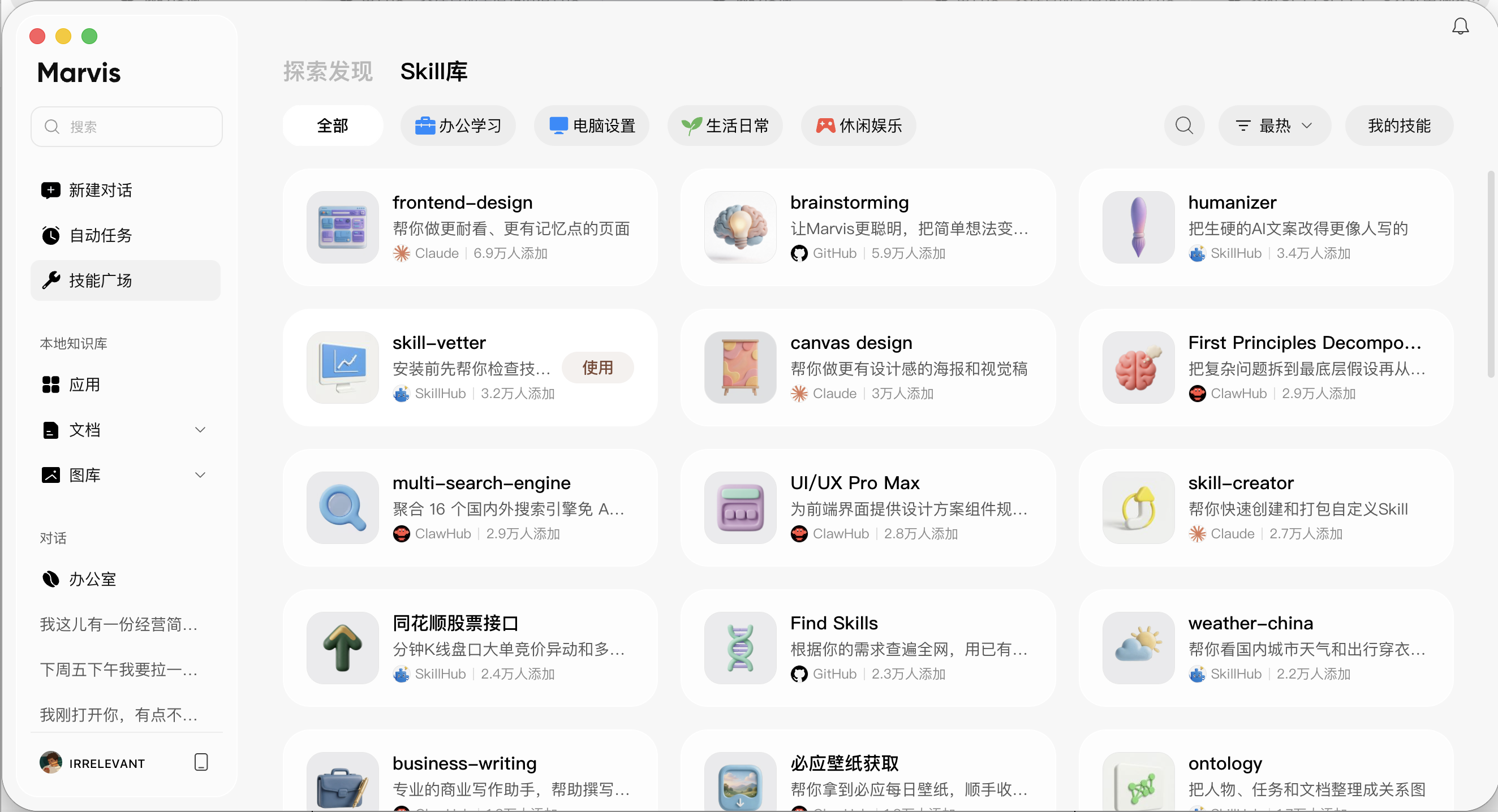
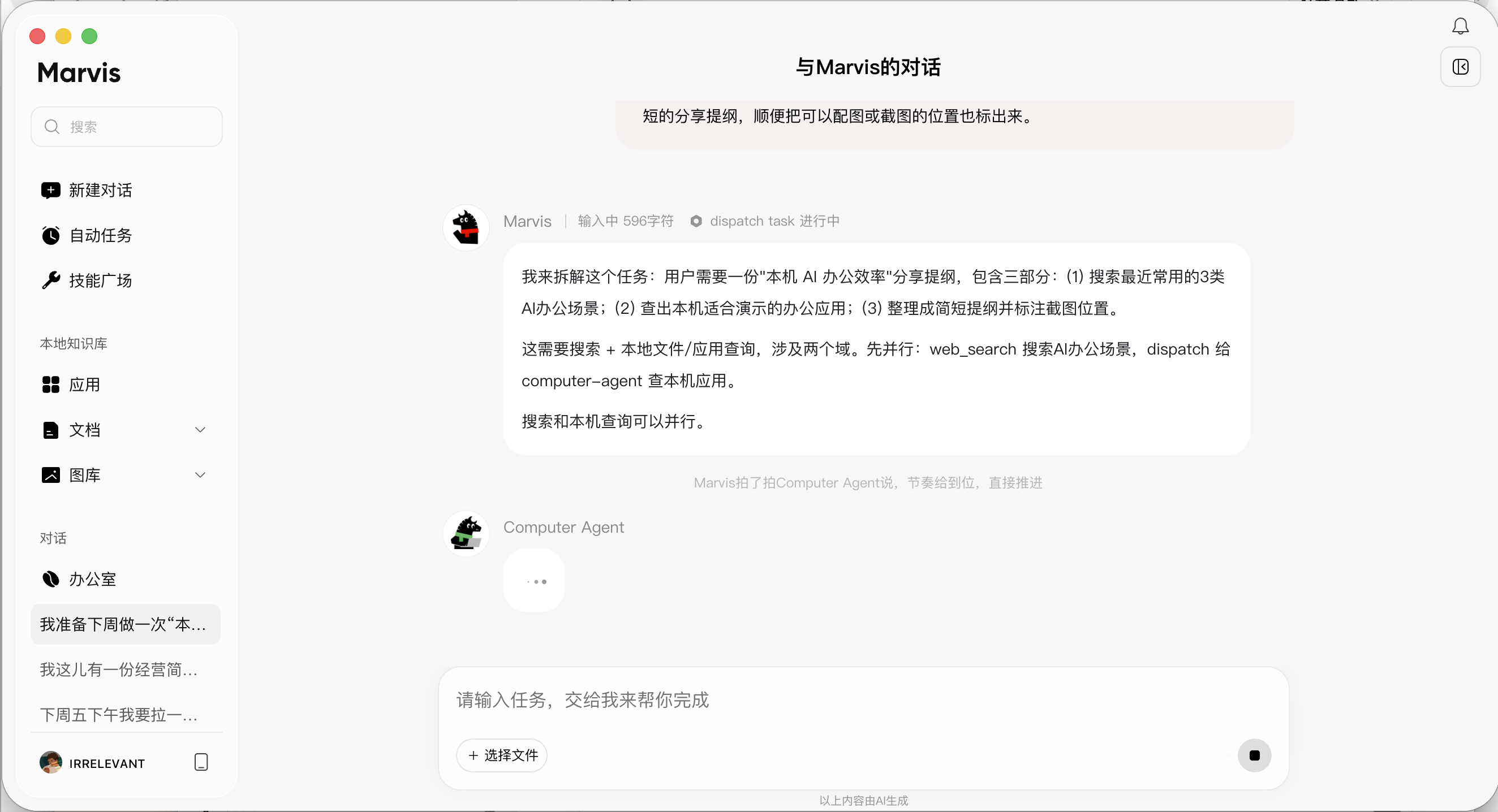
To be honest, AI tool plugins like these are not uncommon. Essentially, they still provide assistance within a specific scenario and are not yet very mature. However, Tencent's Marvis is different. It's a network-like collection of Agent intelligences, with a main Agent orchestrating tasks at the top and scheduling specialized Agents like File, Computer, App, Browser, and Search to execute in parallel below. It integrates the system, files, applications, computing power, and cross-device control into the same middleware layer. Tell it, 'Help me find that Agent architecture diagram PPT that the PM sent me last week. I forgot the filename, but it's saved on the desktop,' and it will scan the file content and perform semantic understanding rather than just searching by keywords in the folder.
(Image Source: Leikeji Graphics)
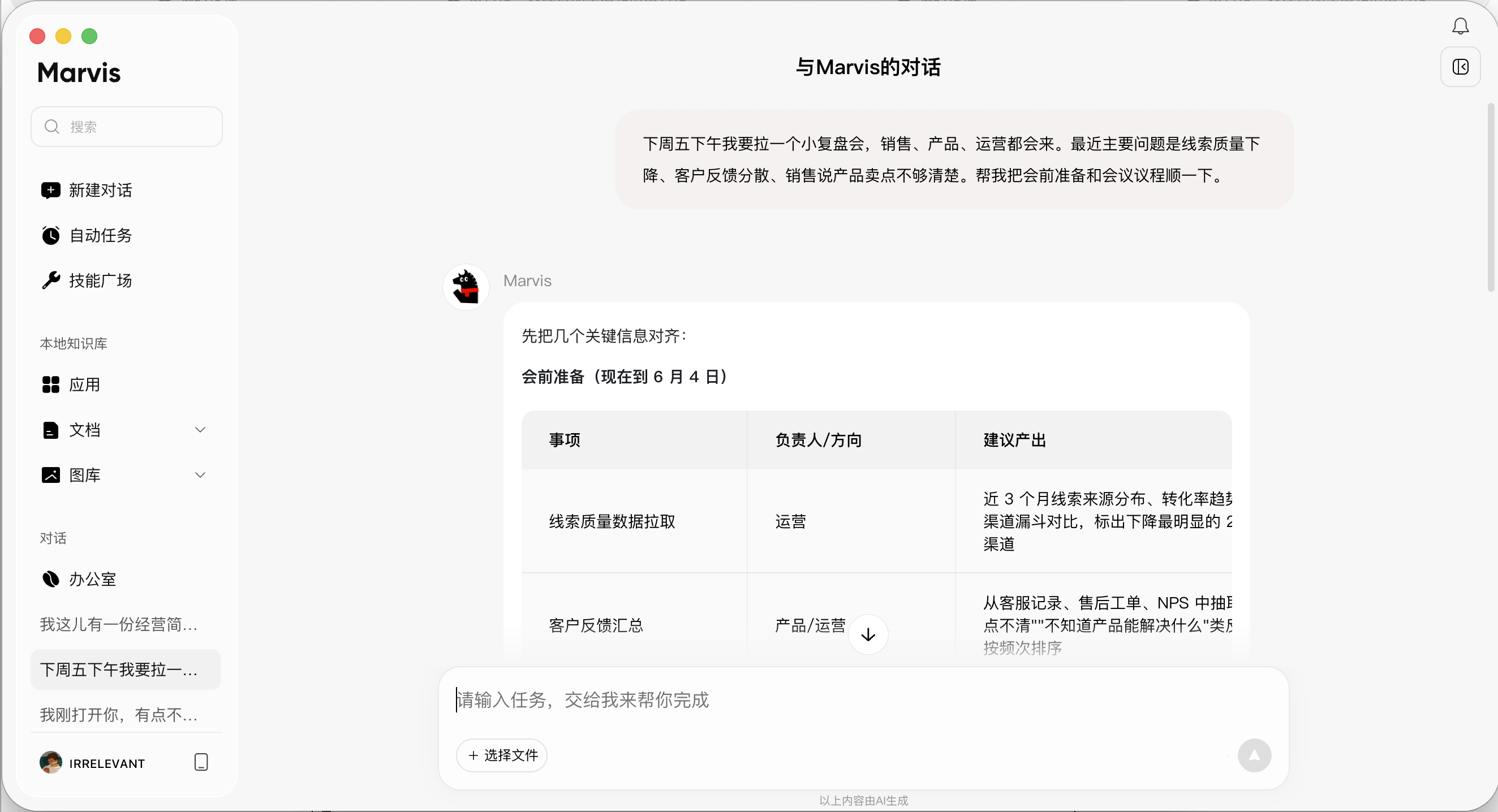
After trying out several scenarios, for example, at first, we asked it to prepare materials for a review meeting. Marvis's response started with a pre-meeting preparation checklist, followed by a 90-minute agenda that conformed to the actual workflow. It also broke down the pre-meeting actions into assignable tasks: the operations team pulls lead quality data, the product team summarizes customer feedback, and the sales team organizes selling point issues, each with a responsible person and expected output. Its cleverness lies in translating 'unclear selling points' into 'organizing customer quotes and specific scenarios,' which is very practical.
Another example is uploading a Word business briefing and an Excel detail sheet simultaneously and asking it to find sales figures, gross profit, regional rankings, and any obvious anomalies. It invoked the File Agent to series connection (link) the two files across sheets, providing sales figures of 2,357,512, gross profit of 836,257, and the highest in the South China region. It also listed issues like duplicate customer phone numbers, empty responsible persons, zero-quantity after-sales orders, and abnormally large orders.
Of course, the relatively long waiting time is still hard to ignore. Simple opening Q&A takes about 30 seconds, not instantaneous. For file analysis, it takes about 6 minutes from submission to the final result, and the granularity of the intermediate process is not fine enough. You can see the File Agent processing, but you don't know how far it has read or how much longer it will take. For scenarios like 'I have materials and want to quickly scan them before a meeting,' 6 minutes is still acceptable.
(Image Source: Leikeji Graphics)
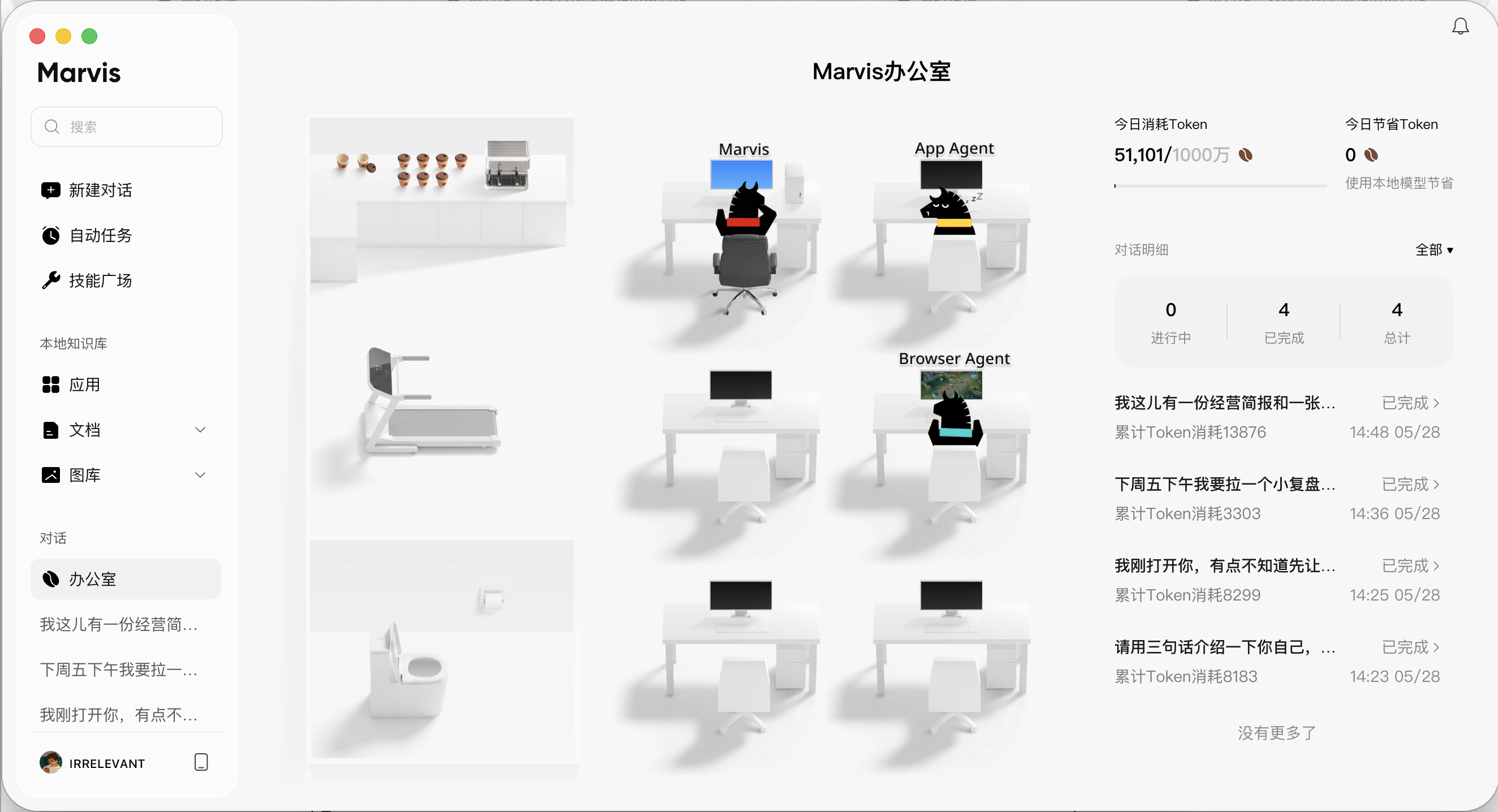
Nevertheless, I believe Marvis's recent success in going viral is also related to its design. In the sidebar, we can see a page called 'Office.' When opened, it displays a white 3D office scene with Marvis, App Agent, and Browser Agent sitting at their respective workstations like employees. On the right, it shows the number of tasks completed today, Token consumption, and ongoing tasks. It uses interesting animations to intuitively show how Agents collaborate and assign tasks among themselves. Compared to dull tools, the image of 'AI workhorses' is deeply ingrained in people's minds.
Regardless of their depth, from helping you generate a draft with one click in PowerPoint to helping you manage files, hold meetings, and scan for anomalies on your entire computer, they all point in the same direction: AI is evolving from a tool that answers questions to a colleague sitting at a workstation handling miscellaneous tasks. The difference is whether this colleague handles miscellaneous tasks or specialized tasks.
Much of the current excitement over vying for positions is largely fueled by OpenClaw.
OpenClaw, formerly known as Clawdbot, was developed by Austrian independent developer Peter Steinberger in November 2025. It's open-source and can run locally. Initially, it didn't attract much attention until a few videos went viral in January 2026, such as 'AI Buys a Car Autonomously' and 'Code Migration Completed in 30 Minutes,' causing a stir in the developer community. Clawdbot changed its name twice due to trademark issues and eventually settled on OpenClaw. From its first version to reaching over 250,000 GitHub Stars, it only took about 60 days, faster than React's decade-long accumulation. The founder subsequently joined OpenAI in February to continue working on Agents.
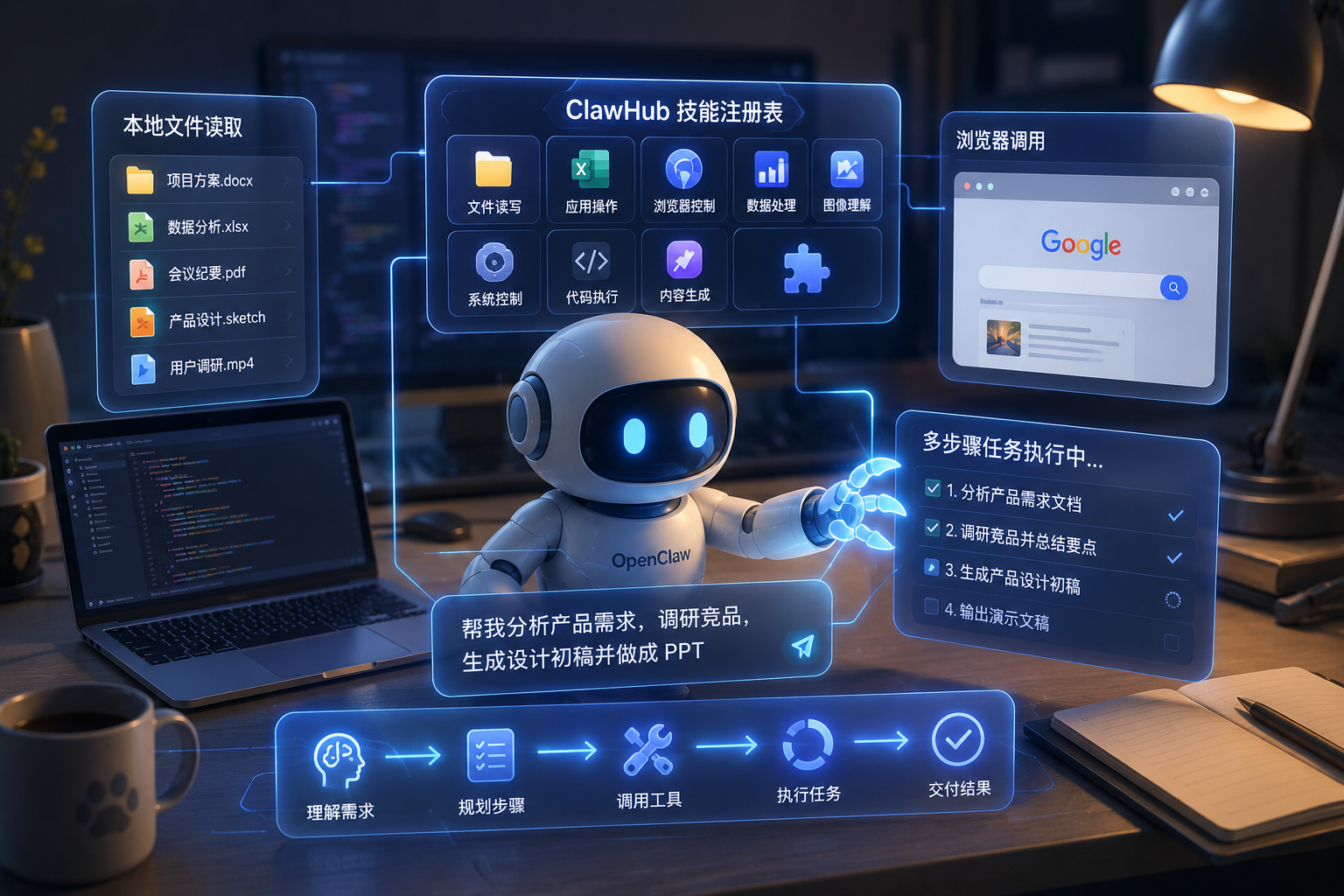
OpenClaw's popularity isn't just because it's novel; it's the first time ordinary users have truly felt what it's like for 'AI to help me work' rather than 'AI to help me answer questions.' It can read local files, operate applications, invoke browsers, and execute multi-step tasks, connecting LLMs to real tools through a skill registry called ClawHub. This architecture proves one thing: it's technically feasible to turn AI into a role that truly works on a computer, and users are willing to use it.
(Image Source: Leikeji Graphics)
When OpenAI first introduced Codex, it was just a relatively simple AI code tool for developers to write code, fix bugs, and submit PRs. But from May 2025 to now, Codex has quietly transformed into something else—it can operate computers, run built-in browsers, process images, execute tasks across tools, and has added 'Goal Mode,' where you set a goal and success criteria, and it keeps running until the task is completed.
This change wasn't part of OpenAI's initial product roadmap. Once an Agent proves itself capable enough in a certain scenario, it will naturally expand into adjacent tasks. After programming comes code debugging, then project management, followed by operating browsers, handling files, understanding context, and so on.
This is why Tencent is cut into (entering) from the operating system level, Google is making Gemini Spark a 24/7 continuous Agent, and Microsoft is advancing Agent Mode in PowerPoint instead of continuing to upgrade the already sufficient chat window. Gemini Spark has built-in native access permissions for Gmail, Google Docs, Sheets, and Slides. Essentially, they are all vying for a position—the 'AI workstation.'
(Image Source: Leikeji Graphics)
The core of an 'AI workstation' is not just a computer equipped with AI software or an extra chatbox on the desktop. More accurately, an AI workstation represents a new working relationship. When a person hands over goals, materials, permissions, and acceptance criteria, AI orchestrates actions among files, applications, browsers, systems, and cloud services. The person shifts from being an executor to a manager, reviewer, and final decision-maker. Of course, this is essentially using AI as a 'workhorse.'
The significance of AI workstations for ordinary people is not about suddenly having a high-tech smart office but about transforming 'I operate the software myself' into 'I assign a task.' People no longer need to remember which folder materials are in, which application handles which step, or where to copy the output. Instead, they clarify the goal, let AI find, read, organize, and invoke tools, and then deliver the results. Just like when using Marvis, you can see which Agent you've invoked and which Agent is 'slacking off.'
This is why it's more suitable for ordinary people than single-point tools and why major companies want to seize this entry point. No matter how good a PPT plugin is, it's still essentially just helping you make a PPT. A truly mature AI workstation, besides completing the PPT, will also help you prepare other needs for the presentation. That's the difference between a plugin and an AI workstation.
(Image Source: Leikeji Graphics)
Of course, for now, ordinary people will be the first to feel the side effects of AI workstations. For AI to work for you, it must see more files, obtain more permissions, and understand more context. Previously, you could just toss a sentence to a chatbot, and if it was wrong, you could just ask again. Now, when you hand over a series of tasks to an Agent, the mistakes could be in files, data, schedules, formats, or even an external sending. So, before AI workstations truly become widespread, users need to learn not more complex prompts but how to more clearly define goals, set boundaries, and check results.
But at least, AI workstations are liberating us from being 'working workhorses,' which is the core reason for their popularity.
Tencent, OpenAI, Google, Agent, AI, Office
Source: Leikeji
All images in this article are from the 123RF licensed image library. Source: Leikeji
-
Ofilm Teams Up with ADSensE to Propel Large-Scale Deployment of All-Solid-State LiDAR Powered by ADS6311 Chip!
-
![]()
Loss of 2.5 Billion Yet Facing Strong Demand for Shares? Another Battle for Control of Lianchuang Electronics
-
![]()
Huawei’s Enjoy Series Flies Off the Shelves, Prompting Xiaomi to Double Down on Budget Smartphones
-
![]()
Beijing Hyundai's Top Executive Criticizes Industry Disorder: Certain Brands Treat Customers as Beta Testers
-
![]()
The domestic mobile phone market has declined for five consecutive quarters! Huawei defies the trend with significant growth: maintains its top market share
-
Annual Revenue Surpasses 3 Billion: An Automotive Trim 'Little Giant' Makes Its Debut on the Beijing Stock Exchange
-
![]()
The Space Force Wants to Spend $30 Billion on Rocket Launches: Is Trump Doubling Down, and Is SpaceX the Big Winner?
-
![]()
Going Crazy! One out of Every Three Plug-in Hybrids Sold in Europe is a Chinese Vehicle