Guide to Avoiding Pitfalls When Buying a TV
 06/02 2026
 544
544
Source | Home Appliance Faction (jiadpai)
Author | Xiaoxiao

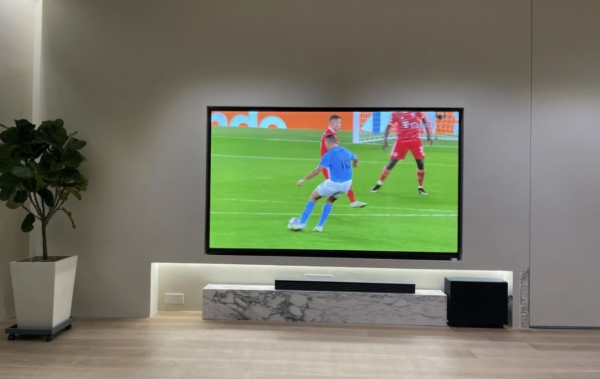
No matter how convenient mobile phones and tablets are, that wall in the living room is always reserved for the TV. Not because it's so useful, but because—as long as it's on, the home feels alive.
But how do you buy a TV? I've noticed a strange phenomenon: many people spend less time thinking about this several-thousand-dollar purchase than they do picking out a pair of shoes. Hence, this '6 Don'ts' principle. Every point is hard-earned experience that cost real money.

Let's start with a harsh truth: a laser TV is essentially an ultra-short-throw projector + an anti-glare screen. Manufacturers like to tout 'diffuse reflection for eye protection' and 'natural colors.' Eye protection is true, but only if—you watch in pitch-black conditions.
Contrast ratio is a fatal flaw: LCD TVs can achieve 5000:1, while laser TVs max out at 1500:1. Open the window during the day, and the picture turns white like it's covered in fog.
Viewing angle disaster: sitting on the side, the screen's left and right brightness are inconsistent—bright on the left, dark on the right, like watching a collage.
Is the anti-glare screen a rip-off? Fresnel screens can block overhead light, but side and ambient light remain unsolved. Plus, that rigid screen alone costs two to three thousand, and it's ruined by a single bump.
Some might say, 'A 100-inch laser TV is cheaper than a 100-inch LCD.' That was true before. Now, an 85-inch Mini LED TV costs around 6,000 yuan, and a 100-inch LCD is about 15,000 yuan. Meanwhile, a reliable 4K laser TV + anti-glare screen still costs over 10,000 yuan.
Conclusion: Unless you have a dedicated home theater (fully blacked out), avoid laser TVs. For an ordinary living room, stick with LCD.

Refresh rate is something you don't notice until you compare. Once you do, you can't go back.
60Hz: 60 frames per second. Fine for news broadcasts, but for sports, gaming, or sci-fi movies with fast-moving scenes—motion blur, fuzziness, dizziness.
120Hz: 120 frames per second. Smoothness doubles, dynamic clarity improves significantly. More importantly: the cost of 120Hz panels is now nearly the same as 60Hz.
Many budget TVs still use 60Hz, not to save money, but to clear inventory.
Tips to avoid pitfalls: Don't just look for '120Hz' in the product title—some use 'software interpolation' for fake high refresh rates. True 120Hz requires: a native 120Hz panel, a chip that supports 120Hz decoding, and at least an HDMI 2.0 port (preferably 2.1).
Prioritize a native 120Hz + HDMI 2.1 combo to future-proof for the next 3-5 years of content.

Many worry that 'a big TV hurts the eyes,' but this is a classic misconception. The truth: it's not the size that hurts, but the smallness. With a tiny screen, you unconsciously lean in, squint, and strain your eye muscles—that's the real cause of fatigue. According to recommendations from the China Video Industry Association:
Viewing Distance
Minimum Recommended Size
Recommended Size
2.0m
50 inches
55-65 inches
2.5m
55 inches
65-75 inches
3.0m
65 inches
75-85 inches
3.5m+
75 inches
85-98 inches
A 55-inch TV is no longer 'big'—it's the entry-level baseline. Now, a 65-inch TV costs just over 3,000 yuan, and a 75-inch costs around 4,000 yuan. Spending 1,500 yuan on a 43-inch TV might seem like saving money, but it wastes your living room's space. Bottom line: if the size isn't right, even the best picture quality is wasted.

TV memory is divided into RAM (running memory) and ROM (storage memory). Many budget TVs advertise '1.5GB + 8GB,' which seems usable, but in reality:
1.5GB RAM: The system takes up 1GB after booting, leaving 0.5GB for apps. Open iQIYI, and you're left with 100MB—switching apps guarantees lag.
8GB ROM: System firmware takes 5-6GB, leaving 2-3GB. Install three or four apps, and it's full. Want to update the system later? Forget it.
TV memory pitfalls to avoid in 2026:
Tier
RAM
ROM
Suitable For
Baseline
2GB
16GB
Basic set-top box/screen mirroring
Recommended
3GB
32GB
Apps, light gaming
Comfort
4GB
64GB
Heavy apps, long-term use
Special reminder: Avoid '1.5GB + 8GB' TVs. They're not 'good enough'—they're outdated from the factory.

Many focus on '4K,' 'HDR,' 'Quantum Dot,' but overlook the most fundamental, experience-affecting parameter: peak brightness.
Brightness < 300 nits: Even with sheer curtains in a bright living room, dark scenes are invisible. Watching 'Game of Thrones' night scenes? It's truly 'black.'
Brightness 300-500 nits: Passable, viewable only in darkness or with curtains drawn.
Brightness 500-800 nits: Good, visible in normal daylight.
Brightness 800+ nits: Excellent, true HDR experience. Sunlight, lights, and metallic reflections look texture (textured).
Why is brightness so crucial? Because contrast, color, and HDR effects all depend on brightness. A TV with insufficient brightness will look grayish, even with a wide color gamut.
Tips to avoid pitfalls: For bright living rooms, prioritize 500+ nits; if budget allows, go for 800+ nits + backlight zones. If the product page doesn't list brightness, assume it's under 300 nits—skip it.

After three years, a TV's bottleneck is often not the screen but the interfaces. Many buy TVs based solely on screen specs, only to find:
Trying to connect a PS5/Xbox, but HDMI is 2.0—no 4K + 120Hz.
Trying to connect a soundbar, but no HDMI ARC/eARC—sound quality is compromised.
Trying to play 4K original discs from a USB drive, but USB is 2.0—stuttering like a PowerPoint.
Interface pitfalls checklist:
Interface Type
Minimum Requirement
Recommended Config
HDMI
At least 1 HDMI 2.0
At least 1 HDMI 2.1 (full 48Gbps)
HDMI ARC/eARC
Must have ARC
eARC (essential for soundbars)
USB
USB 2.0
USB 3.0 (high-speed reading)
Wired Network
100M
1000M (Gigabit Ethernet)
The easiest place to get scammed: Many TVs advertise '120Hz,' but their HDMI ports are 2.0—meaning only built-in apps can display 120Hz content; external game consoles/PCs are limited to 60Hz.
Bottom line: Interface configuration determines the TV's expandability for the next 3-5 years.

A TV isn't worth bankrupting yourself for a flagship model, but it's also not worth approaching with a 'just buy anything' attitude. The living room's centerpiece is where your family spends shared time.
You might not turn it on for a week, but during Spring Festival family gatherings, weekend animations with kids, or late-night soccer matches alone—those are the moments when a good TV ensures you're not distracted by thoughts of 'Did I make the wrong purchase?'
Hopefully, this '6 Don'ts' guide helps you save thousands in wasted money and years of frustration.

-
Ofilm Teams Up with ADSensE to Propel Large-Scale Deployment of All-Solid-State LiDAR Powered by ADS6311 Chip!
-
![]()
Loss of 2.5 Billion Yet Facing Strong Demand for Shares? Another Battle for Control of Lianchuang Electronics
-
![]()
Huawei’s Enjoy Series Flies Off the Shelves, Prompting Xiaomi to Double Down on Budget Smartphones
-
![]()
Beijing Hyundai's Top Executive Criticizes Industry Disorder: Certain Brands Treat Customers as Beta Testers
-
![]()
The domestic mobile phone market has declined for five consecutive quarters! Huawei defies the trend with significant growth: maintains its top market share
-
Annual Revenue Surpasses 3 Billion: An Automotive Trim 'Little Giant' Makes Its Debut on the Beijing Stock Exchange
-
![]()
The Space Force Wants to Spend $30 Billion on Rocket Launches: Is Trump Doubling Down, and Is SpaceX the Big Winner?
-
![]()
Going Crazy! One out of Every Three Plug-in Hybrids Sold in Europe is a Chinese Vehicle