Claude Finally Integrates a Built-in Browser! Doubao Work Beat It to the Punch—Can Qianwen Catch Up?
 08/28 2026
 341
341
Why Do ChatGPT, Claude, and Doubao Require Their Own Browsers?
On August 27, Beijing time, Anthropic finally rolled out a seemingly basic yet significant update to Claude: a built-in browser.
In this latest iteration, when Claude encounters a task requiring web access, it can now directly launch its own browser within the desktop sidebar. This allows it to read web pages, click links, input data, and fill out forms—all without relying on the Claude Chrome extension. Anthropic's explanation is straightforward:
"For many web tasks, Claude doesn't need 'your browser'; it just needs 'a browser'."
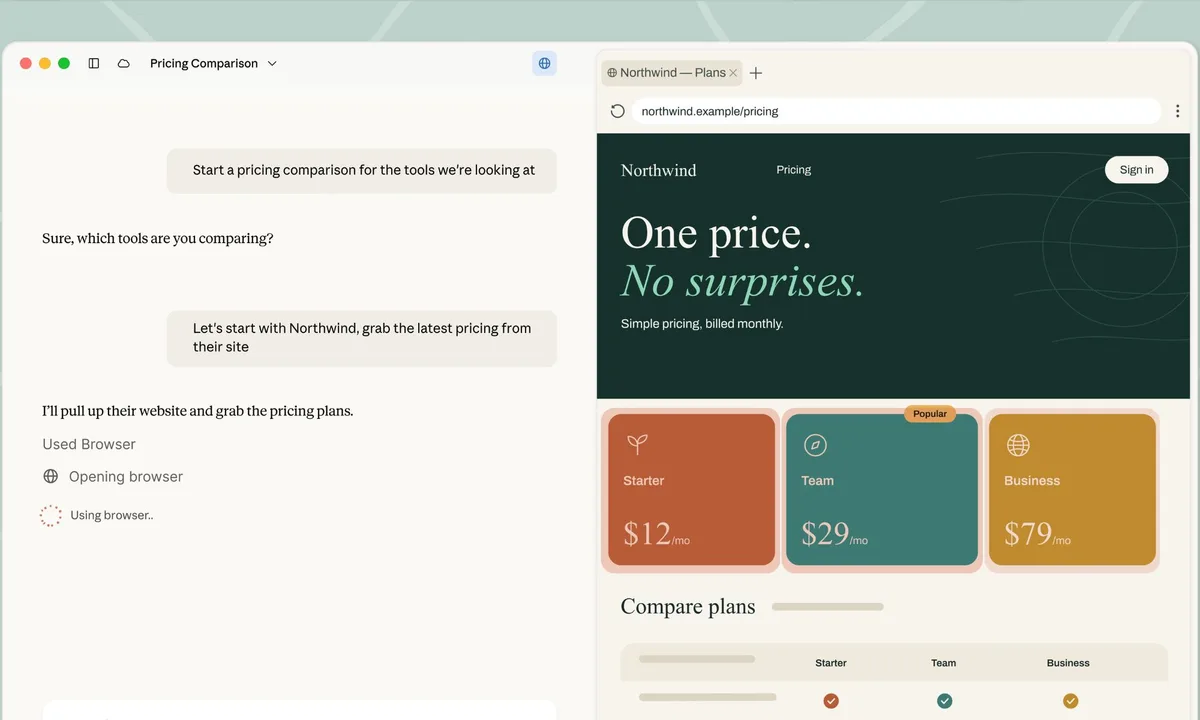
Image Source: Anthropic
This statement is intriguing because, among today's general-purpose AI agent desktop applications, built-in browsers are less common than one might expect.
ChatGPT was an early adopter in this regard. The Codex desktop app previously included a Chromium-based browser, a feature retained when Codex was merged into the new ChatGPT desktop app. It offers functionalities like tabs, downloads, login status tracking, and general settings. Recently, it even introduced web annotations, enabling users to directly select and comment on pages to guide the AI's work.
The situation differs in China.
After testing several general-purpose AI agent desktop apps, I found that Qianwen Office and Tencent WorkBuddy still lack built-in browsers. While they can search and scrape information from web pages and have some web operation capabilities, they don't provide a complete, persistent browser environment for the agent. Qianwen Office offers a browser plugin, while WorkBuddy requires configuring MCP to control the browser installed on the user's computer.
Doubao Work, however, has already integrated a browser, albeit a rudimentary one. It's more like a browsing window for the agent to open web pages, far from the comprehensive browser experience offered by ChatGPT.
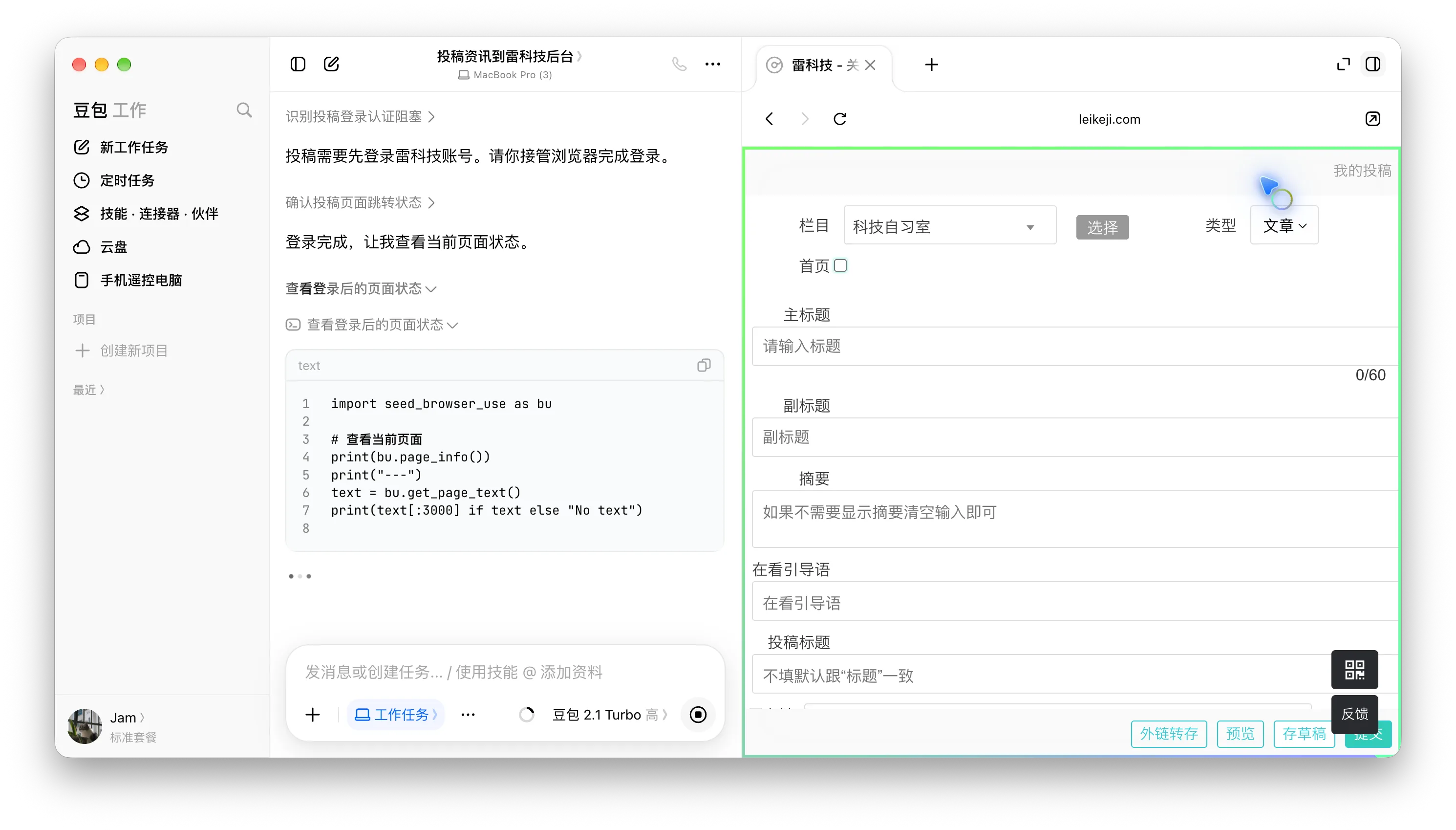
Image Source: Leikeji
Claude initially fell into the former category. Previously, Claude relied on the Claude Chrome browser plugin to control the user's already-open Chrome browser. Now, Anthropic has introduced its own browser.
At first glance, it may seem like companies are merely adding another feature. However, when comparing ChatGPT, Claude, Qianwen Office, WorkBuddy, and Doubao Work, a question arises: Does a general-purpose AI agent aiming to take over computer tasks necessarily need its own browser?
After ChatGPT, Doubao, and Claude have provided their answers.
Agents Previously Relied on 'Borrowing' Local Browsers
It's not new for AI agents to operate browsers to accomplish tasks, but they often had to 'borrow' the user's browser.
Claude previously depended on Claude in Chrome. After users installed the Chrome plugin and granted authorization, Claude could access the user's Chrome browser, read pages, click links, input text, work across tabs, and even use the user's existing login status for websites requiring authentication.
Qianwen Office operates similarly. While its desktop app doesn't have its own browser, it provides a browser plugin. When users enable the extension and keep Chrome running, Qianwen can call the browser to complete clicks, inputs, and information collection. The official even explicitly recommends prioritizing browser automation for web tasks because it's faster and more precise than directly controlling the entire computer.
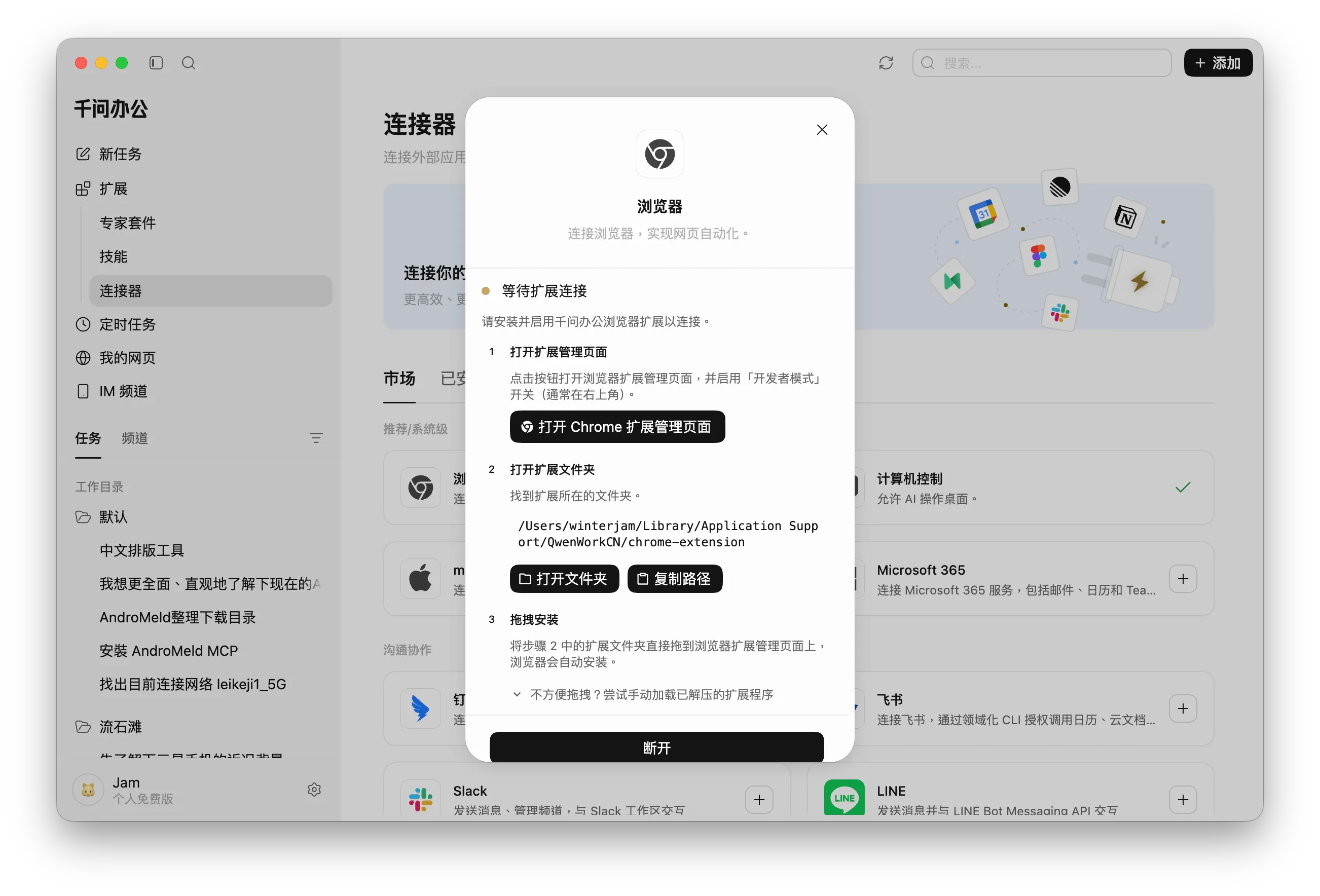
Image Source: Leikeji
WorkBuddy takes a more 'engineer-oriented' approach. It doesn't come with a browser and relies mainly on MCP to connect to external tools. Tencent officially defines WorkBuddy's connectors as MCP + CLI or Skill + CLI, and users can also configure their own MCP Server. To enable web page operations, a common approach is to integrate browser automation MCPs like Playwright, allowing the agent to indirectly control the browser on the computer.
The underlying mindset is similar: if the agent doesn't have a browser, it finds a way to borrow one.
The most direct benefit of this approach is that it reuses the browser the user is already using. The account is logged in, cookies are present, plugins are installed, and the web page is right there. The agent can start working immediately after taking over. Especially for enterprise backends, email, or other websites that heavily rely on login status, logging in again on another browser would incur additional costs.
Users can also supervise more easily. What the agent clicks or fills in happens in the familiar Chrome browser, and users can take over at any time if something seems off.
MCP also offers an advantage—openness. Today, you can connect WorkBuddy to Playwright, and tomorrow you can continue to connect to databases, GitHub, Notion, and internal systems. The agent doesn't need to redesign a set of interfaces for each capability. This is also why MCP has quickly become an infrastructure for agents.
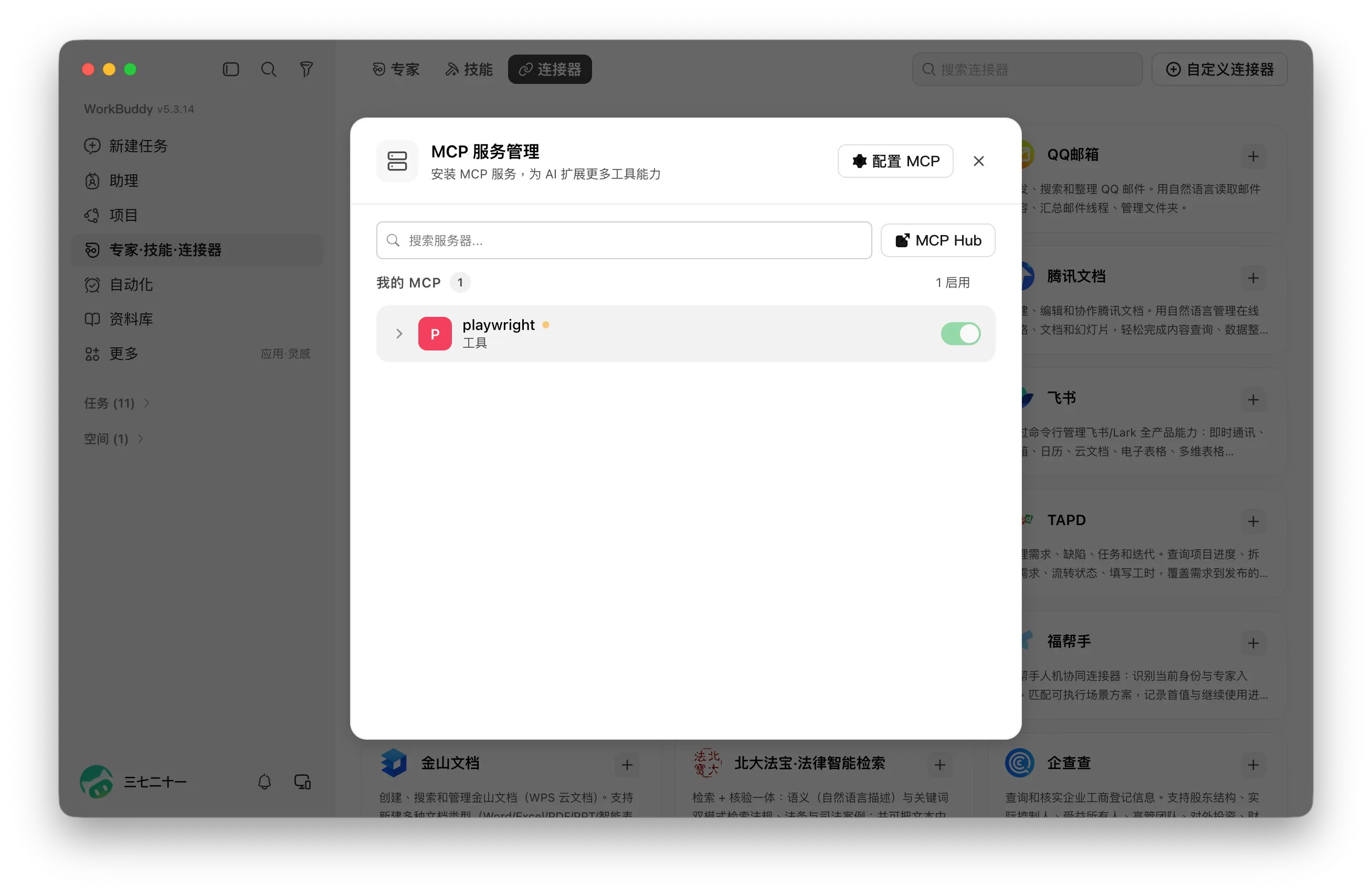
Image Source: Leikeji
However, when it comes to truly high-frequency use, the problems of 'borrowing a browser' gradually emerge.
First, it's inconvenient. Claude and Qianwen at least provide plugins or connectors, while MCP solutions like WorkBuddy often require users to find, install, and configure tools themselves. For developers, these steps aren't a barrier, but for average office users, they deviate from the product logic of 'tell the agent one sentence and wait for the result'.
Moreover, human browsers and agent browsers have different needs.
A human's Chrome browser is typically filled with dozens of tabs, plugins, history, and various accounts, and may be taken back by the user at any time to continue working. When an agent performs a task that takes an hour and a half, it prefers a fixed, controllable browser environment where it can freely open new tabs, download files, maintain logins, and know where it left off after a failure.
Having two entities vying for control of the browser can work, but the experience is hardly stable.
More practical issues include dependency. If Chrome isn't running, plugins are disabled, permissions aren't granted, or versions are incompatible, the agent's web capabilities may directly fail. Qianwen Office's official documentation specifically warns that browser automation requires keeping Chrome running, and timed tasks may get stuck on the login page after the login status expires.
So, before the merger, Codex had long since switched its approach. Since agents use browsers every day, why not bring your own?
Doubao Work and Claude have also reached this conclusion.
With a built-in browser, the browser's version, permissions, tabs, downloads, cookies, and task status can all be managed uniformly by the agent platform. Users don't need to install plugins in advance or ensure their Chrome is in the right state. When a web page is needed, the agent launches the browser itself and continues with the task afterward.
As Anthropic said when introducing this Claude update: "Some tasks do require 'your browser,' but many more just need 'a browser'."
Of course, at this stage, it's not an 'either-or' situation. On the same day Claude added its built-in browser, it also officially expanded the use of Claude in Chrome. ChatGPT already has a complete built-in browser but continues to retain the Codex Chrome extension.
The plugin takes over 'my browser,' while the built-in browser provides the agent with 'its own browser.' When general-purpose agents start truly taking over work, the latter will eventually be needed.
Will Browsers Be Completely 'Absorbed' by Doubao Work and Others?
Claude's move was inevitable.
Last month, OpenAI announced the shutdown of ChatGPT Atlas (an AI browser), and our assessment is that the AI browser product route is encountering an awkward problem—agents are developing too quickly and have already started to 'absorb' the browser itself.
Atlas is the most typical example. In October 2025, OpenAI released Atlas, hoping to rethink browsers. Less than ten months later, it announced the service would stop, and Atlas's browser agent capabilities were subsequently transferred to ChatGPT and Codex.
In the Atlas era, the logic was to put the agent into the browser: users open the browser, and the agent helps you understand web pages, operate them, and complete tasks. By the time of Codex, and now the ChatGPT desktop app, the order has reversed:
Users first open the agent, and when a web page is needed, the agent opens the browser.
When I recently used the ChatGPT desktop app, this feeling was quite pronounced. The built-in Chromium isn't just a temporary web window; it includes common features like tabs, refresh, downloads, logins, and basic settings. If users really need to, they can use it as a normal browser.
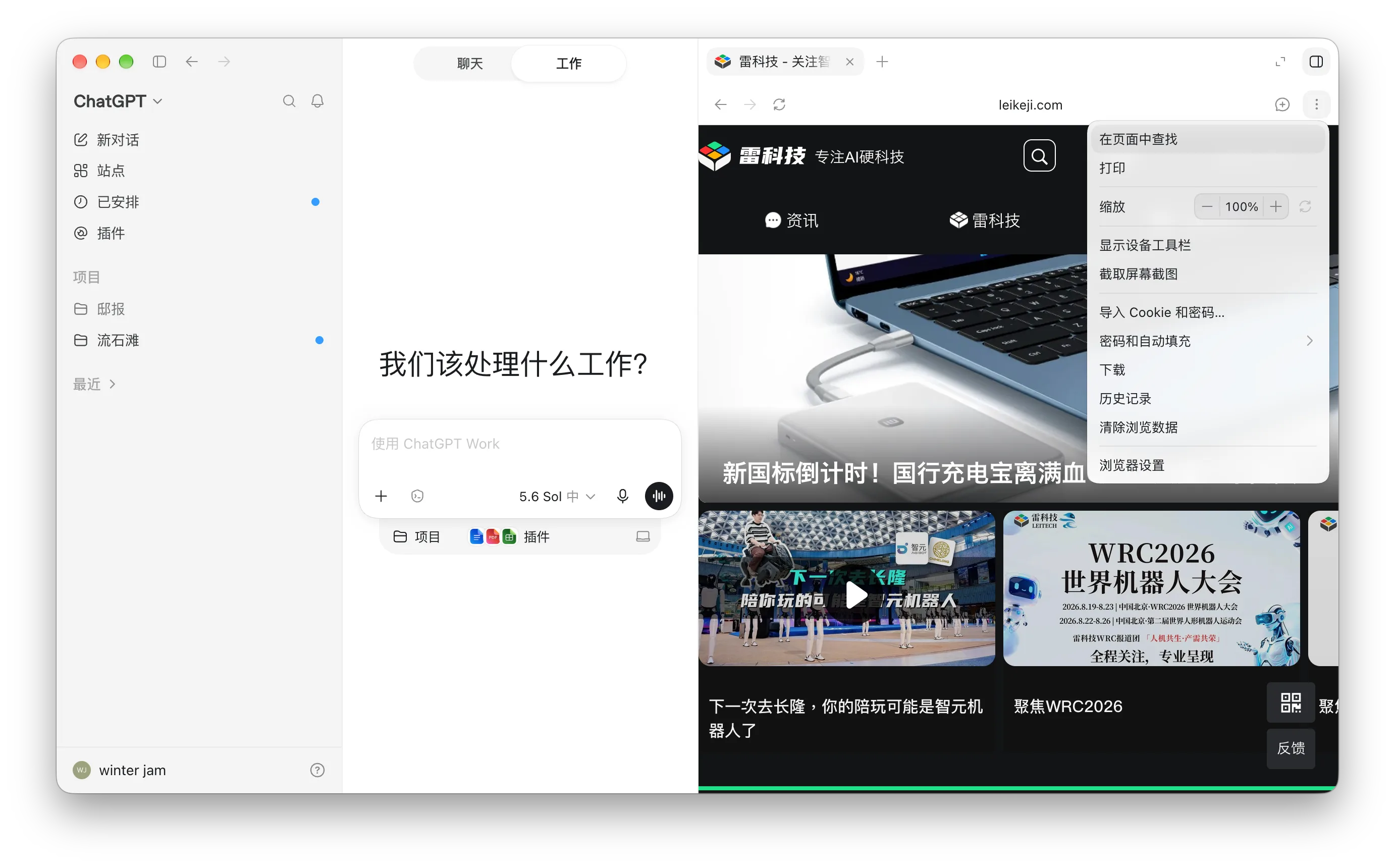
Image Source: Leikeji
But most of the time, I don't actually need to. When I ask ChatGPT to find information, access a website, operate a backend, or complete a web task, the browser is just a window in the execution process. I only need to open it to see how far it's gotten or take over directly when intervention is needed.
The recently added web annotations are even more interesting. Users can circle a piece of content on the page, leave instructions, and let the AI continue processing. The browser is increasingly becoming the agent's workbench and the interface between humans and agents.
This is already far from the traditional browser usage logic.
In the past, we searched, opened web pages, switched tabs, compared information, and filled out forms ourselves. After agents take over, these actions are pushed into the background. Users increasingly see tasks and results, with web pages appearing only when necessary.
The browser's most natural position is inside the agent platform, appearing on demand.
This doesn't mean browsers are worthless. On the contrary, before APIs and MCP cover the entire internet, browsers may be one of the most important infrastructures for agents.
Many real-world websites are still designed for humans. Logins, captchas, complex backends, dynamic pages, uploads and downloads, and payments all require a complete browser environment. Agents can prioritize calling APIs, use MCP, or directly obtain structured web data, but when encountering these 'old internet' interfaces, they still need to open Chromium and click, input, and submit like a human.
The difference is that browsers increasingly don't need humans to open them actively.
From this perspective, China's general-purpose AI agent desktop apps will likely follow the same path. Doubao Work has already taken a step forward by including a browser for the agent to use directly, with some human-assisted design, though its functions are still rudimentary and mainly serve to 'open web pages for the agent.' It's bold to predict that in future updates, Doubao will further improve and complete the browser's basic functions, as well as more natural human-agent collaboration.
The issues for Qianwen Office and WorkBuddy are more straightforward. Browser plugins and MCP can already let agents operate web pages, but as tasks become longer and web operations more frequent, the agent's need for a stable, independent, and long-term browser environment will only grow stronger.
In Conclusion
ChatGPT already has a built-in browser, Claude is now following suit, and Doubao Work has a basic version. When Qianwen Office and WorkBuddy will catch up is largely a matter of product rhythm.
On the other hand, as more agents start incorporating built-in browsers, the number of 'AI browsers' that truly require human use may dwindle.
Browsers won't disappear in the future. Agents may even open more web pages and launch more browser instances than humans do today. But for users, browsers will increasingly resemble file systems, shells, or databases, hidden within the agent's execution process.
Browsers used to be our gateway to the internet. Next, they may increasingly become the agent's gateway to the internet.
As for humans, we just need to tell it what we want to do.
AIAgent browser ChatGPT claude
Source: Leikeji
All images in this article are from the 123RF licensed image library. Source: Leikeji
-
![]()
Dual Leaders in Robot Vacuum Industry Look Overseas for Growth
-
![]()
BYD: The Giant That Rose Again
-
![]()
Claude Finally Integrates a Built-in Browser! Doubao Work Beat It to the Punch—Can Qianwen Catch Up?
-
![]()
Cars Are Expanding: Will Class A Vehicles Be Phased Out as Class B Models Approach the 100,000 Yuan Threshold?
-
![]()
Xiaopeng Faces Two 'Tough Battles'
-
![]()
NVIDIA: Projected to Surge by Another 70% Next Year, the Computing Power 'Central Bank' Ramps Up Production!
-
![]()
How to Alleviate Pressure on the Battery Swap Model? NIO Has Finally Figured It Out
-
![]()
Don’t Use Efficiency as an Excuse to Conceal the Problems of Hastily Launched Cars